
Key takeaways:
Writing a professional quote is a key step to turning leads into loyal customers and standing out in your service industry.
- Include all essential details to set clear expectations. Use a consistent template that lists your business and client info, unique quote number, issue date, itemized services with costs, and clear terms and conditions.
- Keep your quotes clear, concise, and itemized. Transparent quotes with straightforward descriptions and cost breakdowns help clients understand their options and make quick decisions—while also allowing for upsells and tiered service packages.
- Showcase your professionalism and build trust. Well-structured quotes that include your branding, details, and next steps give a polished impression and foster confidence, increasing your chance of winning the job.
- Send quotes promptly and follow up. Whether by email, text, or in person, timely quotes (and reminders for unapproved ones) ensure you don’t lose business to competitors and keep potential jobs moving forward.
- Leverage quoting software to save time and avoid errors. Tools like Jobber help automate quoting, include optional line items or photos, and streamline client communication to help you convert more leads with less effort.
Level up your quoting game and grow your business. Get more tips, inspiration, and business resources by signing up for the Jobber Newsletter. Sign up here.
Great news—you got a lead! Now you need to turn it into a paying job. You can do that with a professional quote that shows potential clients which services they’re getting, what they cost, and why they should choose you over the competition.
Done right, a quote builds trust, sets client expectations, and gives you a chance to upsell additional services or highlight options for different budgets.
Whether you’re writing a quote for cleaning services, construction, or general contracting, these steps will help you learn how to write up a quote for a job that wins more work.
What is a formal quote?
A formal quote is a professional document that a service provider gives to a prospective client to outline the services, costs, and terms of a potential job.
Unlike a rough estimate, a quote includes line items with a description of each product or service and its associated cost. It also includes any taxes, fees, or discounts to provide an accurate, upfront price.
You should create a formal quote any time you want to:
- Lock in a price before work begins.
- Provide clients with a document to review and approve.
- Have a paper trail for larger, more complex jobs.
- Upsell additional services or packages.
- Offer tiered pricing to suit a variety of budgets.
Jobber automatically formats your quotes with your logo, brand colors, and professional layout. That way, every new business quote you send looks formal and polished without extra design work.
1. Choose a template
Using a professional quote template keeps your quotes consistent and prevents you from forgetting or missing important information. You can create or download one through Microsoft Word or Google Docs, or you can use Jobber’s free quotation template.
No matter which template you choose, make sure it covers all the necessary information, such as:
- Your business name and contact details
- A unique quote number
- The client’s name, address, and phone number
- The date it’s being issued
- A list of products and services with prices
- Any relevant estimate disclaimers
- An expiry date, if relevant
- The total amount due, including deposits, discounts, fees, and taxes
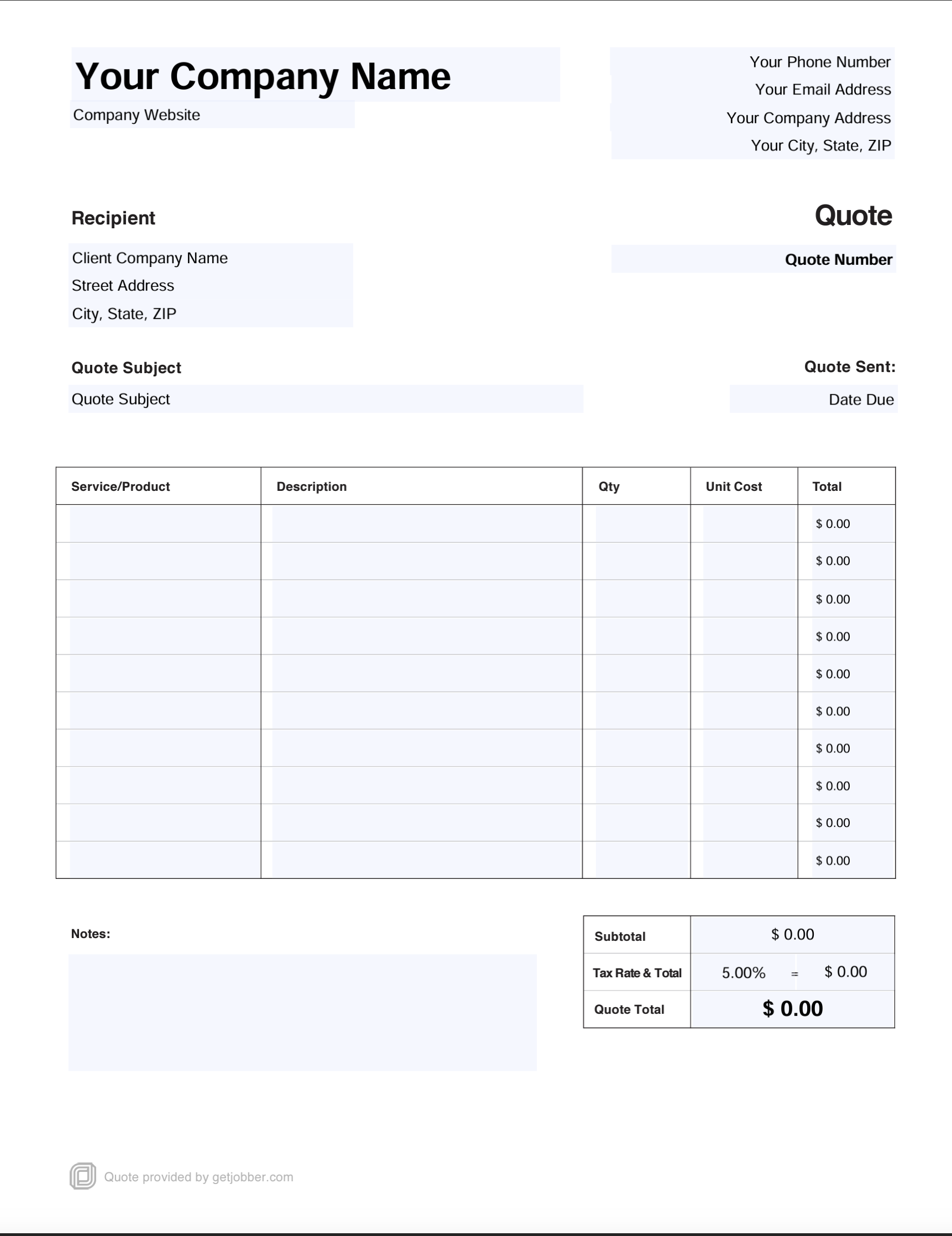
Pro Tip: Make sure your template includes the word “quote” or “estimate” in it so potential customers know what it is right off the bat.
2. Add your business details
Your contact information should be clear and easy to find so customers can easily approve your quote or reach out with any questions.
Every professional job quote you send to a potential client should include your:
- Business name
- Address
- Phone number
- Email address
Pro Tip: To boost professionalism and give potential customers a great impression, use quoting software like Jobber to customize your quotes with your business logo and brand colors.
3. Enter client details
Next, enter customer information so it’s clear exactly who you’re quoting services for. Make sure to include their:
- Name
- Address
- Phone number
- Email address
This helps keep estimates organized. Having a customer’s contact information on file also makes it easy to send a quote follow-up down the road if you need to.
4. Number your quote
Similar to an invoice number, each quote you create should have an individual quote number. Quote numbers help you track, organize, and file quotes so you can quickly pull them up and refer back to them as needed.
If you use a CRM like Jobber, the software can automatically generate and assign quote numbers for you. But if you add them manually, your quote numbers should:
- Only include letters and numbers.
- Be 3–5 characters long.
- Include a client’s name or initials.
- Be unique and not repeated for other quotes or clients.
5. Add the issue date
The date of issue is the day you send your quote. It’s important to include for a few reasons:
- It prevents disputes caused by fluctuating prices. Say a customer waits three months after you send a quote to book a service. Your material, labor costs, or service price increases may affect the total. An issue date clarifies when the quote was created and which costs it reflects.
- It starts the validity period. If your quote has a disclaimer stating it will expire within a specific timeframe (like two weeks), the issue date determines when the validity period begins.
- It serves as a reference point for timelines and schedules. The issue date reflects your availability at the time a quote was created. If a customer delays booking and your schedule changes, you can refer back to the issue date for clarification. For example, if the initial quote was sent during your off-season and now you’re booked solid.
6. Describe each product and service you’re providing
An itemized quote includes a list of each product and service you’re providing, as well as the cost associated with each one.
Itemized quotes tell clients what they’re paying for and how much each line item costs. They boost transparency, make total costs easier to understand, and give clients a chance to add or remove items to fit their budgets.
To make this section of your quote as clear as possible, include a cost breakdown with:
- A brief description of each item
- Quantity
- Unit price
- Total price per item
It should cover everything the client will need to pay for, like materials, labor, products, and any additional costs, like a demolition or delivery fee. It doesn’t need to include every possible detail—think of it as a short-form bullet list, not a comprehensive paragraph for each item.
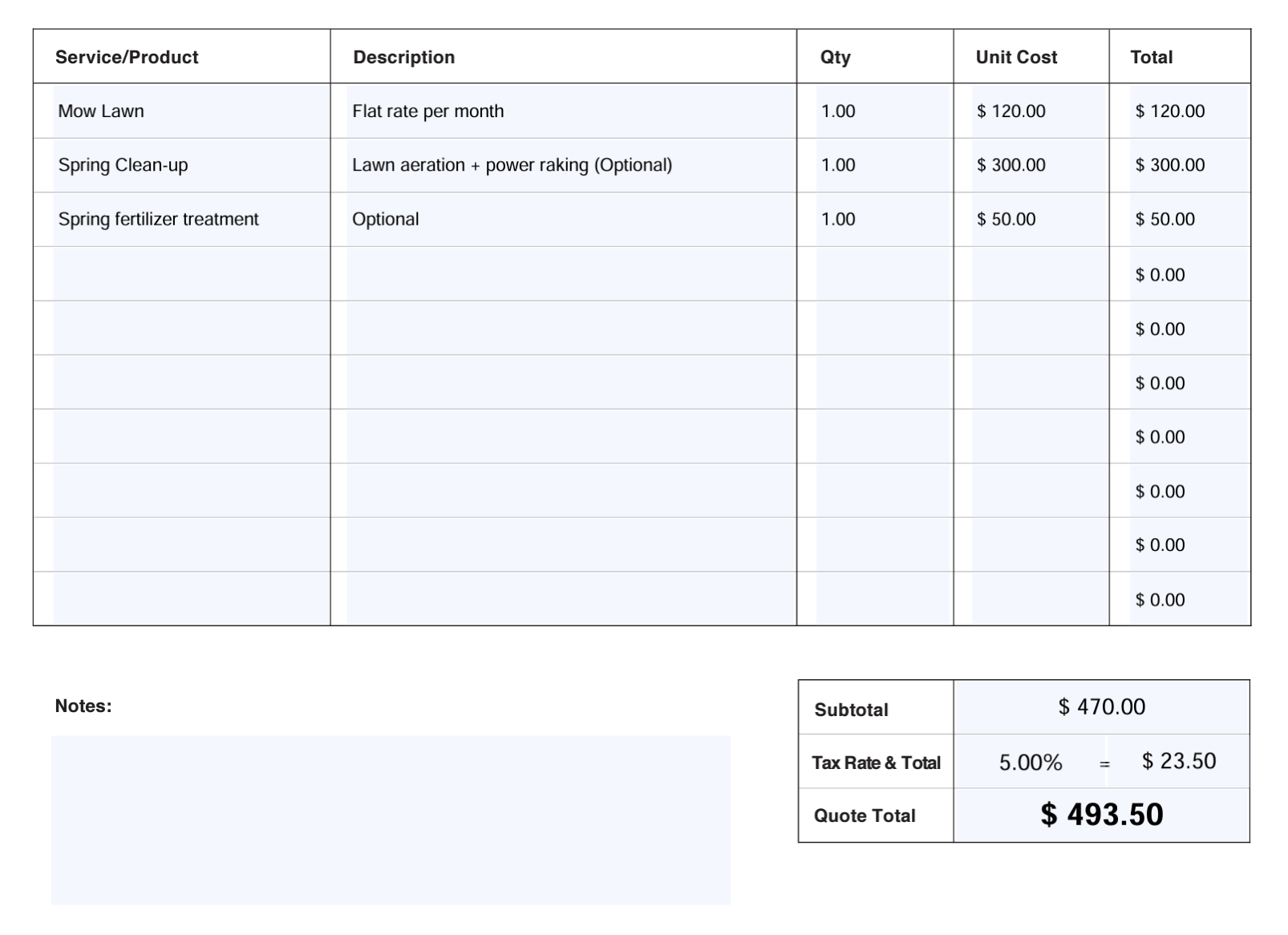
This is also an ideal place to include any add-ons, upsells, or tiered pricing options you offer based on your pricing strategy. For example, in your service quotes, you could include line items for:
- Cleaning add-ons: A base house clean plus an add-on for deep cleaning or carpet cleaning.
- Lawn care packages: Basic (weekly mowing), standard (weekly mowing with weeding), and premium (weekly mowing with weeding, seasonal aeration, and fertilizer treatments).
- General contracting products and services: Lumber, sheetrock, framing labor, drywall hanging, and debris removal.
We are quoting everything.
When a customer calls in just for a window wash, they are getting priced everything that we can clean on their house. They’re getting a fence cleaning estimate, they’re getting a driveway cleaning estimate, patios, decks, walkways, house wash, roof cleaning.

With quoting software like Jobber, you can include optional line items in your quotes to make it easy for clients to customize their services, helping you to bring in more profit. You can also add pictures of the products and services you offer to make your quote stand out.
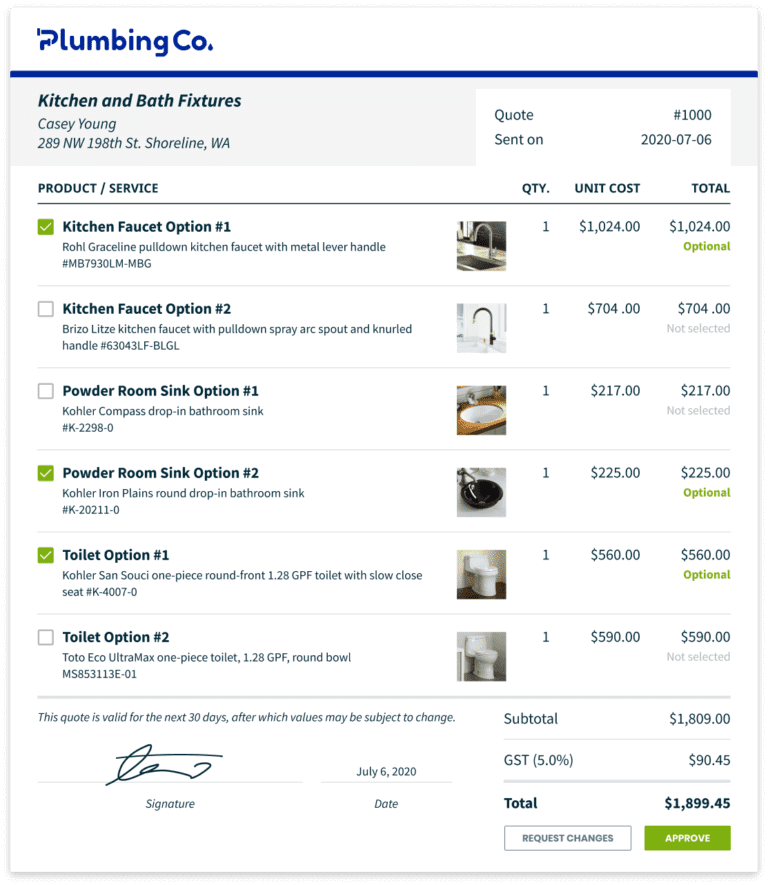
By including pictures in our quotes, our customers can easily identify which service we’re talking about as well as know what to expect from us.
It eases their concerns because it shows we’re being totally transparent and forthcoming in our bidding process and makes us stand out from the other 5 bids they got.
7. Specify your terms and conditions
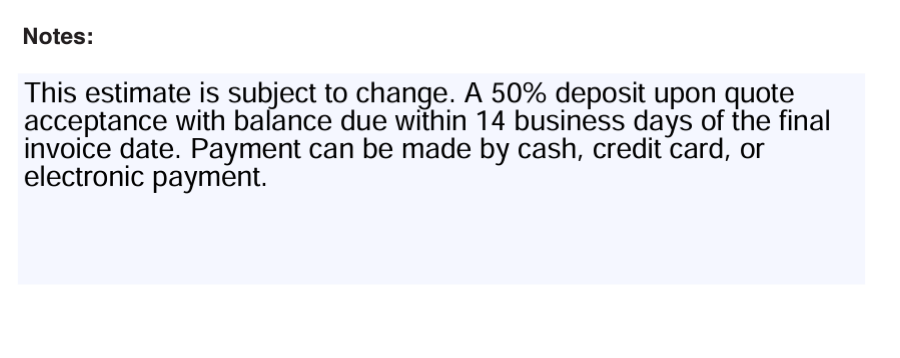
Quote terms and conditions outline the relationship between you and a client before it officially begins. They keep you on the same page about payments, job scope, and timelines.
For example, quote terms and conditions can specify:
- Whether a deposit is due upfront
- Which payment methods you accept
- When a client must pay by
- How to handle costs that go beyond the initial project
- What you do and don’t guarantee or provide a warranty for
- Client responsibilities, like clearing the work area
- If and when the quote expires
You can either include terms and conditions in the notes section of your quote or as a separate paragraph, depending on the template you choose.
8. Add the finishing touches
The last thing you need to do before you send a quote to a prospective client is add any additional details, such as:
- The total due, including taxes and fees
- Any relevant discounts or promotions
- A place for the client to sign or approve your quote
- A thank you note
- Clear next steps, like whether they need to approve the quote or schedule the service
Once that’s done, your quote is ready to send.
Service quote examples
To learn how to write a job quote for different services, take a look at these examples.
(Want a template you can start using today? Download our free quote template or try Jobber’s quoting software to generate professional quotes in minutes.)
1. Simple service quote example
Even straightforward services need quotes. A single line item quote keeps things simple while giving your client all the information they need to say yes to the job.
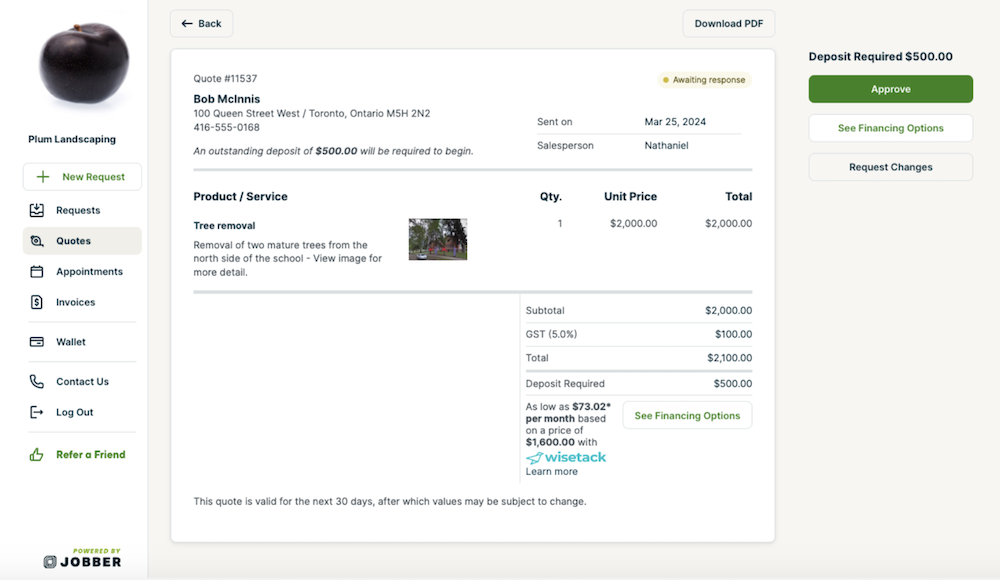
This quote is effective because it:
- Includes all the essential details about the service, business, and customer
- Has a total price, including taxes
- Outlines payment terms, like a deposit
It’s also easy for a potential customer to approve right away because it’s simple, clear, and easy to read.
2. Itemized service quote example
For jobs with multiple services or products, an itemized quote offers clients a transparent breakdown of exactly what they’re paying for. It also provides the client with the flexibility to choose what works for their budget.
This type of quote is effective because it:
- Lets clients choose between product options that suit their needs and budget
- Uses images to help clients visualize what they’re buying
- Has clear descriptions and costs for each item, preventing confusion about pricing
Each of these examples was created using Jobber’s quoting software. Start your free trial to create professional quotes like these in minutes.
How to send a quote to a potential client
To send a quote to a client, you have a few different options. The most common methods are via letter mail, in person, or by email or text message.
1. Letter mail quotes
Mailed quotes can be slow compared to the other options, and they’re easy to lose and misaddress, so it’s best to only use them when you have to. For example, with clients who don’t use email or a smartphone.
Otherwise, in-person, email, or text quotes are faster. A speedy response prevents you from losing customers to competitors with a quicker response time.
2. In-person quotes
In-person quotes work well when you’re creating a quote on the job site. For example, if you’re at a client’s house to estimate a drywall repair and you feel confident you have an accurate idea of the labor and material costs it will require.
Or, if you use quoting software like Jobber to input job details as you go, like the square footage, job photos, and the markup you need to set on top of your profit margin.
If you don’t have this information, or you need to confirm material or labor costs before providing a quote, it’s better to send one via email or text within 24–28 hours of visiting the job site. That way, you’ll be able to provide an accurate number to the potential customer.
3. Email and text message quotes
Most of your prospective clients will be open to receiving their quotes via email or text. These types of quotes are convenient, quick, and easy to respond to or approve. Plus, they’re harder to lose than paper quotes.
Text messages are ideal for simple quotes or clients who need a quick response time, whereas email can be better for a more detailed job estimate or when you need to send an attachment.
But either is a good choice if you:
- Want to keep a paper trail of your quotes
- Know your client prefers to communicate via email or text
- Use quoting software like Jobber to generate, send, and follow up on quotes
READ MORE: Quote follow-up email templates
Best practices for how to write a professional quote
Quotes are the perfect opportunity to showcase your professionalism, impress potential clients, and book more jobs—as long as they’re done well. When you write a service quote, make sure to:
1. Keep it simple
By nature, quotes include a lot of important information. Keep them as concise and clear as possible, no matter the job size, so clients can easily review and approve them.
If they’re too detailed or overly complicated, a potential customer may feel overwhelmed and choose to put off the work or reach out to a competitor.
2. Always provide next steps
Tell clients what the next steps are so they can follow through and take action. It helps to anticipate and answer client questions like:
- Do they need to approve the work with a digital or physical signature?
- Is a deposit required before any work can begin?
- Should they call your office to book an appointment?
When you send quotes through Jobber, your customer can visit client hub (their self-serve customer portal) to approve quotes, pay a deposit, or provide a signature.
3. Send follow-ups
If a client doesn’t immediately approve your quote, it doesn’t mean they aren’t interested in hiring you. They could have forgotten to respond or might need an extra few days to confirm their budget.
If you don’t hear back from a client, sending a professional quote follow-up is an effective way to win more jobs. With Jobber, you can automate the quoting process to send potential clients a reminder email if they don’t respond within a specified period, like after 3 days.
You should follow up on a quote.
Using Jobber makes this super easy because they do automated follow-ups, and you can set that up however you want, as many as you want.
4. Use software
Manually creating quotes for every job takes a lot of time and leaves room for human error, like misspelling a client’s name or incorrectly adding up your total.
Using quoting software frees you up to focus on more important tasks and prevents you from making embarrassing mistakes. It also starts your client relationships off right by demonstrating your professionalism, showcasing transparency, and building trust.
Stand out from the competition and turn more leads into customers by writing accurate, detailed quotes that are easy to approve.
Writing winning job quotes
Learning how to make a quote for a job can make all the difference to your service business. It doesn’t just tell customers how much a job will cost—it also boosts your professionalism and trustworthiness.
Sending a professional quote any time a potential customer reaches out can help you book more jobs, keep your schedule full, and grow your business.
Originally published in November 2019. Last updated on May 14, 2026.
Frequently Asked Questions
-
A formal quote should include:
• Your business name, address, website, email address, and phone number
• The client’s name, address, and contact information
• A unique quote number and issue date
• An itemized list of products and services with individual costs
• Applicable taxes, fees, and discounts
• Your terms and conditions
• An expiration date
• The total amount due -
Quotes lock in a price while estimates give clients a ballpark. For example, a cleaning quote for a 2-bedroom house might be $180, while an estimate might be $150–$200, depending on the condition of the property. In Jobber, you can create both quotes and estimates depending on the job. Both are easy to convert into scheduled jobs once the client approves them.
-
Quoting a job for construction follows the same steps as any service business. However, quotes can be slightly more complex because of:
• Fluctuating material costs
• Labor costs from subcontractors and specialists
• Permit fees
• Equipment rentals
To protect both yourself and your client, here’s how to quote a job for construction:
• Set shorter expiration periods, like 14–21 days.
• Put labor and materials as separate line items.
• Include any fees, such as permits, in the total.
• Have a term that allows the quote to be updated if the project scope changes. -
Most service businesses set quotes to expire 30 days after being issued. For industries with fluctuating material costs, you may want to limit quotes to 14–21 days to protect your profit margin.
-
Whether you ask for a deposit on your quote depends on the service, client, and total value of the work. Many service providers request deposits for jobs:
• Over a certain dollar value
• From new customers
• With high upfront material or labor costs
• That will require multiple visits
Deposits are usually 25–50% of the total job value. However, each state limits how much you can charge. For example, in California, you can’t ask for more than 10% or $1,000 (whichever is less) as a deposit. Be sure to confirm the rules and regulations where you live.