
Key takeaways:
If you’re looking to streamline your roofing business, the right CRM software can help you manage clients, leads, and projects with ease.
- Boost productivity and client management. Roofing CRMs allow you to access customer information from anywhere, improving efficiency and making it easy for your crew to deliver top-notch service both in the office and in the field.
- Enhance communication and automate tasks. CRM tools keep all communications organized, automate reminders and follow-ups, and enable your field crews to update job progress in real-time, reducing errors and delays.
- CRM software with roofing-specific features. Look for tools that enable effective lead management, detailed job scheduling, automated communications, quick quoting, and mobile access so you have everything you need on the go.
- Compare the best options for your needs. Top picks include Jobber for all-in-one workflows, Roof Chief for job proposals, HubSpot for easy marketing integration, Pipedrive for automated lead management, and Zoho for robust project management tools.
- Choose CRM software designed for the roofing industry. CRMs tailored for roofers help manage unique challenges, like job complexity and accurate estimating, to keep your business running smoothly and help you grow.
Strong customer relationships keep your roofing business growing. With Jobber’s CRM, you can track every lead, deliver a professional experience, and keep jobs moving. Start your free trial now.
Originally published in February 2025. Last updated on September 26, 2025.
If you’re still relying on spreadsheets and sticky notes to track job details and client information, it’s time to level up your roofing business with the right CRM software.
A CRM system can help you streamline operations, manage leads, and keep your crew on schedule without losing track of client details in a sea of paperwork. Wondering what CRM is built for roofing and exterior services? You’ve come to the right place.
In this guide, you’ll learn how a CRM can improve your workflow, what features to look for, and discover five of the best roofing CRM software to find the perfect fit for your business.
What you need to know about roofing CRMs:
-
Benefits of using a roofing CRM
-
Key CRM features to look out for
-
Roofing CRM software comparison chart
-
Why roofing-specific CRMs matter
-
Jobber: Best all-in-one CRM for roofers
-
Roof Chief: Best CRM for job proposals
-
HubSpot CRM: Best CRM for integration with marketing tools
-
Pipedrive: Best CRM for lead automation
-
Zoho CRM: Best CRM for integration with project management tools
Benefits of using a roofing CRM
A roofing CRM (customer relationship management) system improves your client management to save time and reduce costly mistakes.
By using a roofing CRM, you can boost productivity, deliver excellent customer service, and ultimately increase revenue—all while keeping every detail in check.
In fact, 83% of small businesses find CRMs more effective than any other tool at helping them reach their marketing goals.
Here are a few of the top benefits of using a roofer CRM.
Access information from anywhere
The top CRM solutions allow you to access all customer information, whether you’re sitting in the office or on top of your customer’s roof.
As soon as your sales team or field techs receive a call from a customer, they can quickly pull up their information to provide personalized customer service.
READ MORE: How to run the office of a roofing company
Improve customer communication
CRM for roofing companies strengthens the communication between you and your customers by bringing all communications into once centralized place, including:
- Emails
- Phone calls
- Text messages
- Job notes
- Documents
That means your team will always have the most up-to-date information, reducing miscommunication and delays.
The best roofing CRMs also streamline communication between office staff and field crews. Your field techs can upload photos, notes, and status updates directly from the job site, giving accurate progress updates and allowing you to better answer your client’s concerns.
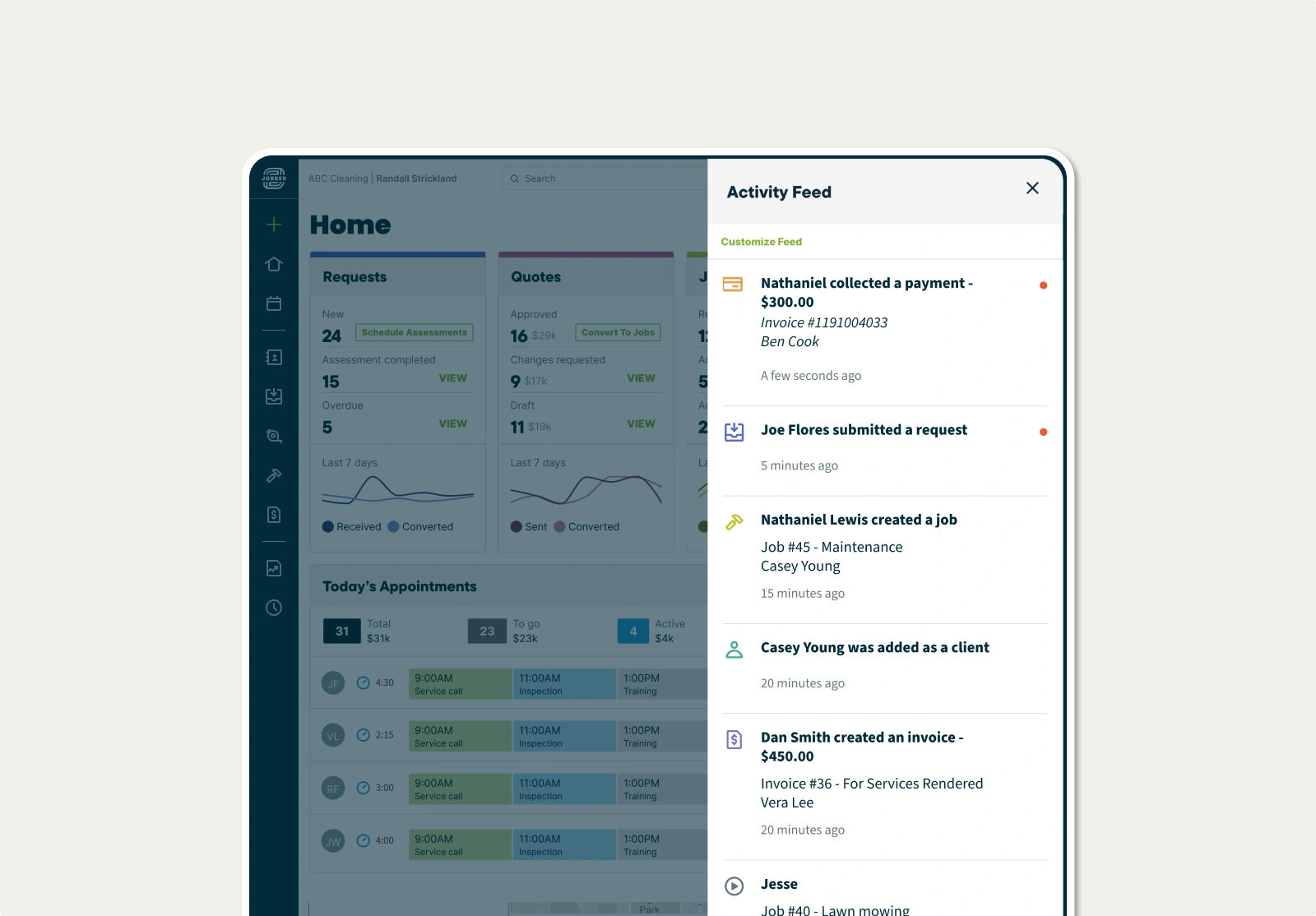
Finally, a CRM with an online self-service portal allows your customers to request jobs or inspections directly on your roofing website. They can also approve estimates, track roofing job progress, and pay invoices without back-and-forth phone calls.
Automate repetitive tasks
The top CRM systems use the power of automation to eliminate the chaos of paperwork and keep your business consistent.
For example, automated follow-ups are a game-changer, keeping your business top of mind and ensuring that none of your customers are ever forgotten.
The right roofing CRM will also automate tasks such as:
- Scheduling
- Appointment reminders
- Capturing leads
- Invoicing
- Payment reminders
This leaves you with more time to work on jobs and grow your business.
Key CRM features to look out for
Every CRM solution has different features, but there are specific features that a CRM built for roofing and exterior services should have.
Here are the best CRM features to have in your roofing toolbox.
1. Lead management
Your CRM should separate your roofing leads and customers to ensure that each group receives the attention it needs.
You should also be able to segment leads based on details such as job type, location, or urgency.
Jobber simplifies lead management by letting you tag contacts as leads so you can manage them separately from active clients.
2. Job management
Roofing contractors need a CRM with strong job and project management features, such as:
- Quick access to job history
- Job forms and checklists
- Job tracking
- Job scheduling
- Employee time tracking
Jobber makes it easy to track all your client details and roofing job information in one place, so your whole team knows exactly what to do on-site.
Plus, scheduling and assigning work to your crew has never been easier. When a new job comes in, simply assign it to an available team member, and they’ll receive a notification of any changes.
3. Automated communication
Following up after every lead or customer interaction can be tedious. It’s also easy to forget when you’re busy.
Automating your communication ensures that no potential customer slips through the cracks. You can send follow-up messages after sending an estimate, or automatically send payment reminders for unpaid invoices.
Pro Tip: Use Jobber to schedule follow-up emails to gather customer feedback, ask for a review, or simply say thank you after every roofing job.
4. Quoting
The faster you get quotes to prospects, the more likely you are to win the job. The right roofing CRM simplifies the process to get quotes to customers faster.
Jobber lets you build a professional-looking quote in minutes. Optional line items let you recommend different roofing materials. Your customers can select the materials that meet their needs, and watch their quote total automatically update before they approve.
Plus, Jobber automatically sends a quote follow-up to customers you haven’t heard back from, to help keep work moving forward.
FREE TOOL: Roof replacement cost calculator
5. Mobile app
You’re climbing ladders, not stuck in an office, so the best roofer CRM should fit in your back pocket.
Make sure that the roofing software you choose comes with a mobile app so that you can access business information from anywhere.
Jobber’s mobile app lets you stay connected to your business from the job site. You can even create quotes and generate invoices from the app, so that you can have a done deal before leaving the client’s property.
READ MORE: 11 roofing apps every roofing contractor needs in 2025
Roofing CRM software comparison chart
| CRM | Best For | Lead Management Features | Mobile App | Pricing |
| Jobber | All-in-one workflows | • Leads are tagged automaticall • Track lead sources • Sync your leads to QuickBooks | Yes | Starting at $39 per user per month |
| Roof Chief | Job proposals | • Customizable lead form • Automated follow-up texts and emails | No | Starting at $399 per 15 users per month |
| HubSpot CRM | Marketing integrations | • Marketing campaigns • Leads activity tracking • Built-in analytics | Yes | Free |
| Pipedrive CRM | Lead automation | • Pipeline visualization • Leads inbox to store leads until ready to qualify them • Web forms for your website | Yes | Starting at $14 per user per month |
| Zoho CRM | Project management integrations | • Webforms to capture site visitors • Lead scoring | Yes | Starting at $25 per user per month |
Why roofing-specific CRMs matter
Roofing projects can be big, complex, and time-sensitive. From juggling weather delays to creating accurate estimates, your team needs tools built with your roofing workflows in mind.
That’s why roofing-specific CRMs are valuable. Unlike one-size-fits-all platforms, they’re designed around the unique workflows of construction contractors who balance sales, job management, and customer service in a fast-moving environment.
In fact, the best CRM for roofing and siding contractors will include industry-focused features like inspection checklists and easy estimate-to-invoice conversions.
While you don’t necessarily need software built only for roofing contractors, choosing a CRM tailored to the realities of roofing and siding work ensures smoother operations, stronger client relationships, and more consistent growth.
Jobber: Best all-in-one CRM for roofers
Use Jobber’s roofing contractor software to manage and organize your roofing client details, job history, and communication all in one place.
Empower your customers with a self-serve portal where they can view scheduled jobs, approve quotes, and make payments without picking up the phone.
Jobber also cuts down on the time you spend on your day-to-day tasks. For example, with one click, convert your roofing quotes into professional invoices as soon as the job is done.
To ensure nothing gets missed on-site, use custom job forms and checklists to capture important job details, document site conditions, and keep your crews consistent and accountable.
And with features like on-my-way texts and automated follow-ups, it’s easy to stay in touch with customers and deliver a professional experience from start to finish.
We would send out quotes to customers, and they would go back to life as normal. Three days later, they would respond to the quote because Jobber sent them a reminder. With this new sense of urgency, we saw our new business skyrocket.
Jobber also integrates with EagleView, giving roofers instant access to precise roof measurements directly inside their client profiles.
When you connect EagleView to Jobber, detailed roof data—like dimensions, pitch, and area—automatically sync from high-resolution aerial reports, eliminating manual measurements and duplicate data entry. This makes it easier to build accurate quotes, plan jobs correctly, and order the right materials without extra site visits or guesswork.
You can also use Jobber to:
- Customize client profiles to save details like roof dimensions, pitches, and required ladder sizes
- Let customers book your roofing services through a booking page on your website
- Easily schedule roofing jobs with a drag-and-drop calendar
- Automatically track your team’s progress with GPS waypoints and employee time tracking
Jobber also has marketing tools available as an add-on to help you get more jobs and reach more potential customers.
Create email campaigns to improve your marketing strategy with Jobber Campaigns, or automatically request reviews from customers to build your online reputation.
What I really like about Jobber is that it has everything all in one platform. From putting together quotes, signing the contract, scheduling, invoicing, and collecting payments. I can do it all in one stop from my phone.

Roof Chief: Best CRM for job proposals
Roof Chief helps you win more roofing contracts by streamlining the proposal-making process.
Use Roof Chief to create job proposals in minutes and deliver to your customers before you leave their home. The platform offers customizable templates and a proposal editor to save time and close deals faster.
Once you create the proposal, your customer can review it and sign on the spot—no more back-and-forth emails.
Other Roof Chief features include:
- Automated text and email follow-ups
- A customer portal
- Lead intake embedded in your website
While Roof Chief is great for proposal creation, it lacks marketing features such as email campaigns to help drive new leads. Plus, although it is a mobile-friendly platform, the solution does not currently have a mobile app.
HubSpot CRM: Best CRM for integration with marketing tools
HubSpot CRM is a versatile CRM that helps your roofing company with sales and marketing.
HubSpot allows you to keep detailed records of your contacts for easy customer management. This allows your sales reps to pull up relevant information quickly to deliver quality customer service.
Other HubSpot features include:
- Customizable reports
- Sales pipeline tracking
- Appointment and job scheduling tools
HubSpot offers solutions for large companies as well as small businesses. Their free plan is great to get started, but you may quickly outgrow its features and need a more robust CRM platform.
Pipedrive: Best CRM for lead automation
Pipedrive is a great CRM tool for managing roofing leads and clients thanks to its lead automation features.
Pipedrive offers lead scoring and provides a chatbot to nurture your leads. Plus, set automatic lead assignments to assign leads to a specific salesperson based on criteria such as the salesperson’s expertise or product knowledge.
For example, you can send roofing leads to one rep and siding leads to another.
Pipedrive can also help you:
- Track leads with a drag-and-drop pipeline
- Generate reports for revenue forecasting
- Visualize and manage projects in stages with custom pipelines
Pipedrive is a great CRM choice, but if you’re looking to combine your other workflows, such as invoicing and payment processing, you might want to choose an all-in-one solution.
Zoho CRM: Best CRM for integration with project management tools
Zoho CRM is the best option if you’re looking for a free tool for task management and to better track your roofing projects.
Zoho CRM provides a simple home screen where you can see your activities for the day, including any upcoming customer calls. From there, you can schedule new calls and tasks with one tap.
Other Zoho CRM features for roofers include:
- Gain detailed communication history for every customer
- Capture leads from forms on your roofing business website
- Strengthen your roofing sales process with custom sales pipelines
The free version of Zoho CRM allows up to three users, but they have other plans that allow for additional users.
For capabilities beyond customer and project management, you’ll have to integrate Zoho CRM with its other offerings.
Whether you’re just starting your roofing business or are a seasoned pro, choosing the best roofing CRM can launch you in the right direction. With these top picks, you’re one step closer to finding the perfect tool to grow your roofing company.