Free Junk Removal Invoice Template
Jobber’s free junk removal invoice template generator helps you bill for every haul in a few minutes. Add your truckload pricing, dump fees, and item surcharges, then download a professional invoice as a PDF that shows clients exactly what they’re paying for.

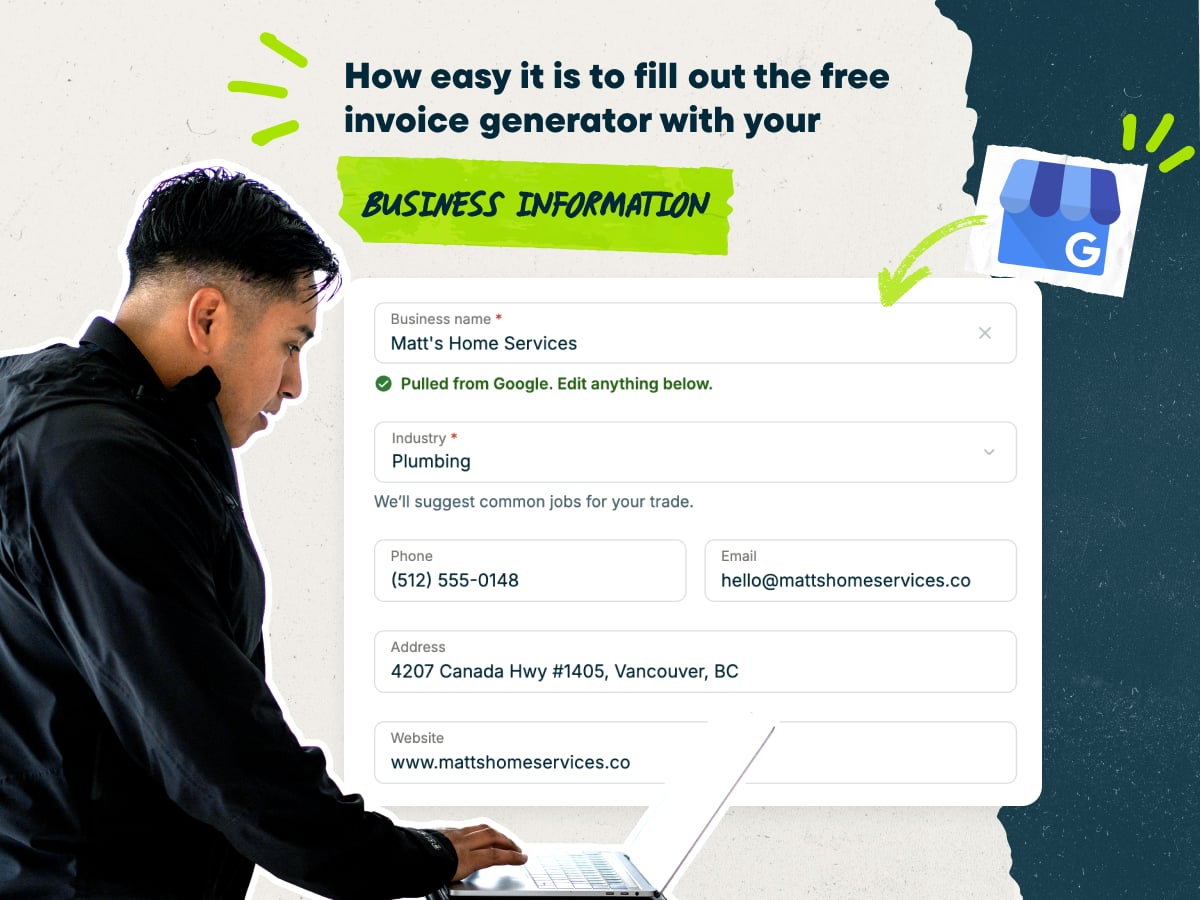
Create a junk removal invoice fast with our free invoice template generator
- Enter your business name to auto-fill your contact details
- Add custom line items or choose pre-loaded junk removal services with typical pricing
- Fill in your client’s name, pickup address, and contact information
- Download your invoice as a PDF, or save it in Jobber to send later
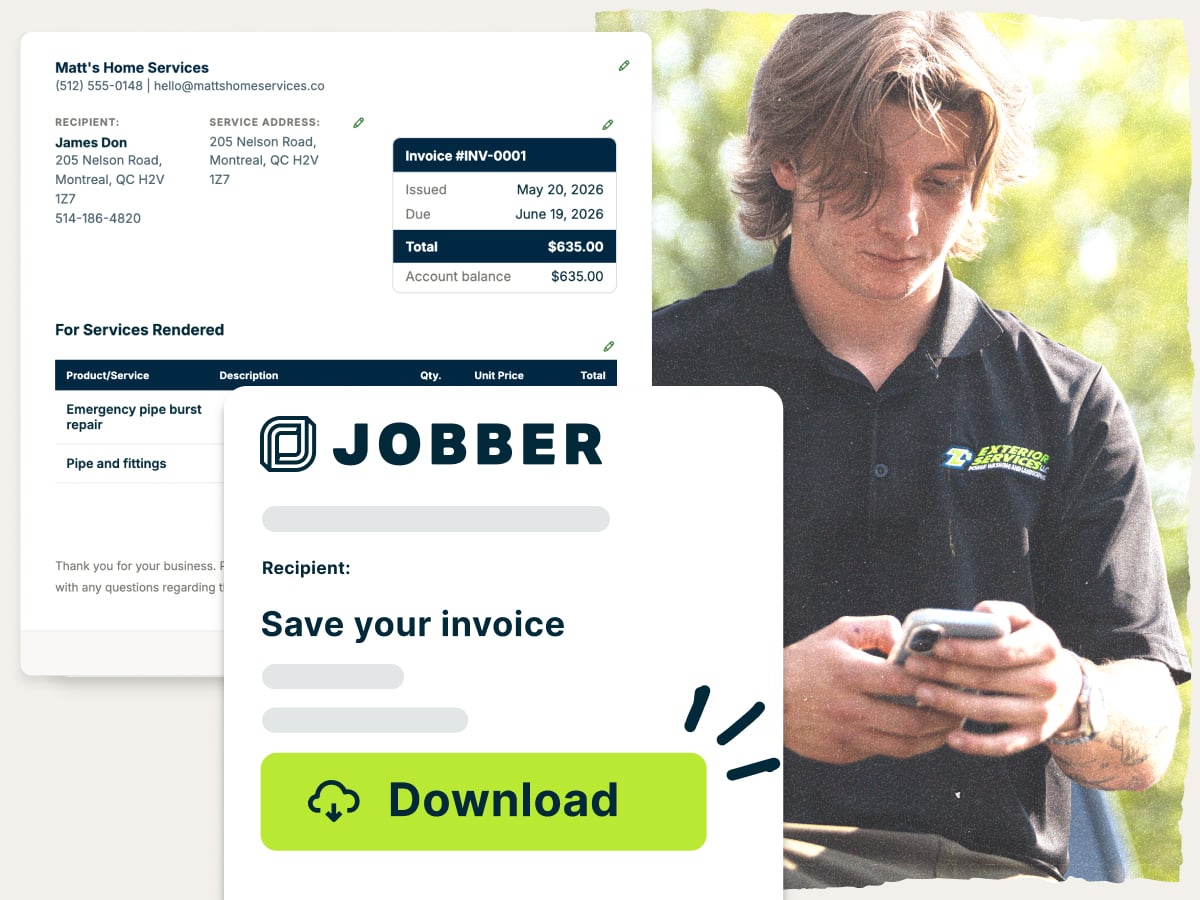
Why use Jobber’s free junk removal invoice template generator?
- Ready to customize: Add your logo, services, and rates in minutes. Bill for a quarter load, a full truckload, or a single couch pickup
- Set up with the essentials: Every invoice has room for dump fees, labor, and mattress or appliance surcharges, showing clients a clear breakdown of the total
- Free to download: Create as many invoices as you need at no cost. Download each one as a PDF and send it to the client right away
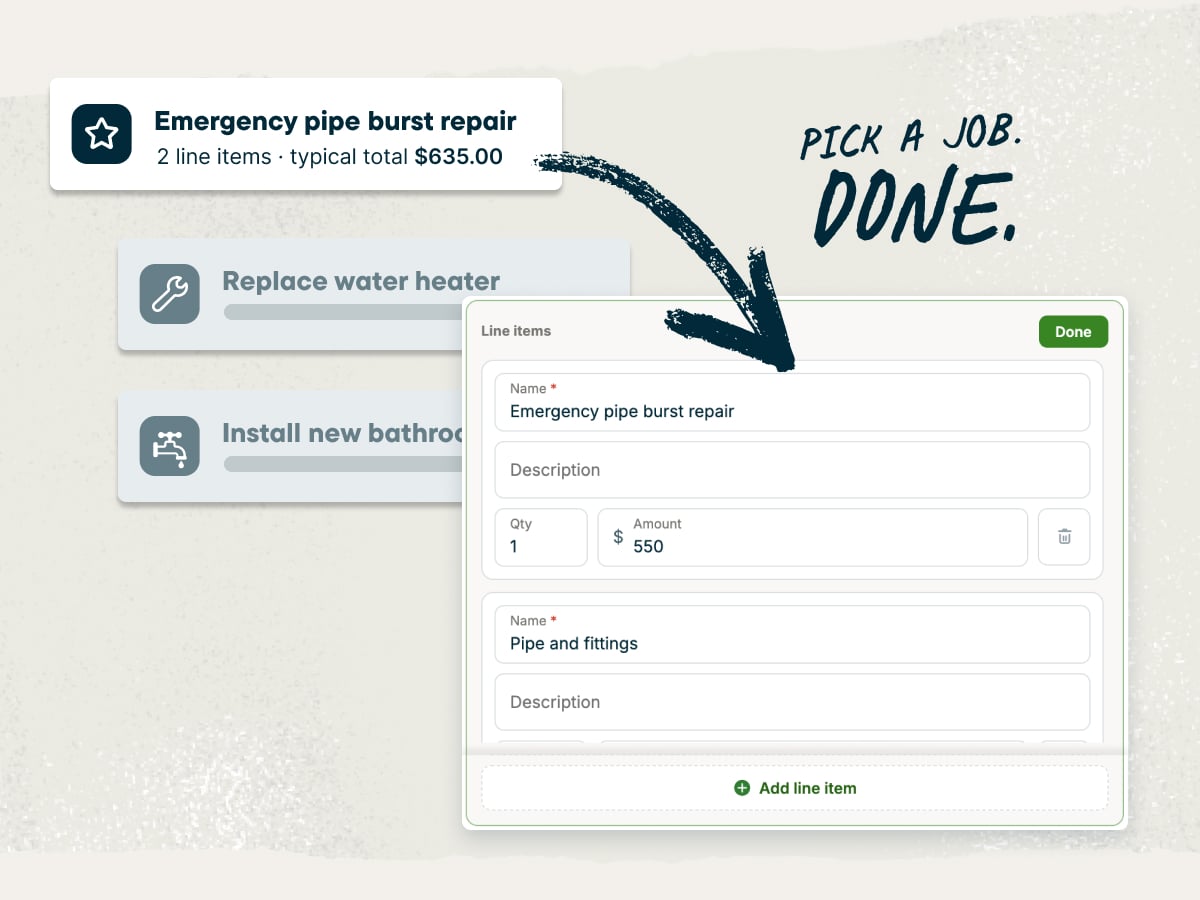
An invoice template generator built for junk removal businesses
Your day is spent loading trucks, managing your crew, and getting to the next cleanout on time. Your invoices need to keep up. The junk removal invoice template generator gives you a clean, professional invoice that shows clients what they paid for so you spend less time answering billing questions.
Explore more Jobber free tools for your junk removal business
Get the rest of your paperwork and pricing sorted with these free tools:
Over 400,000 home service pros in 50+ industries trust Jobber
“Jobber has been a huge part of our business since day one. It’s helped us schedule jobs, dispatch our crew, communicate with customers, send invoices, and stay organized as we’ve grown.”
How to create a junk removal invoice
You can create a junk removal invoice in Microsoft Word, Google Docs, Microsoft Excel, or Google Sheets. However, you’ll spend more time formatting your document and adding up totals.
Use the junk removal invoice template generator instead. It handles the layout and the math for you, so you only have to fill in the job details and line items. Then you can download a free PDF and send it to your client.
Follow these tips to write an invoice your clients will understand and pay quickly:
- Match your invoice to your quote. Use the same service names and rates from your price sheet. Matching names make it easy for clients to check the bill against what they approved.
- Show how you priced the load. Say whether you charged the job by truckload, weight, or time. A line like “Half truckload, about 240 cubic feet” helps prevent billing questions from the client.
- List dump fees on their own line. Disposal costs change by city and junk type. A separate line shows clients exactly what the landfill or transfer station charged for disposal.
- Explain every surcharge. Name the item and the reason, such as refrigerant handling for a fridge. A clear reason helps answer questions about extra charges.
- Note changes from the quote. The final load is often bigger or smaller than the estimate. Add a short note explaining the difference in volume so the client knows why the price changed.
- Mention what you recycled or donated. A quick line about donated furniture or recycled e-waste builds trust. It also shows the client where their stuff went so they don’t have to wonder.
- Send it before you leave the driveway. Invoicing on the spot keeps the job fresh in your client’s mind. It also gets money into your account sooner.
Need to create lots of invoices, fast? Invoicing software lets you bill several clients at once and track who has paid. It can even handle different types of invoices for bigger jobs like deposits and milestone billing.
What is the junk removal invoice template generator best for?
The junk removal invoice template generator is best for billing clients quickly and professionally after any haul-away job. It works whether you run a single truck or a full crew.
Use the junk removal invoice template generator to:
- Bill for every haul. Invoice single-item pickups, like a couch or hot tub, as easily as a full truckload.
- Price full cleanouts. Break down garage, basement, and estate cleanouts by volume, labor, and disposal.
- Charge for construction debris. List drywall, lumber, and renovation waste with the right weight or volume pricing.
- Track dumpster rentals. Bill for dumpster drop-offs, rental days, pickups, and disposal fees in one invoice.
- Handle recurring commercial pickups. Send consistent invoices to property managers and businesses on a regular pickup schedule.
What should be included in a junk removal invoice?
A junk removal invoice should include your business details, your client’s details, every service you provided, and the total amount due. Knowing what to include on an invoice keeps it clear and easy to pay.
Add these details to every junk removal invoice:
- Invoice number: Give each invoice a unique invoice number so you and your client can track it.
- Issue date and due date: Show the date you sent the invoice and the date when payment is due.
- Company information: Include your business name, logo, phone number, email, and address.
- Client information: Add the client’s name and contact details, and list the pickup address separately if it’s different from the billing address.
- Line items: Describe each service, such as a truckload fraction, cubic feet or cubic yards hauled, or an item surcharge.
- Itemized costs: Break out labor costs, disposal and dump fees, and any weight-based or hourly charges.
- Payments received: Subtract any deposit or partial payment the client already made.
- Subtotal, tax, discounts, and fees: Show the subtotal, sales tax, discounts, and any extra fees like stair carries or trip charges.
- Total due: Clearly state the final amount the client owes, and put it front and center.
- Payment terms: Spell out your payment terms, including due date, accepted payment methods, and late fees.
- Thank-you note: End with a short thank-you note to show you appreciate their business.
Free junk removal invoice template vs. Jobber invoicing software
Use the free junk removal invoice template generator when you need a professional invoice. Fill in the job details, download a PDF for free, and send it to your client in just minutes.
As your business grows, Jobber’s invoicing software saves you even more time. It’s a natural next step once you start a junk removal business and the jobs pile up.
Jobber saves client and job details, turns completed jobs into invoices, sends them by text or email, and automatically follows up on unpaid invoices. Jobber customers get paid 4x faster collecting payment online vs. waiting on checks.

and payment history organized in one place for easier access.
and pricing already recorded on the completed job.
making it easy for them to review and pay.
it is time to invoice at job completion or on a recurring schedule.
and send them to customers in a few clicks.
remind customers when an invoice remains unpaid.
so they can pay directly from their digital invoice.
while working from the office, on the road, or at a job site.
Frequently asked questions about junk removal invoices
-
A junk removal invoice template generator is a free online tool that builds a professional invoice for your junk removal jobs. Fill in your business information, client details, and services provided, along with the prices for each. The template handles the layout, adds up your totals, and gives you a PDF to send to the client.
-
Yes, you can customize every part of the junk removal invoice template. Add your business name, logo, and contact details, as well as client information. Then add in your own services with prices for each. Finish up with the tax rate, due date, and payment terms.
-
Yes, you can download your junk removal invoice as a PDF for free once it’s ready. Email it, text it, or print it for your client.
-
Yes, the junk removal invoice template is completely free. There’s no subscription needed to create and download invoices.
-
You can make a junk removal invoice template by setting up a reusable layout with your business details, your common services, and your rates. The fastest way is to fill in the junk removal invoice template generator once with every bit of information you might need, then reuse it for every job.
-
A junk removal invoice should include an invoice number, issue and due dates, your company and client information, and itemized line items. It should also show dump fees, labor, payments received, taxes, the total due, and payment terms. End it with a thank-you note to show clients you value their business.
-
A junk removal invoice looks like a one-page document with your business details at the top and an itemized list of services below. The list shows truckload or volume charges, item surcharges, and dump fees. The bottom shows the subtotal, tax, total due, payment terms, and a thank-you note.

-
You can price a junk removal job on an invoice by volume, weight, or time, then add disposal fees and surcharges. Most junk removal companies charge by truckload fraction, such as a minimum, quarter, half, or full load.
Use these national averages for pricing a junk removal job as a starting point:
• A full truckload of 360–480 cubic feet averages $400–$800.
• A half truckload averages $175–$375, and a quarter truckload averages $100–$175.
• A minimum load averages $70–$125.
• Mattresses average $70–$120, appliances $70–$205, and hot tubs $250–$450.
If you charge by weight, list the pounds or tons hauled and your rate. If you charge by time, list crew size, hours, and your hourly rate, plus disposal fees. -
You can use this junk removal invoice template to bill for services by following these simple steps:
1. Enter your business name and contact details.
2. Add your client’s name, pickup address, and billing address.
3. List each service, such as truckload volume, labor, dump fees, and surcharges.
4. Add any deposit, discount, or tax.
5. Set your payment terms and due date.
6. Download the invoice as a PDF and send it to your client. -
The two words describe the same thing, but the document’s name varies depending on who’s holding it. You’ll send the client an invoice, which is an itemized request for payment that you send after completing the work. The client will call it a bill when they pay it.
-
The difference between an invoice and a receipt is that an invoice asks your client to pay, while a receipt confirms they already did. First you’ll send the invoice with an itemized list of services you provided, followed by the receipt as proof that the client paid for those services. Send proof of payment faster with the free junk removal receipt template.
-
The difference between a quote and an invoice is that a quote shows the expected price before you complete the work, while an invoice asks for payment after the job is done. The final load can differ from the quoted volume, so your invoice should reflect what you actually hauled. Build your next quote with the free junk removal estimate template.
-
You can send a junk removal invoice by email, text message, or mail, or hand over a printed copy on site. Email and text are the fastest options, and they give your client a link or PDF to pay from right away.
-
The best time to send a junk removal invoice is right after the truck is loaded and the job is done. Otherwise, send the invoice within 48 hours of finishing the job while the work is fresh in your client’s mind.
For large junk removal jobs, it’s a good idea to collect a deposit before work starts so you can maintain cash flow. With multi-day jobs, send milestone invoices as you finish each phase so you’re not waiting until the end to get paid. -
Your client should pay their junk removal invoice by the due date in your payment terms. For residential jobs, many haulers ask for payment when the job is done. For commercial clients, terms like net 30 give them 30 days to pay.
Pick payment terms that fit your business and stick to them on every invoice. Shorter payment windows help you improve cash flow. For bigger cleanouts, you can also offer financing to customers so they can pay over time. -
Invoicing software is a tool that creates, sends, and tracks invoices for you. Here’s how Jobber’s junk removal invoicing software connects to the rest of your business:
• Keep clients updated with automatic customer communication and payment reminders.
• Accept card payments on site or online with credit card processing.
• Let clients pay for big cleanouts over time with consumer financing.
• Book jobs and turn them into invoices when they’re done with scheduling.
Over 400,000 home service pros in 50+ industries trust Jobber
“If you can make a quote on the spot, you’re 10 steps ahead of the competition.”
Jobber changed the game because it’s right at people’s fingertips.
