Free Pressure Washing Invoice Template
Jobber’s free pressure washing invoice template generator helps you bill for driveways, house washes, and roof soft washing in minutes. Add surfaces, square footage, and rates, and the template does the math for you. Download a professional PDF, send it to the client, and get paid before you’re finished packing up the trailer.

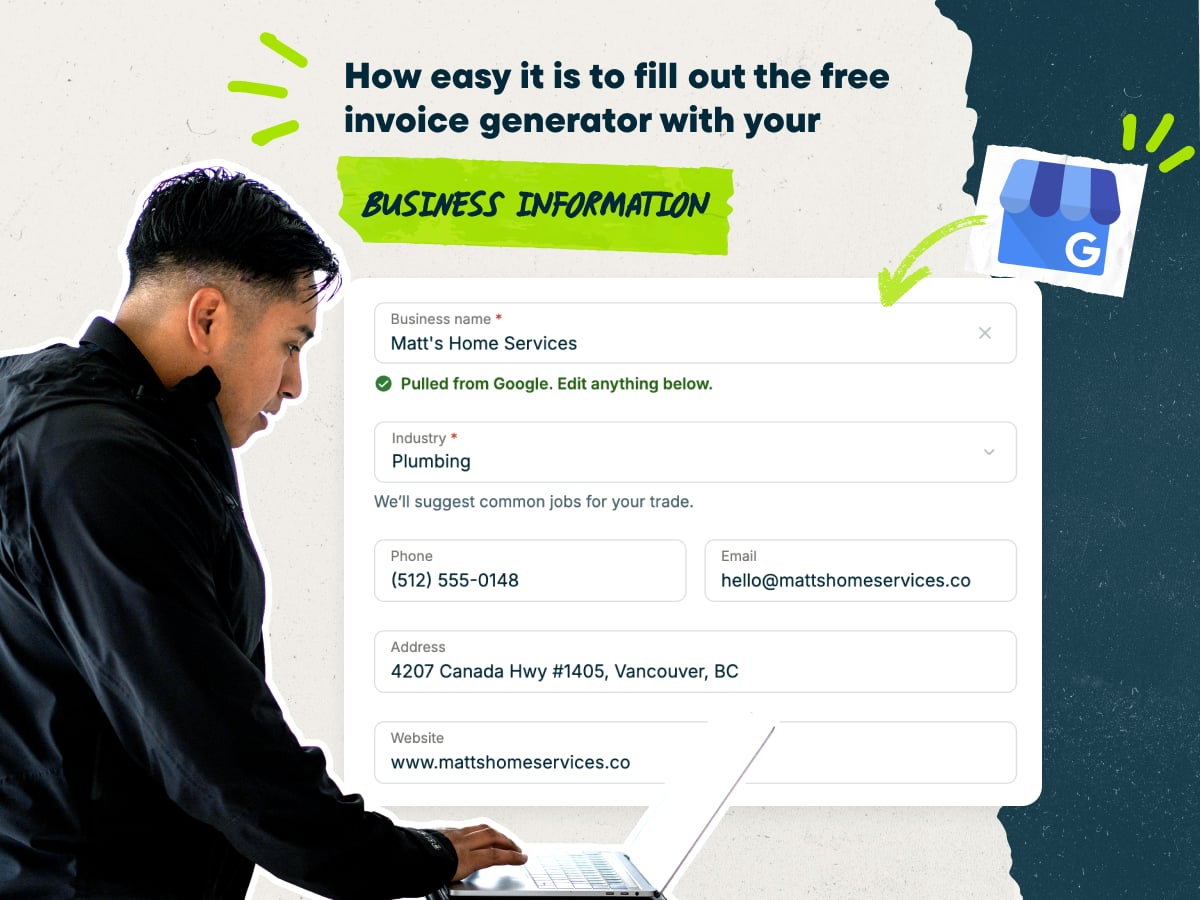
Create a pressure washing invoice fast with our free invoice template
- Enter your business name to auto-fill your contact details
- Add your own line items, or pick pre-loaded options with typical pricing
- Add your client’s contact information
- Download your invoice as a PDF, or save it in Jobber
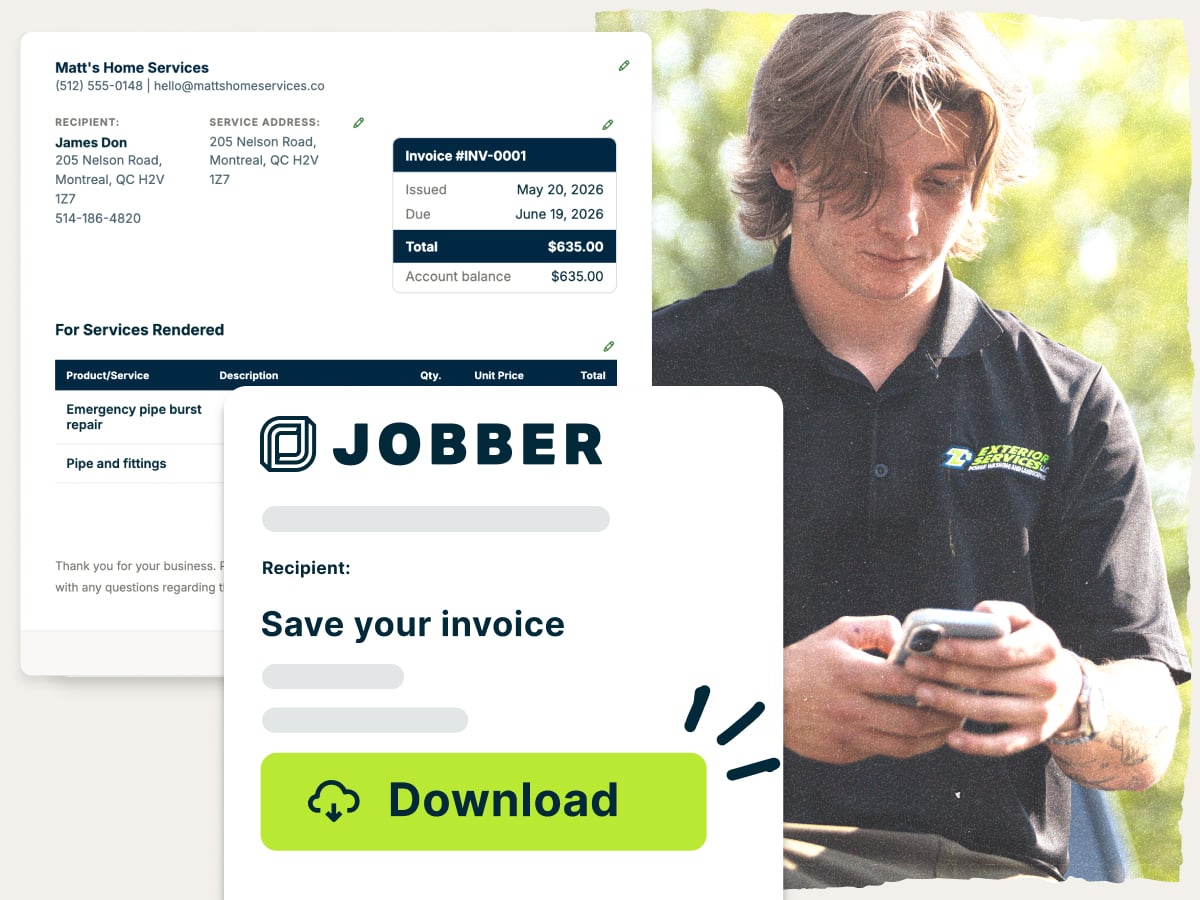
Why use Jobber’s free pressure washing invoice template?
- Ready to customize: Add every surface you cleaned, with its square footage and rate. Set your own services, add-ons, and payment terms
- Set up with the essentials: The template includes the fields every invoice needs, like an invoice number, due date, and itemized services so clients see what they’re paying for
- Free to download: Create your invoice and download it as a PDF at no cost. Email it to your client or print it for the job site
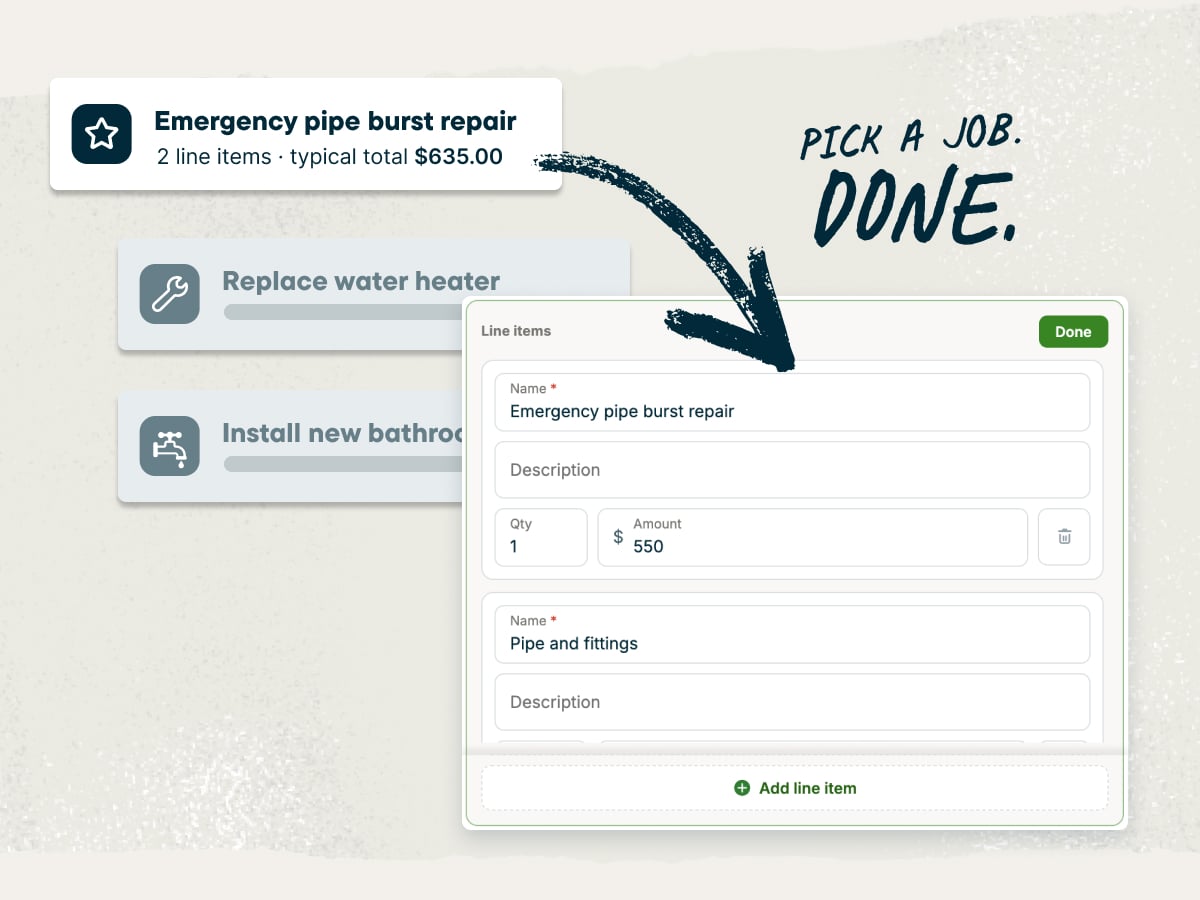
A pressure washing invoice template built for pressure washing businesses
When you run a pressure washing business, you’re the estimator, the marketer, and the one out in the field—meaning paperwork takes up most of your evening. This template helps you bill each driveway, deck, and house wash by the square foot and send the invoice before you leave the property.
Explore more Jobber free tools for your pressure washing business
Get the rest of your paperwork and pricing sorted with these free tools:
Over 400,000 home service pros in 50+ industries trust Jobber
“Jobber is so great. My guys can send the invoice automatically. If they don’t pay it, they get a fee attached to it after the first week. It puts me in a position where I don’t have to chase payments.”
How to create a pressure washing invoice
You can create a pressure washing invoice in Microsoft Word, Google Docs, Microsoft Excel, or Google Sheets. These documents aren’t designed for regular invoicing, though, so you’ll spend more time on formatting and math.
Use the invoice template generator instead—it handles the layout and adds up your totals, so you only have to fill in the job details. Then download a PDF and send it to the client.
Whichever format you pick, these tips help you write an invoice your clients understand and pay quickly:
- Give each surface its own line. Split the driveway, siding, and patio into separate lines with the square footage and cleaning method for each. Clients can match every line to the quote they approved.
- Call out condition surcharges. Oil stains, mold, mildew, and moss take extra time and product to clean. Add a separate pretreatment line so the higher price makes sense.
- List chemicals and materials. Show degreaser, surfactants, or sealant as material costs when you bill for them. If you bring your own water tank, pass on that cost, too.
- Show optional add-ons separately. Put sealing, gutter brightening, or an extra area like the back patio on their own lines. That way, clients see exactly what they added after approving the quote.
- Credit deposits before you send. Check your records for any deposit you collected at booking. Subtract it so the client only sees what’s left to pay.
- Set payment terms up front. Share your terms when you quote the job, then repeat them on the invoice.
What is the pressure washing invoice template best for?
The pressure washing invoice template is best for billing residential and commercial jobs quickly and professionally. Use it for jobs like these:
- One-time house washes: Bill a single soft wash, driveway cleaning, or deck job as soon as it’s done.
- Recurring or seasonal maintenance: Reuse the same line items for spring cleanings, quarterly storefront washes, or yearly roof treatments.
- Commercial storefronts and fleet: Itemize sidewalks, parking areas, and fleet vehicles on one invoice for property managers.
- Add-on services: Add sealing, gutter brightening, or an extra area the client asked for on site.
- Getting paid before you leave the property: Send the invoice from the driveway and collect payment while the client is still home.
Need to create lots of invoices, fast? The free template builds one invoice at a time and works for most types of invoices. If you bill every week, you’ll want invoicing software that saves client details and turns completed jobs into invoices.
What should be included in a pressure washing invoice?
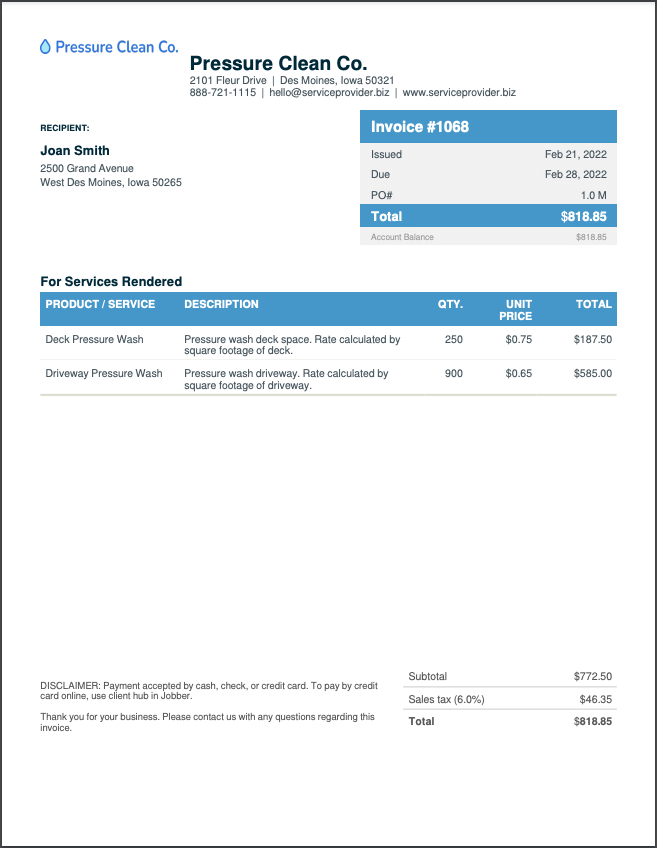
A pressure washing invoice should include your business and client details, each surface you cleaned, the total due, and your payment terms. Here’s what to include on an invoice for a pressure washing job:
- Invoice number: Give every invoice a unique invoice number so you and your client can track it.
- Issue and due dates: Show the date you sent the invoice and the date payment is due.
- Company information: Add your business name, logo, phone number, email, and address.
- Client information and service address: List the client’s name and contact details, plus the address of the property you cleaned.
- Line items: Describe each surface, its square footage, and its rate to match the pressure washing estimate the client approved.
- Itemized costs: Break out labor costs, chemicals, and equipment fees so clients see where their money goes.
- Payments received: Show any deposits or partial payments the client already made.
- Subtotal, taxes, and discounts: List the subtotal, then add sales tax and subtract any discounts.
- Total due: Make the final balance easy to spot so the client knows how much to pay.
- Payment terms: Spell out your payment terms, accepted payment methods, and any late fees.
- Thank-you note: End with a short thank-you note to encourage repeat bookings.
For larger or commercial jobs, collect a deposit up front and send progress invoices as each stage wraps up. Then send a final invoice for the remaining balance.
Free pressure washing invoice template vs. Jobber invoicing software
The free pressure washing invoice template works well when you’re starting a pressure washing business or billing a handful of jobs. You fill in the details, download a PDF, and send it yourself.
Once you’re invoicing every week, Jobber’s invoicing software takes more off your plate. It saves client and job details, turns completed jobs into invoices, and sends them by text or email. It also follows up on unpaid invoices automatically. Jobber customers get paid 4x faster collecting payment online vs. waiting on checks.

and payment history organized in one place for easier access.
and pricing already recorded on the completed job.
making it easy for them to review and pay.
it is time to invoice at job completion or on a recurring schedule.
and send them to customers in a few clicks.
remind customers when an invoice remains unpaid.
so they can pay directly from their digital invoice.
while working from the office, on the road, or at a job site.
Frequently asked questions about pressure washing invoices
-
A pressure washing invoice template is a ready-made invoice layout you fill in with your job details, prices, and client information. Jobber’s invoice template generator builds it for you, adds up the totals, and creates a PDF you can send to the client.
-
Yes, you can customize every part of the pressure washing invoice template. Add your business name and logo, client details, line items, prices, taxes, dates, and payment terms so the invoice is accurate to the job.
-
Yes, you can download your pressure washing invoice as a PDF once you’ve filled it in. Email it, text it, or print it for clients who prefer paper. You can also save it in Jobber.
-
Yes, the pressure washing invoice template is free to use and download. Fill it in, download your invoice, and send it to your client at no cost.
-
You can make a pressure washing invoice template in Microsoft Word, Google Docs, Microsoft Excel, or Google Sheets. You’ll need to build the layout and check the math on every invoice, though, which takes extra time and effort. The invoice template generator handles both, so you only fill in the job details.
Or, to skip manual invoices altogether, use field service invoicing software that creates invoices from your completed jobs. -
A pressure washing invoice should include your business details, client details, an invoice number, dates, itemized services, the total due, and payment terms. Itemize each surface with its square footage and rate so clients see what they’re paying for. Finish with a short thank-you note to encourage repeat bookings.
-
A pressure washing invoice is usually one page, with your business details at the top and the total due at the bottom. In between, it lists each surface you cleaned, its square footage, and the rate. It ends with your payment terms and a short thank-you note.
-
You bill for pressure washing jobs by the hour, by the square foot, or at a flat rate. Typical pressure washing prices run $50–$100 per hour, $0.10–$0.50 per square foot, or $90–$200 per job at a flat rate. If you bring your own water tank, pass that cost on to the client, too.
Set your price based on these factors:
• Property type: Residential homes and commercial properties need different equipment and time.
• Size: Larger surfaces take more time, water, and product.
• Condition: Oil stains, mold, mildew, and moss need pretreatment and extra time.
• Accessibility: Second-story siding, steep roofs, and tight spaces slow the job down.
• Equipment and chemicals: Degreasers, surfactants, and specialty nozzles add to your material costs.
• Hot vs. cold water: Hot water power washing handles grease and oil better, but the equipment costs more to run.
• Competitor pricing: Local rates show what clients in your area expect to pay. -
You can bill for services using this template in five steps:
1. Open the invoice template generator and enter your business name.
2. Add your client’s name, contact details, and service address.
3. Add a line item for each surface, with the square footage and rate from your approved quote.
4. Add taxes, discounts, and any deposit the client already paid.
5. Download the invoice as a PDF and send it to your client. -
The difference between a quote and an invoice is that a quote comes before the job. An invoice comes after the job, when you ask for payment. The quote lists the surfaces, square footage, and price the client approves.
After you complete the job, you can turn that approved quote into an invoice. You should also add any changes to the job scope, like an extra area or an oil stain pretreatment. -
The two words describe the same thing, but the document’s name varies depending on who’s holding it. You’ll send the client an invoice after you wash their driveway, and they’ll call it a bill when they pay it.
-
You can send an invoice to clients by email, text message, mail, or in person. Email and text get the invoice to clients fastest. A printed copy works when the client is home at the end of the job.
-
The best time to send a pressure washing invoice is right after the job, within 48 hours at the latest. If you can, send an invoice before you leave the property, right after the final walk-through. The job is fresh in your client’s mind, and the clean driveway is right in front of them.
-
Your client should pay their pressure washing invoice within two weeks, and no later than net 30. Shorter terms protect your cash flow when you’re buying chemicals and fuel for the next job.
Put a clear due date on every invoice and follow up fast on unpaid invoices. For bigger jobs, you can offer financing so clients pay over time. -
Yes, you can change a pressure washing invoice after you send it. Send the client a corrected invoice with the same invoice number, or note the revision next to the number. Tell the client what changed, such as an added area or a corrected square footage.
If the client already paid part of the bill, show that payment on the updated invoice. Then the new balance is clear to both of you. -
Pressure washing invoicing software creates, sends, and tracks invoices for you, so you spend less time on paperwork. Here’s what you can do with Jobber:
• Turn completed jobs into invoices and send them by text or email.
• Accept card payments with credit card processing, online or on site.
• Offer consumer financing on bigger jobs so clients can pay over time.
• Send automatic reminders when invoices go unpaid.
• Communicate with clients by text and email from one place.
Over 400,000 home service pros in 50+ industries trust Jobber
“If you can make a quote on the spot, you’re 10 steps ahead of the competition.”
Jobber changed the game because it’s right at people’s fingertips.
