Jobber vs. LMN
Growing a landscaping or home service business is hard enough without wrestling with disconnected software. Jobber gives you one app to quote, schedule, invoice, and get paid. See how it compares to LMN.

Jobber vs. LMN: Comparison Table (2026)
Same categories. Same criteria. Here’s how Jobber and LMN compare on the features that matter to home service businesses.
High-Level Comparison
Setup time
~50 minutes
Not specified
Pricing model
Transparent pricing starting from $29/month
From $297/mo plus mandatory onboarding fee
Scheduling & Dispatch
Available
Available
Reporting & Analytics
Available
Advanced dashboards on Professional and up
AI Tools
Jobber AI available on all plans, AI receptionist available as an add-on (included in Plus)
Available
Mobile app
Who are Jobber and LMN?
Jobber
Jobber is an all-in-one field service management platform built for 50+ home service industries.
More than 400,000 service pros use Jobber to handle quoting, scheduling, invoicing, payments, and client communication from a single app.
LMN
LMN (Landscape Management Network) is a field service management platform built specifically for landscaping and green industry businesses.
LMN is known for its production-rate estimating, detailed job costing, and budgeting tools. It splits functionality across separate apps — LMN Crew, LMN Time, and LMN CRM.
Core operations
Jobber covers the full job lifecycle in one platform — from the first quote to the final payment and the follow-up that wins your next job. LMN offers more in-depth landscape-specific estimating and job costing, but it doesn’t include marketing tools, online booking, or automated invoice follow-ups.
Keep all quotes, jobs, invoices, payments, and communication history organized in one place.
Learn more
Available
Available
Organize customers into targeted groups for streamlined communication, reporting, and marketing
Learn more
Available
Available
Give clients a centralized portal to view quotes, approve work, pay invoices, and manage appointments online.
Learn More
Available
Available
Let customers request work and book services directly through an online booking form.
Learn More
Available
Not available
Track leads, quotes, and follow-ups in one place so opportunities never slip through the cracks.
Learn More
Available as an add-on (included in Plus)
Available
Quoting
Create professional, customizable quotes with itemized pricing and company branding.
Learn More
Available
Available
Allow customers to select optional services or upgrades directly within a quote.
Learn More
Available
Available
E-signature approval
Available
Available
One-tap convert: quote → job
Available
Not available
Scheduling & dispatch
Easily assign, move, or reschedule jobs with just a click, drag, and drop.
Learn More
Available
Available
Build named crews, view their availability, and schedule the whole team at once for easier dispatching.
Learn More
Available
Available
Automatically organize daily routes to reduce drive time and improve efficiency across multiple appointments.
Learn More
Available
Available
Get real-time visibility into team locations and job progress in the field.
Learn More
Available
Available
Invoicing
Track labor, materials, and expenses to make sure every job stays profitable.
Learn More
Available
Available
Get a dedicated bookkeeper to manage your books and deliver monthly financial reports for clearer business decisions.
Learn More
✓ Available as an add-on (US only)
Not available
payments
Offer customer financing options directly during the payment or quote process.
Learn More
Available
Available
marketing
Create a simple business website to help attract and convert leads.
Learn More
Available (included in all plans)
Not available
Stand out in local search with a Google profile that’s active and accurate.
Learn More
Available (included in all plans)
Not available
Send follow-up requests to help generate more customer reviews.
Learn More
Available as an add-on (included in Plus)
Not available
Send targeted marketing emails to clients.
Learn More
Available as an add-on (included in Plus)
Not available
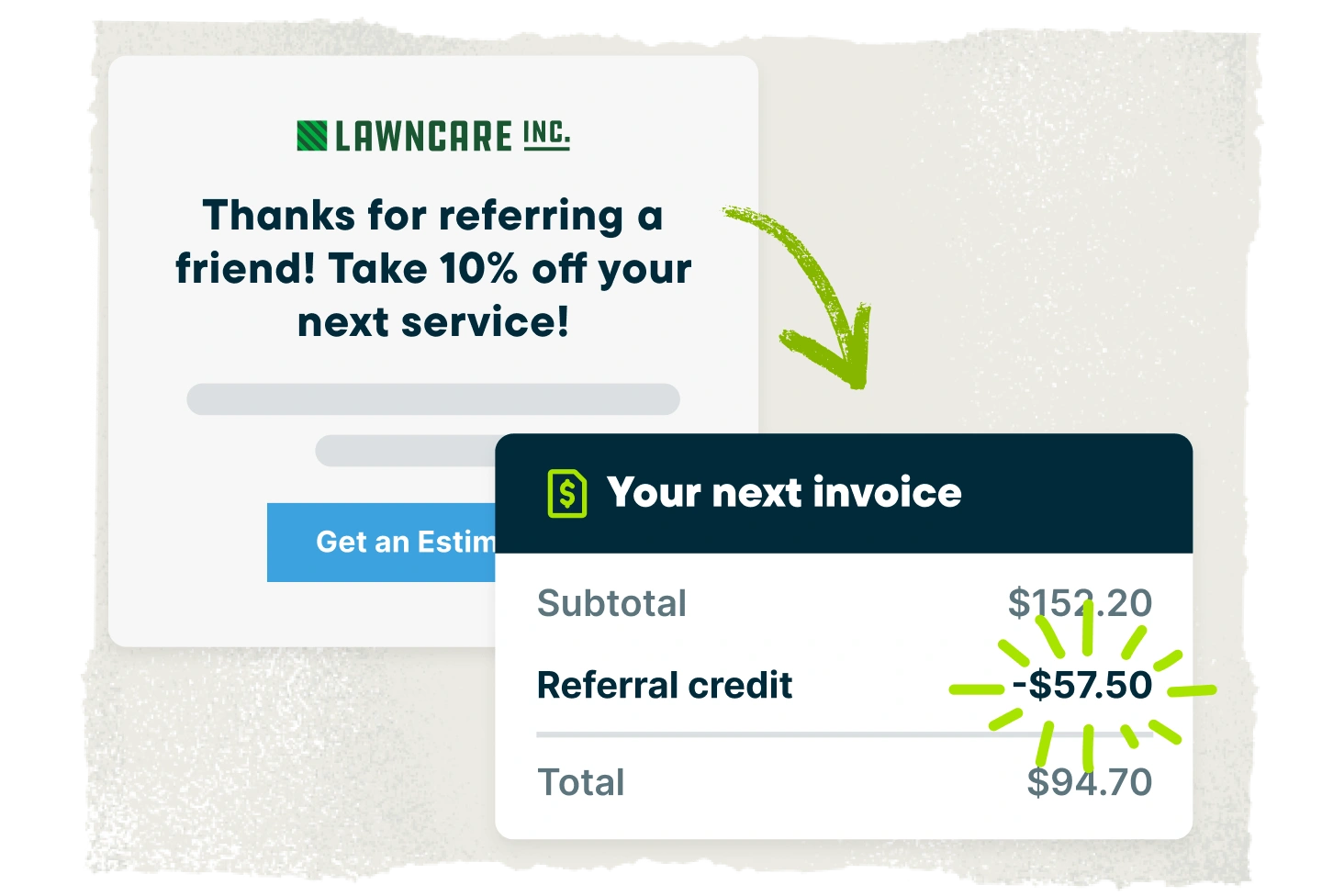
Let customers refer new business through structured referral incentives.
Learn More
Available as an add-on (included in Plus)
Not available
Create and publish posts to your Facebook page and Google Business Profile.
Available as an add-on (included in Plus)
Not available
Turn completed jobs into marketing posts you can share on your website, Google Business Profile, Facebook, and email to showcase your work.
Learn More
Available as an add-on (included in Plus)
Not available
AI
AI-powered tools to help service businesses run smarter
Learn More
Available (included on all plans)
Available
Answer calls and texts 24/7, capture leads, and book jobs automatically.
Learn More
Available as an add-on (included in Plus)
Not available
Connects to ChatGPT and Claude so you can use Jobber data in AI conversations.
Available
Not available
“With Jobber, we’re able to run five or six crews per day. I never need to stop by the job sites; they run on their own.”

Mobile technician tools
Jobber runs your entire operation from a single mobile app on iOS and Android — available in English and Spanish. LMN splits field functionality across LMN Crew, LMN Time, and LMN CRM, which means your team is switching between apps throughout the day.
Core Mobile app
iOS & Android native apps
Available
Available
App language
English & Spanish
English & Spanish
on the job
Attach visual documentation directly to the job
Available
Photos only
Keep job instructions, required tasks, and site details organized for field teams.
Learn More
Available
Available
Alert team members immediately when jobs are assigned, moved, or updated.
Learn More
Available
Available
Capture customer approvals directly on a mobile device.
Available
Available
Invoicing & payments in the field
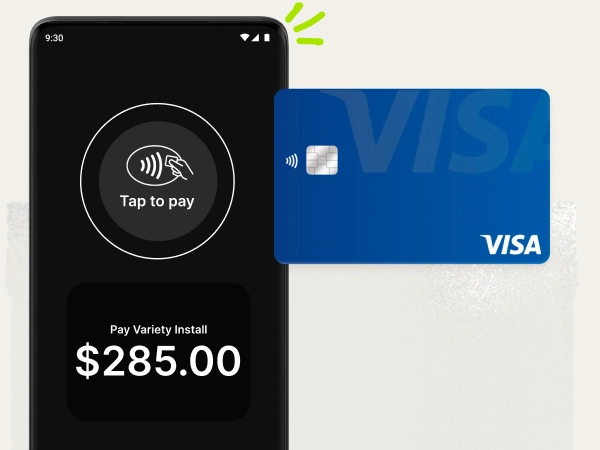
Allow customers to pay in person by tapping a card or digital wallet on a mobile device.
Learn More
Available
Not available
Built for how you actually work
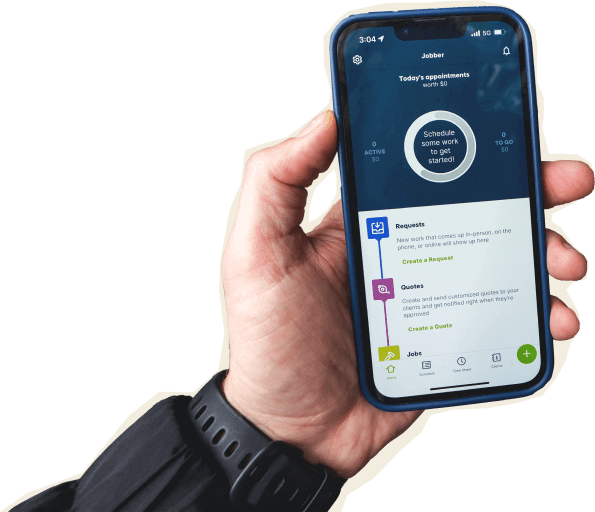
Jobber runs your entire operation — quoting, scheduling, invoicing, payments, and client communication — from a single app, while LMN splits that across three separate tools. That means less toggling between apps and fewer costly mistakes for your crew.
One app for your whole day
Jobber handles quoting, scheduling, invoicing, and payments without switching between tools. Your office team and field crew work from the same platform, so updates happen in real time.
The Jobber mobile app keeps everything accessible from your phone — whether you’re on a job site or driving to the next one. LMN requires separate apps for crew management, time tracking, and CRM — which means more toggling, more room for mistakes, and slower days.
Collect payments online and in the field
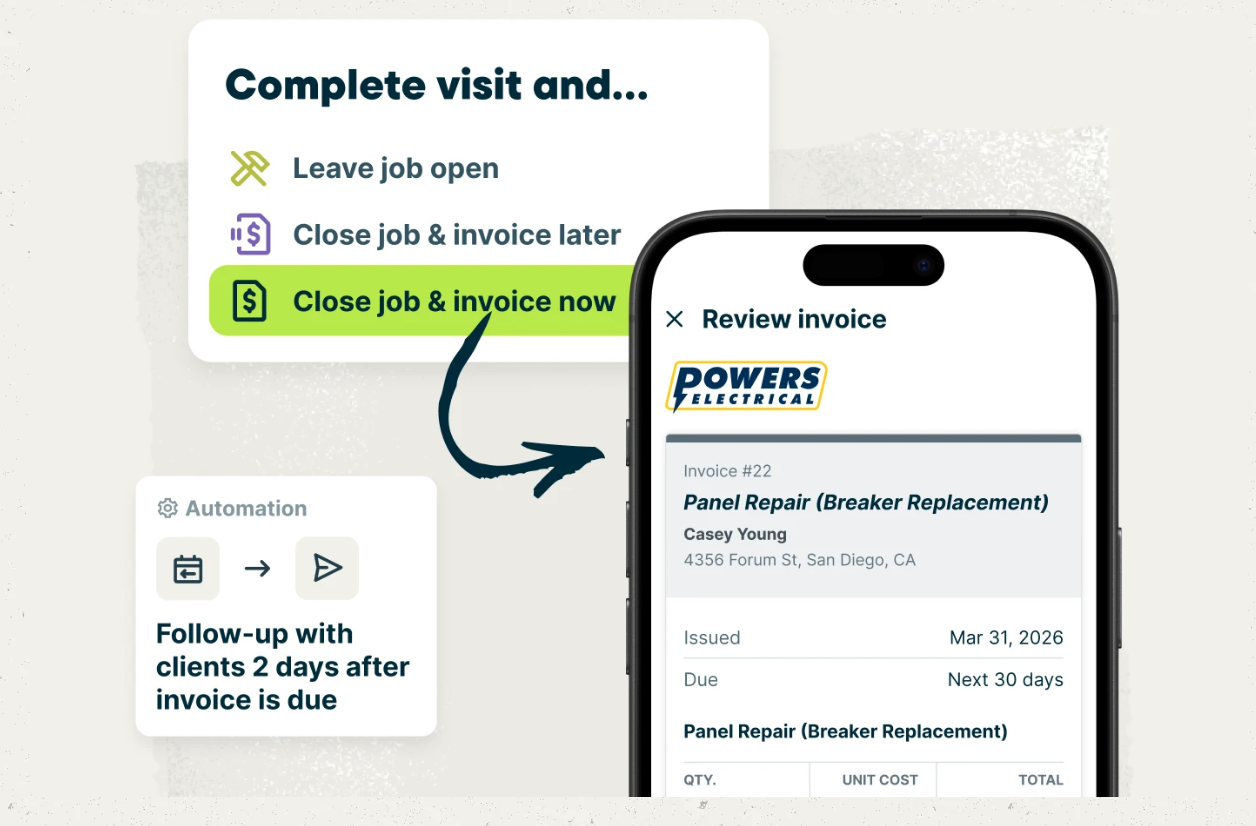
Jobber automates invoice follow-ups and gives clients a simple way to pay through Client Hub — by credit card, ACH, or Tap to Pay. You can even offer consumer financing for quotes on larger jobs.
Service pros who collect payment online with Jobber get paid 4x faster compared to waiting on checks.
LMN doesn’t offer automatic invoice follow-ups or a mobile card reader for collecting payment in the field.
Marketing that books more work
Jobber’s Marketing Tools— Reviews, Campaigns, Referrals, and Websites — helps you win new business from your existing client base without spending hours on marketing.
Businesses using Jobber’s automated review requests earn 2x as many Google reviews per month, and 80% of marketing campaigns led to a new job booked within 30 days. LMN doesn’t include any marketing tools.
Jobber vs. LMN: Pricing
Jobber offers a lower-cost, more accessible path for growing service businesses, with plans starting at $149/month annually for up to five users. By comparison, LMN’s Starter plan begins at $297/month for one office user and five crew members. Jobber also provides a 14-day free trial, transparent pricing across all plans, and a solo-user option.
Tier 1
Core
1 user
$29/mo (when billed annually)
Starter
1 office/crew lead + 5 crew
$297/mo
$797 one-time onboarding
Tier 2
Connect
1 user
$99/mo (when billed annually)
2-15 users
Starting from $149/mo (when billed annually)
Professional
3 office/crew leads + 15 crew
$648/mo
$1,497 one-time onboarding
Handle complex work and grow without limits.
Learn More
Grow
1 user
$149/mo (when billed annually)
2-15 users
Starting from $229/mo (when billed annually)
Enterprise
Custom pricing (contact sales)
Starts at 100 users
Tier 4
Plus
2-15 users
Starting from $399/mo (when billed annually)
Not available
Additional user pricing
$29/mo
Office/crew lead: $21.97/mo each
Crew: $20/mo per 5-pack
Free trial
14 days, no credit card required
No available
Why landscaping businesses choose Jobber
Switching from LMN to Jobber
Making the switch doesn’t mean starting from scratch. The process takes less than two weeks and costs nothing extra:
Tell us your setup
Share what you’re using today — your client list, job history, and how your team works. We’ll map out a plan to bring everything into Jobber.
Data migration
We’ll move your client data, job history, and key records into Jobber at no extra cost — typically in 3–5 business days.
Team training
Your crew gets hands-on training so they’re comfortable with Jobber before day one. We offer 1-on-1 onboarding sessions to walk you through scheduling, quoting, invoicing, and payments.
Go live
Most teams are fully live within 10 days. We recommend running both systems side-by-side for about a week so nothing falls through the cracks.
Jobber vs. LMN: Which should you choose?
Choosing the right software comes down to what your business actually needs day to day. Both platforms have real strengths — here’s how to decide.
Choose LMN if:
- You run a landscaping-only business and need production-rate estimating. LMN’s estimating system is purpose-built for the green industry, with production rates that tie directly into job costing. If detailed landscape estimating is central to how you bid work, LMN goes deeper here.
- You rely on QuickBooks Desktop. LMN offers a direct QuickBooks Desktop integration on Professional and Enterprise plans. Jobber syncs with QuickBooks Online and Xero, but doesn’t support QuickBooks Desktop.
- You need built-in budgeting and seasonal planning. LMN’s Professional and Enterprise plans include full budgeting capabilities and subcontractor tracking that larger landscape operations may need for seasonal planning.
Choose Jobber if:
- You want one app that handles quoting, scheduling, invoicing, and payments — without mandatory onboarding fees. Jobber’s entry-level plan starts at $149/mo with no hidden costs. LMN’s Starter plan is $297/mo plus a $797 onboarding fee.
- You need marketing tools to win new business. Jobber’s Marketing Tools include a Website builder, Reviews, Campaigns, and Referrals — tools that LMN doesn’t offer at all. Service pros using Jobber grow revenue an average of 37% in their first year.
- You serve any home service industry beyond landscaping — or want faster setup. Jobber works for 50+ industries, and your team can learn it in days, not weeks. Jobber’s quoting tools also help you bid landscaping jobs with confidence, using optional add-ons, images, and automated follow-ups.
Frequently asked questions
-
It depends on the size and complexity of your operation. LMN is built specifically for landscape and green industry businesses, with production-rate estimating, detailed job costing that includes subcontractor tracking, and budgeting tools for seasonal planning. Jobber covers landscaping along with 50+ other home service industries, and gives you marketing tools, online booking, and a single mobile app that LMN doesn’t offer. If your business runs multiple service types or you want built-in tools to win new clients, Jobber is the stronger fit. If you only do landscape construction and need advanced estimating workflows, LMN may suit you better.
-
LMN’s Starter plan costs $297 per month and includes one office user plus five crew members, while its Professional plan costs $648 per month and includes three office users plus 15 crew members. Enterprise pricing is not publicly available. In comparison, Jobber offers tiered pricing for teams of all sizes. The Connect team plan starts at $149 per month annually for up to five users, or $299 for up to 15 users. Jobber also offers a 14-day free trial with no credit card required, transparent pricing across all plans, and a solo-user option, while LMN does not offer a free trial and only partially publishes its pricing. See all of Jobber’s plans and pricing.
-
Jobber includes several features LMN doesn’t offer: online booking so clients can schedule appointments themselves, Marketing Tools, Websites, Reviews, Campaigns, and Referrals to help you win and retain clients, a Receptionist for AI-powered call handling, a mobile card reader, and instant payouts for collecting payment in the field, automatic invoice follow-ups, lead management, custom automations, and Xero integration. Jobber also runs everything from a single mobile app, while LMN requires separate apps for crew management, time tracking, and CRM. You also get 1-on-1 product coaching and access to a thriving community of service pros who share advice and support.