Free Commercial Cleaning Invoice Template
Jobber’s free commercial cleaning invoice template generator helps you bill office, retail, and facility clients in minutes. Add your recurring visits, square-footage pricing, and payment terms, then download a professional PDF that’s ready to send to your client.

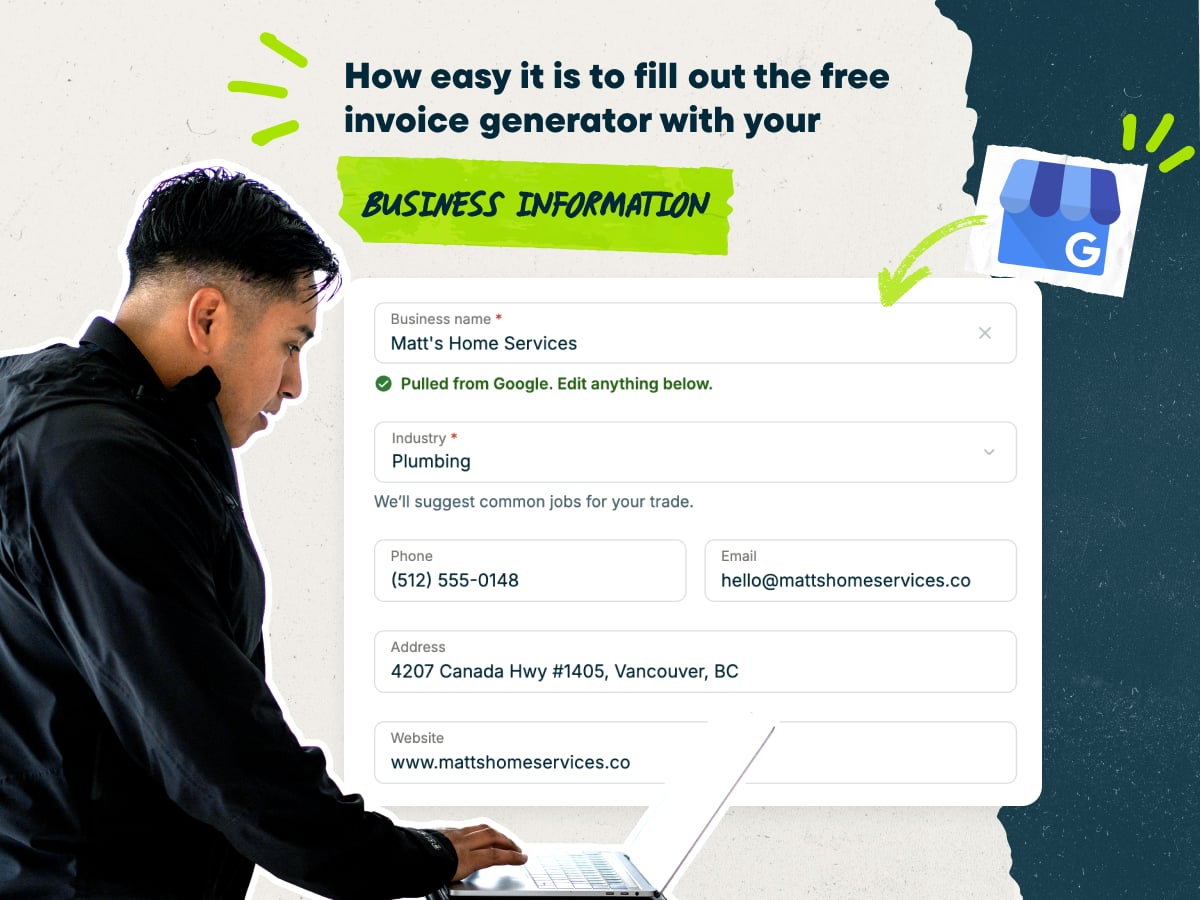
Easily create a commercial cleaning invoice with our free invoice generator
- Enter your business name, and the generator will auto-fill your other details
- Choose pre-loaded line items or write your own, like nightly janitorial service or restroom restocking
- Enter your client’s company name, site address, billing address, and PO number
- Download the finished invoice as a PDF, or save it in Jobber to send and track later
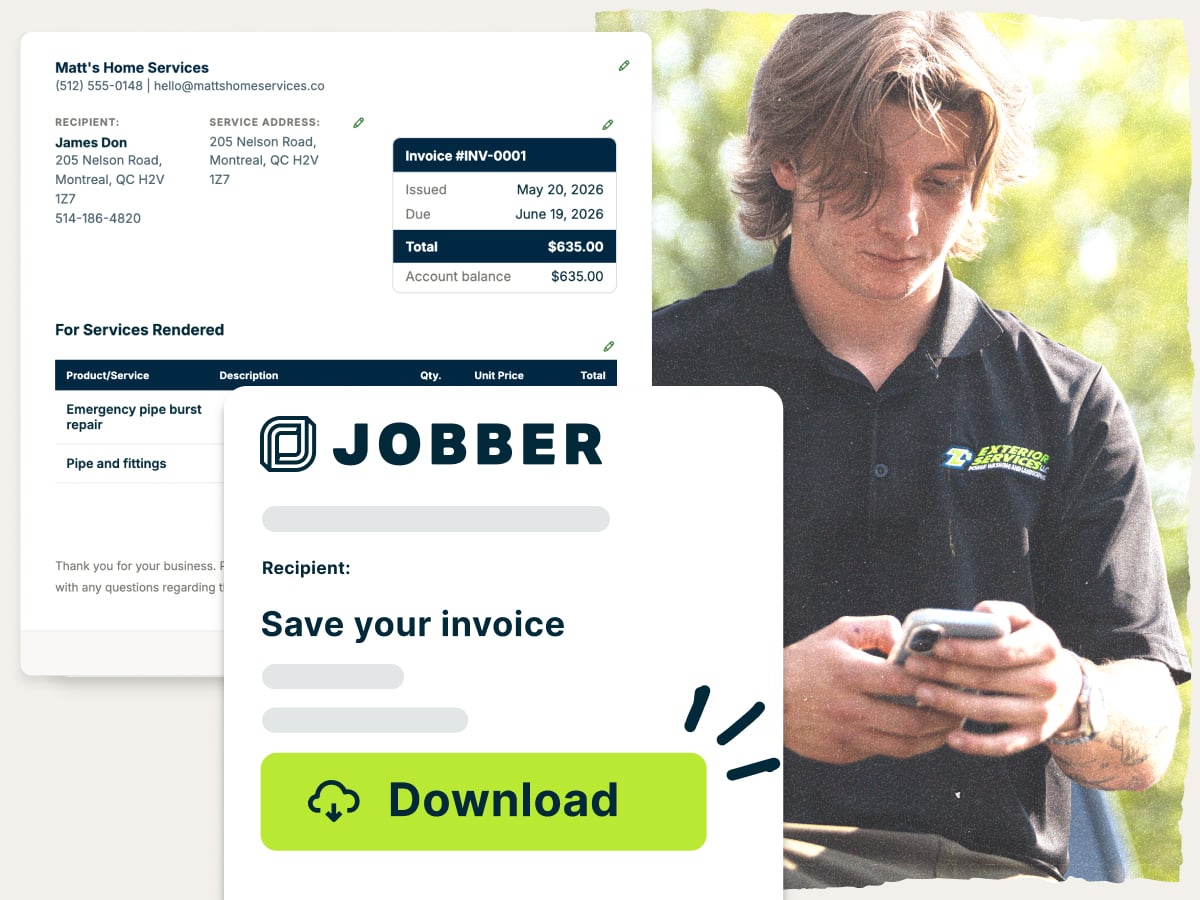
Why use Jobber’s free commercial cleaning invoice template generator?
- Ready to customize: Add your logo, business and client details, services, and payment terms for each commercial account. Bill by square footage, hourly, flat rate, or per visit
- Set up with the essentials: The template already has fields for the invoice number, due date, line items, taxes, and payment terms. Every invoice gives a facility manager the details they need to approve payment
- Free to download: Create and download as many commercial cleaning invoices as you need at no cost, then send them to clients—no subscription required
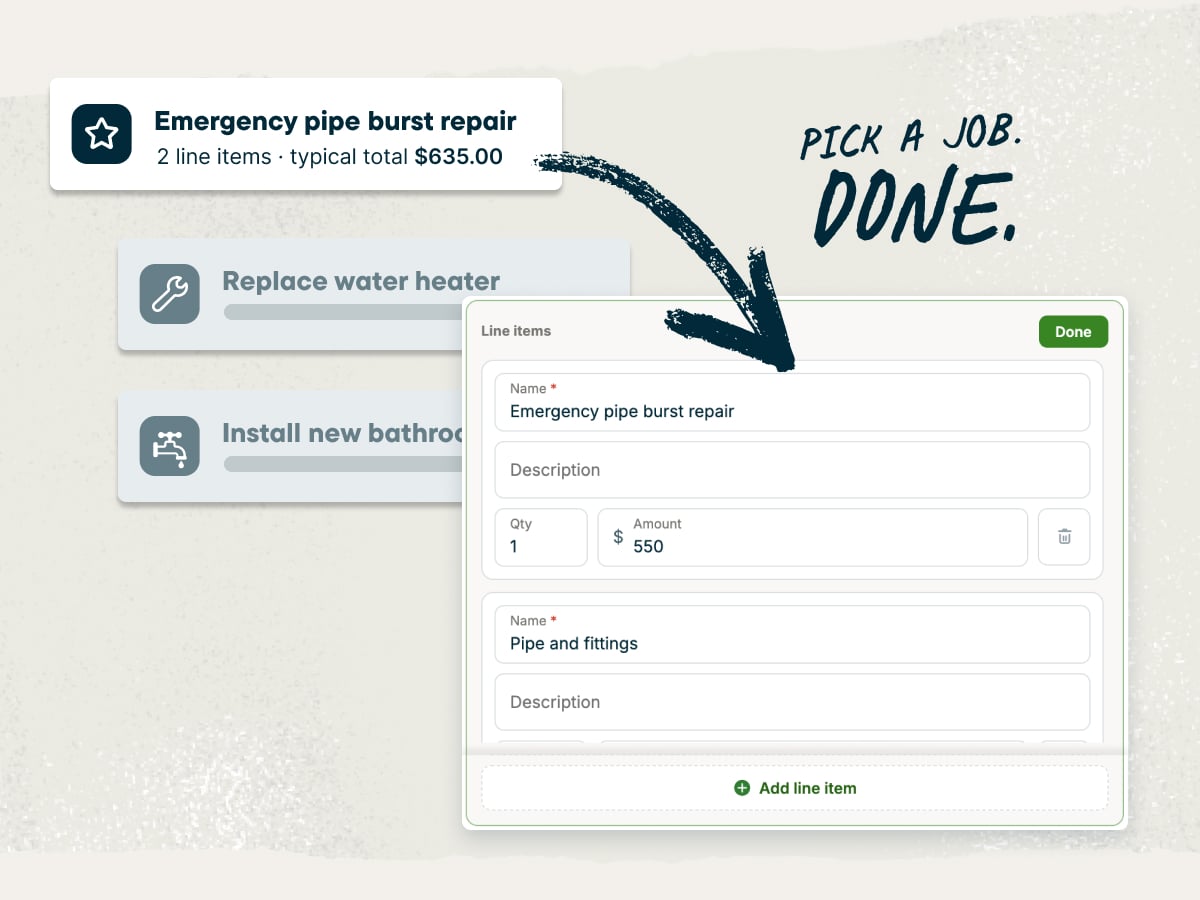
An invoice generator built for commercial cleaning businesses
This template generator gives you room for the details commercial clients check before they pay, like PO numbers, site addresses, visit counts, and contract terms. Use it as an office cleaning invoice template for a single tenant or a janitorial invoice template for a multi-site account. Clear, itemized invoices mean fewer client questions and faster payments.
Explore more Jobber free tools for your commercial cleaning business
Get the rest of your paperwork and pricing sorted with these free tools:
Over 400,000 home service pros in 50+ industries trust Jobber
“Jobber allows for less hands-on involvement that our commercial clients look for. With the automatic invoices, everything can be done through their bank and their credit cards.”
How to create a commercial cleaning invoice
You can write an invoice in Microsoft Word, Google Docs, Microsoft Excel, or Google Sheets. These templates are easy to edit but require you to spend more time on math or formatting.
Use the commercial cleaning invoice template generator instead. It handles the layout and adds up your totals, so you only have to fill in the job details.
Use these tips to make each invoice clear and easy to approve:
- Start with a clean, branded layout. Put your logo, business name, and contact details at the top. A consistent layout makes your invoices easy to spot in a busy accounts payable inbox.
- Describe the scope and visits. List the services you performed and how many visits the invoice covers, like “13 nightly visits in October.” Match the wording in your contract so the facility manager can check it quickly.
- Show your pricing method. Say whether you charge by the square foot, by the hour, at a flat rate, or per visit. A line like “2,500 sq ft at $0.08/sq ft” shows exactly how you reached the total.
- Set clear payment terms. State the due date, accepted payment methods, and any late fee. Use the same terms you agreed to in the contract, like Net 15 or Net 30.
Need to create lots of invoices, fast? Use the commercial cleaning invoice template generator for one-off jobs, and check which types of invoices fit your contracts. When you’re billing dozens of sites every month, Jobber’s invoicing software creates and sends them in batches.
What is the commercial cleaning invoice template generator best for?
The commercial cleaning invoice template generator is best for cleaning businesses that want accurate, professional invoices without building them from scratch. It also provides consistency so you can use the same format for every client, no matter which employee is invoicing. Use the template for jobs like these:
- Recurring office contracts: Bill a month of nightly or weekly visits on one invoice.
- One-time cleans: Invoice post-construction, move-out, or deep-clean jobs at a flat rate or by the square foot.
- Add-on services: List extras like carpet extraction, floor stripping and waxing, or interior glass cleaning as separate line items.
- Multi-site accounts: Break out each site address so the client can match charges to each building.
What should be included in a commercial cleaning invoice?
A commercial cleaning invoice contains a lot of the same information as other home service invoices, but with some cleaning-specific details. Here’s what to include on an invoice for commercial cleaning:
- Invoice number: Give each invoice a unique invoice number so you and the client can track it.
- Issue and due dates: Show the date you sent the invoice and the date payment is due.
- Company information: Add your business name, logo, phone number, email, and address.
- Client information: Include the client’s company name, contact person, service or site address, and billing address. Add the accounts payable contact if it’s different from your site contact.
- PO number and contract reference: Add the client’s purchase order (PO) number and your contract or agreement number. Many commercial clients need both to approve payment.
- Detailed line items: List each service you provided, like nightly janitorial service, restroom restocking, floor scrub and buff, interior glass, and high-touch disinfection.
- Pricing method and itemized costs: Show the rate, quantity, and cost for each line by square foot, hour, flat rate, or visit. Use the labor cost calculator to ensure your rates cover wages.
- Payments received: Subtract any deposits or partial payments the client already made.
- Subtotal, taxes, discounts, and fees: Show the subtotal, then list any sales tax, discounts, or late fees separately.
- Total due: Make the final amount owed easy to find.
- Payment terms: Include the due date, accepted payment methods, and late fees with clear payment terms.
- Thank-you note: Close with a short thank-you note to show you value the account and the client.
Commercial cleaning rates typically run $0.05–$0.20 per square foot, so a big one-time job adds up fast. For a post-construction clean or other large job, collect a deposit up front and bill the rest in progress payments. Record each payment along with the other details every invoice needs, so the client knows what’s left to pay.
Free commercial cleaning invoice template generator vs. Jobber invoicing software
The commercial cleaning invoice template generator lets you add your business and client details, customize services and pricing, and download a PDF. It’s free to use, with no subscription.
Once you get recurring contracts, Jobber’s invoicing software takes on more of the work. It saves client and job details, turns completed jobs into invoices, sends them by text or email, and automatically follows up on unpaid invoices. Jobber customers get paid 4x faster collecting payment online vs. waiting on checks.

and payment history organized in one place for easier access.
and pricing already recorded on the completed job.
making it easy for them to review and pay.
it is time to invoice at job completion or on a recurring schedule.
and send them to customers in a few clicks.
remind customers when an invoice remains unpaid.
so they can pay directly from their digital invoice.
while working from the office, on the road, or at a job site.
Frequently asked questions about commercial cleaning invoices
-
A commercial cleaning invoice template generator is a free online tool that turns your job details into a professional invoice. Just fill in a simple form, and it formats the invoice for you and provides a PDF that you can send to the client. It’s faster than building a layout from scratch in a document or spreadsheet.
-
A commercial cleaning invoice should include your business details, the client’s details, the services you performed, what they cost, and when payment is due. You can also add the site address, PO number, and contract reference so the client’s accounts payable team can approve payment. Close with a short thank-you note to show you value the account and the client.
-
Yes, you can customize every part of the commercial cleaning invoice template. Add your logo, rename services to match your contract, set your own rates, and write payment terms for each client. The same template works for offices, retail stores, medical facilities, and one-time jobs.
-
Yes, you can download your commercial cleaning invoice as a PDF. Once you’ve filled in the details, download the file to email, print, or save it in your records. You can also save it in Jobber. A PDF keeps your formatting the same on any device.
-
Yes, the commercial cleaning invoice template generator is free to use, including the PDF download. Create and download as many invoices as you need without a subscription. If you later want to save clients, send invoices, and collect payments online, Jobber’s invoicing software handles that.
-
The fastest way to make a commercial cleaning invoice template is to use the commercial cleaning invoice template generator. It gives you a ready-made cleaning service invoice template with commercial fields already in place. Add your business details, line items, and payment terms, then reuse the same format for every client.
Or, to skip manual invoices altogether, use field service invoicing software that creates invoices from your completed jobs. -
A commercial cleaning invoice is usually a one-page document with your business details at the top and the client and site details below. The middle section lists each service with its quantity, rate, and amount. The bottom shows the subtotal, taxes, total due, payment terms, and a short thank-you note.

-
You can bill for commercial cleaning services by adding the job details to the template and sending the finished invoice to your client. Follow these steps:
1. Enter the client’s company name, site address, and billing contact.
2. Add line items for each service, like nightly janitorial service or floor care.
3. Apply any sales tax, discounts, or fees.
4. Set the invoice date, due date, and payment terms.
5. Send the invoice to your client by email or text so they can pay online. -
Invoice a recurring commercial cleaning contract once a month, with all of that month’s visits batched onto one invoice. List the number of visits, the rate, and any add-ons so the client can match each charge to the contract.
To save time, keep a card on file for automatic payments. Then use batch invoicing in Jobber’s invoicing software to bill every recurring client at once. -
Yes, put a PO number on a commercial cleaning invoice whenever the client gives you one. Many businesses and property managers use purchase orders to approve spending, and their accounts payable team may not pay an invoice without one. Ask for the PO number when you sign the contract, and place it near the invoice number.
-
It depends on your state and the type of cleaning service. Some states tax commercial cleaning or janitorial services, and others don’t. Check with your state’s revenue agency or an accountant before you add sales tax to your invoices.
-
The two words describe the same thing, but the document’s name varies depending on who’s holding it. You’ll send the client an invoice, and they’ll call it a bill when they pay it. For commercial clients, the accounts payable team often logs your invoice as a bill in their accounting system.
-
The difference between an invoice and a receipt is that an invoice asks your client to pay, while a receipt confirms they already did. Send the invoice when the work is done, and send a receipt once payment clears so the client has proof of payment for their records. If the client hasn’t approved the work yet, send a quote instead of an invoice.
-
You can send a commercial cleaning invoice by email, text message, or mail, or hand it over in person. Email works well for commercial clients, because many accounts payable teams process invoices from a shared inbox. With Jobber’s invoicing software, you can send invoices by text or email and let clients pay online.
-
The best time to send a commercial cleaning invoice is right after you finish the job. It’s a good idea to invoice within 48 hours of finishing the job while the details are fresh. For recurring contracts, invoice on the monthly schedule you agreed to in the contract.
-
Most commercial cleaning clients should pay within two weeks, and no later than Net 30. Net 15 and Net 30 are common terms for commercial accounts, so agree on them in the contract before the first visit. Clear, short terms help you improve cash flow.
For a large one-time job, a deposit with progress payments is one way to offer flexible payment options to customers. -
Commercial cleaning invoicing software creates, sends, and tracks your invoices, so you spend less time on billing. Here’s how Jobber’s invoicing software helps you bill:
• Create and send invoices for many cleans at once with batch invoicing.
• Automatically follow up with clients about unpaid invoices.
• Get reminders to invoice after each visit.
• Track which visits you’ve already invoiced.
• See which invoices are paid and which are past due.
• Keep every client message and invoice follow-up in one place.
• Accept card payments online with built-in credit card processing.
• Connect invoicing to your scheduling, so completed visits are ready to invoice.
Over 400,000 home service pros in 50+ industries trust Jobber
“If you can make a quote on the spot, you’re 10 steps ahead of the competition.”
Jobber changed the game because it’s right at people’s fingertips.
