Plumbing Inspection Report Template
A plumbing inspection report template provides a consistent way to document the condition of a property’s plumbing system. It helps you capture the same information on every job so reports are easier to complete, review, and share with customers.
Use our plumbing inspection report template to document your findings for pre-purchase inspections, maintenance visits, rough-in inspections, post-repair verification, and other plumbing assessments.
Download Now
HELLO By clicking “Register now” I agree to Jobber’s Terms of Service and Privacy Policy. I understand that Jobber may contact my business by email using the information I have provided. Message & data rates may vary. For help, reply HELP. To Opt-out, reply STOP.
How to use this plumbing inspection report template
Follow these steps to complete your plumbing inspection checklist template and fill out your inspection report:
- Record the property and client information.
- Inspect each component in the plumbing system.
- Document your findings and record the condition of each item, with photos to support your observations.
- Add repair recommendations, maintenance suggestions, and any additional notes.
- Review the report with the customer and answer questions.
- Save the report as a PDF and send it to the customer, along with a quote for any recommended repairs.
What’s in this plumbing inspection report template
A complete plumbing inspection report should include all of the information needed to document the property’s condition, communicate findings, and recommend next steps. This includes:
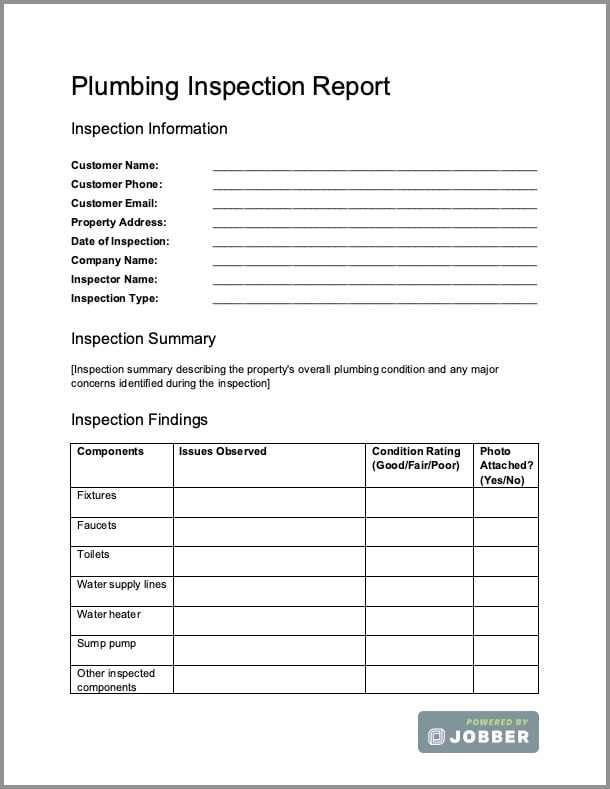
- Client and property details such as the customer’s name, contact information, property address, inspection date, technician, and inspection type
- Inspection summary describing the property’s overall plumbing condition and any major concerns identified during the inspection
- Inspection findings by system, with separate sections for fixtures, faucets, toilets, water supply lines, water heater, sump pump, and other inspected components
- Condition ratings such as Good, Fair, Poor, or Pass/Fail for each inspected item
- Photos of damaged components, code concerns, leaks, corrosion, or other issues, with captions that explain what each image shows
- Recommendations for repairs, replacements, and maintenance tasks, arranged in order of priority
- Code or safety observations about visible issues that may need correction or deeper investigation
- Additional comments or observations that don’t fit into the standard inspection categories
- Signatures for both the technician and the customer, confirming the inspection was completed and the report was received
How to write a plumbing inspection report
To write your professional plumbing inspection report, start by downloading our free template or creating your own. Then follow the steps below:
- Document client and property details, including their name, contact information, and address. Make sure to include the inspection date and information about your business, such as your plumbing company name, inspector name, and inspection type.
- Write an inspection summary that describes the property’s overall condition and any major concerns identified during the inspection.
- Share detailed findings from your inspection, including any issues observed for specific system components (e.g., fixtures, faucets, toilets, supply lines). For each finding, include a condition rating and photos.
- List replacement and repair recommendations, arranged in order of priority. This tells the client what they need to do—and what should happen first.
- Note any code or safety observations that may need correction or deeper investigation. You can also leave any additional comments that don’t fit into the standard inspection categories.
- Add your signature and get the customer to sign the report, too. This indicates that the inspection is complete, and both the business and the customer agree on your findings.
Tips for writing a plumbing inspection report
Follow these best practices when you’re creating your plumbing inspection report and preparing to send it to the customer:
- Use plain language that customers can understand. For example, instead of just stating “shut-off valve is corroded,” explain what you observed, why it matters, and whether the valve needs to be repaired or replaced.
- Include photos as visual evidence of leaks, corrosion, damaged fixtures, improper installations, or other concerns. Add short captions to provide context for each image.
- Use severity ratings (Low, Medium, High, Pass/Fail) to indicate how urgently an issue should be addressed. Severity ratings help customers prioritize repairs and make it easier for technicians to explain which work should be scheduled first.
- Leave space for technician and customer signatures. While these signatures don’t replace a formal contract or estimate, they show that the inspection was completed and you reviewed the report with the customer.
- List next steps for the customer to take. Whenever possible, finish the report with clear action items for the customer, like recommended repairs, maintenance work, additional testing, or a quote for the proposed work.
Residential vs. commercial plumbing inspection reports
Residential and commercial plumbing inspection reports often follow the same basic format. They include findings, system condition ratings, photos, and recommendations to explain what the inspection uncovered and how to fix any problems.
While the structure is very similar, the inspection scope, level of detail, and language included in residential vs. commercial plumbing inspection reports can vary. See our breakdown below and find out how to write your report, based on who it’s for:
| Differences | Residential report | Commercial report |
|---|---|---|
| Who the report is for | Homeowners or homebuyers | Facility managers, maintenance teams, contractors, or property owners |
| What types of systems are being inspected | Smaller home plumbing systems | Large, complex plumbing systems for offices, retail buildings, apartment complexes, industrial facilities, or institutions |
| Explanation of identified issues | May simply identify areas of concern without explaining why the issue matters | May reference applicable plumbing codes, regulations, standards, or maintenance policies for compliance |
| Use of technical language | Explain findings in language that’s easy for homeowners to understand | Use technical terminology because readers are familiar with building systems |
How Jobber helps plumbers document inspections
Want to standardize your inspections, complete and send reports from the field, and follow up with customers—all without having to switch between multiple tools? Plumbing software like Jobber makes it easy to:
- Create custom checklists to guide technicians through each inspection with consistent fields, tasks, condition ratings, notes, and photo attachments. By completing forms digitally, every technician follows the same reporting process.
- Complete inspection reports on site using Jobber’s mobile app on the technician’s phone or tablet. Photos, notes, and customer details are saved with the job, reducing paperwork and the risk of forgetting to file the report.
- Email your report to the customer once the inspection is complete. Jobber’s field service CRM lets you send documents fast and keep all your customer communications in one place.
- Attach a quote or invoice to your report. If you recommend follow-up repairs, you can create and send a quote based on your findings. Once the quote is approved, schedule the work, dispatch your crew, complete the job, turn it into an invoice with one click, and accept payments—all in one place.
Frequently Asked Questions
-
A plumbing inspection report is a document that records the condition of a property’s plumbing system after an inspection. It summarizes the components you inspected, documents any defects or safety concerns, includes supporting photos and notes, and recommends repairs or maintenance when needed.
-
A plumbing inspection checklist is a tool technicians use while performing the inspection. It lists the systems and components that you need to evaluate. With a complete plumbing inspection form in hand, you won’t miss a single detail.
A plumbing inspection report, on the other hand, is the finished document you send to the customer. It summarizes the inspection results, describes any issues, includes photos that prove your findings, and outlines recommended repairs or maintenance. -
A plumbing inspection report template helps you produce consistent, professional reports for every inspection. It saves time, captures important information, supports clear communication with customers, and creates documentation that you can reference later if a customer has any questions or concerns.
-
While reports can vary depending on the type of plumbing system and the customer’s needs, plumbing inspection reports commonly include:
• Customer and property information
• Inspection summary (as an overview of the full report)
• Inspection findings organized by plumbing system
• Condition ratings (e.g., Good, Fair, Poor, Pass/Fail)
• Photos of visible issues with notes
• Repair, replacement, and maintenance recommendations
• Code or safety observations
• Additional comments or notes
• Customer and technician signatures -
Residential plumbing inspections commonly range from $100 to $500, while more comprehensive inspections or commercial properties could cost up to $1,375. The cost of a plumbing inspection varies depending on the property’s size, location, and the purpose of the inspection. Costs may also be higher if the inspection requires specialty tools or procedures.
-
Most homes should get a professional plumbing inspection about once a year. Annual inspections can identify leaks, corrosion, failing fixtures, water heater issues, and other problems before they become expensive repairs. Commercial properties or older buildings may require more frequent inspections depending on use, local regulations, and maintenance needs.