Free Auto Detailing Invoice Template
Make a professional car detailing invoice without building it from scratch with our free auto detailing template generator. Add your business and client details, list your detailing packages and add-ons, and set your totals and payment terms. Then download it and send it to your client.

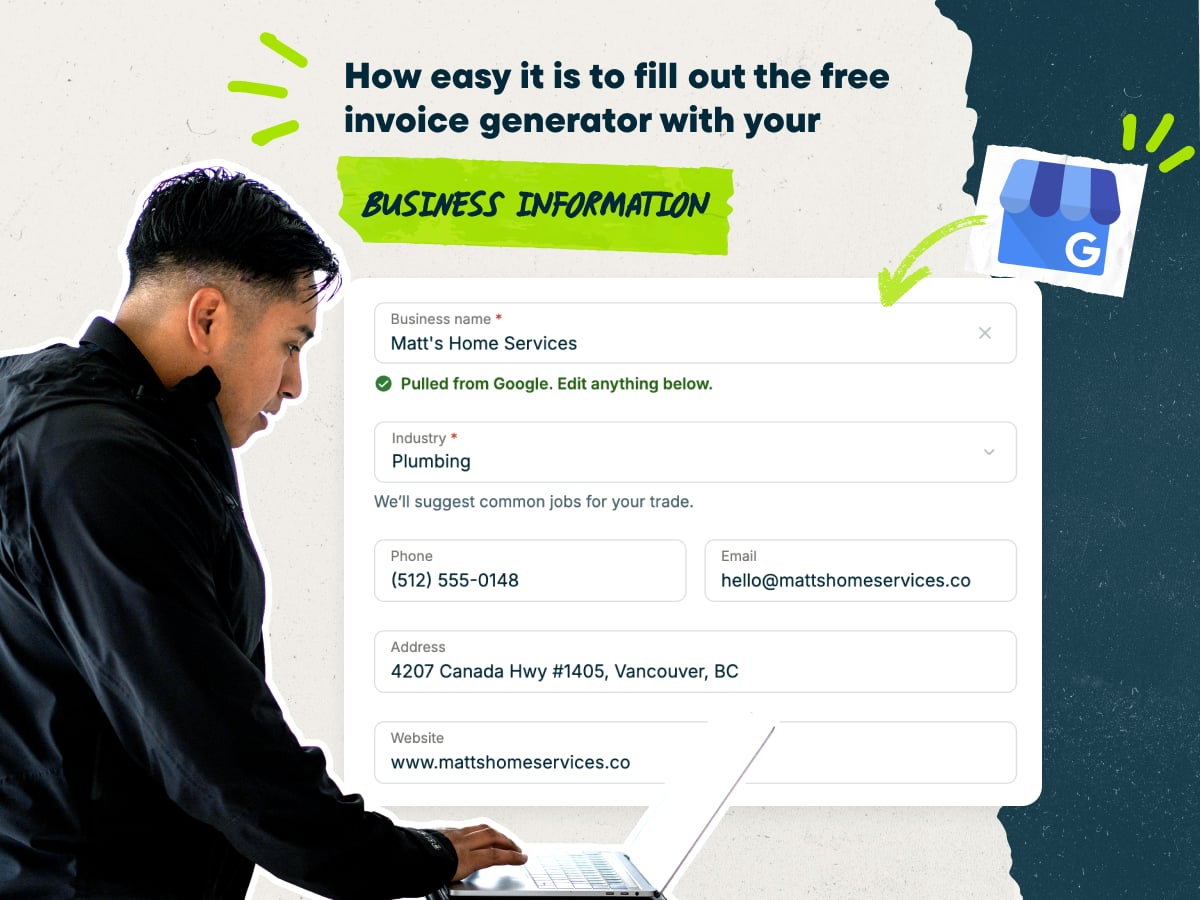
Create an auto detailing invoice fast with our free invoice generator
- Type in your business name and the generator fills in your contact details.
- Add custom line items for your packages and add-ons, or start with pre-loaded line items and typical pricing.
- Add your client’s name and contact info, plus the vehicle’s year, make, and model.
- Download your invoice as a PDF, or save it in Jobber to send and track later.
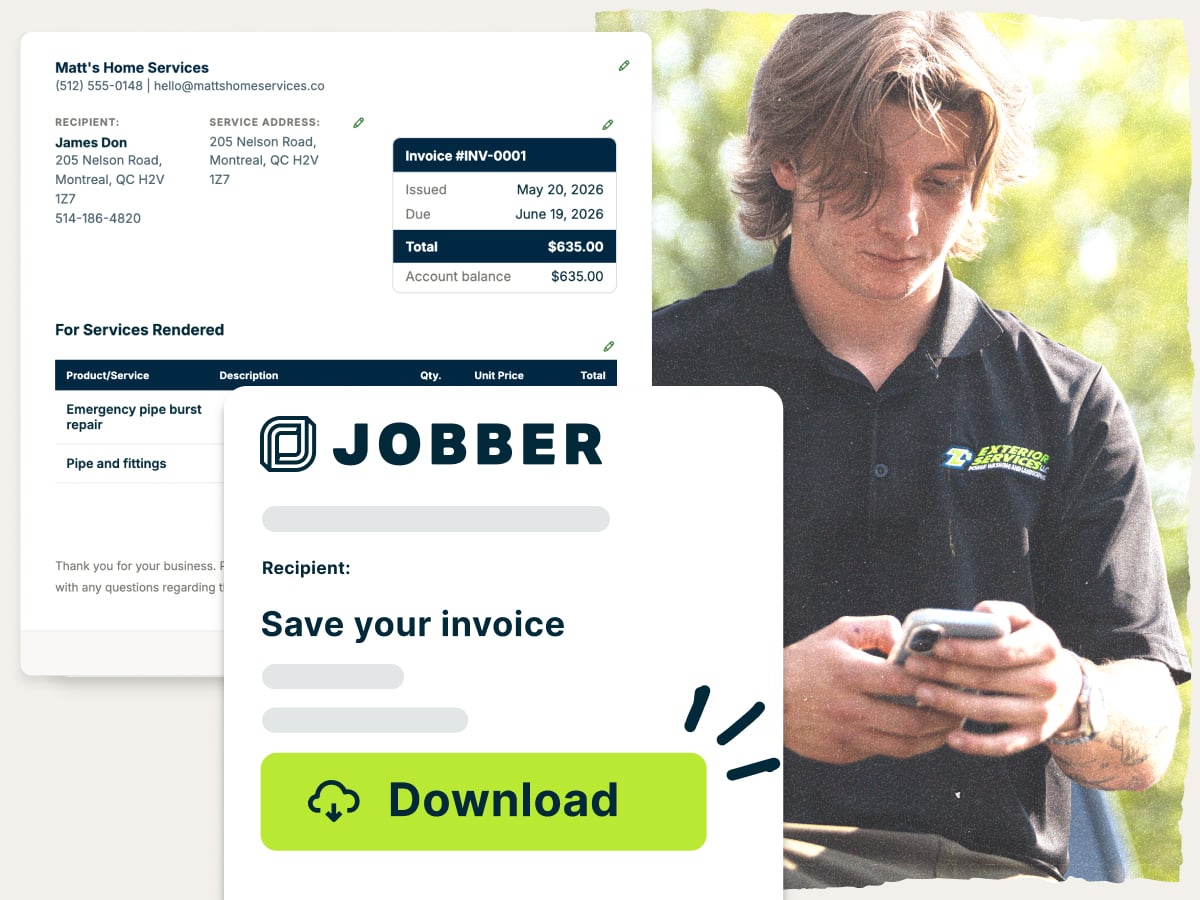
Why use Jobber’s free invoice generator?
- Ready to customize. Edit services, prices, and terms to match how you charge, whether that’s by package, vehicle size, or the hour.
- Set up with the essentials. Every invoice has the parts clients expect to see, including line items, totals, and payment terms.
- Free to download. Get a clean PDF invoice at no cost and send it to your client as soon as the detail is done.
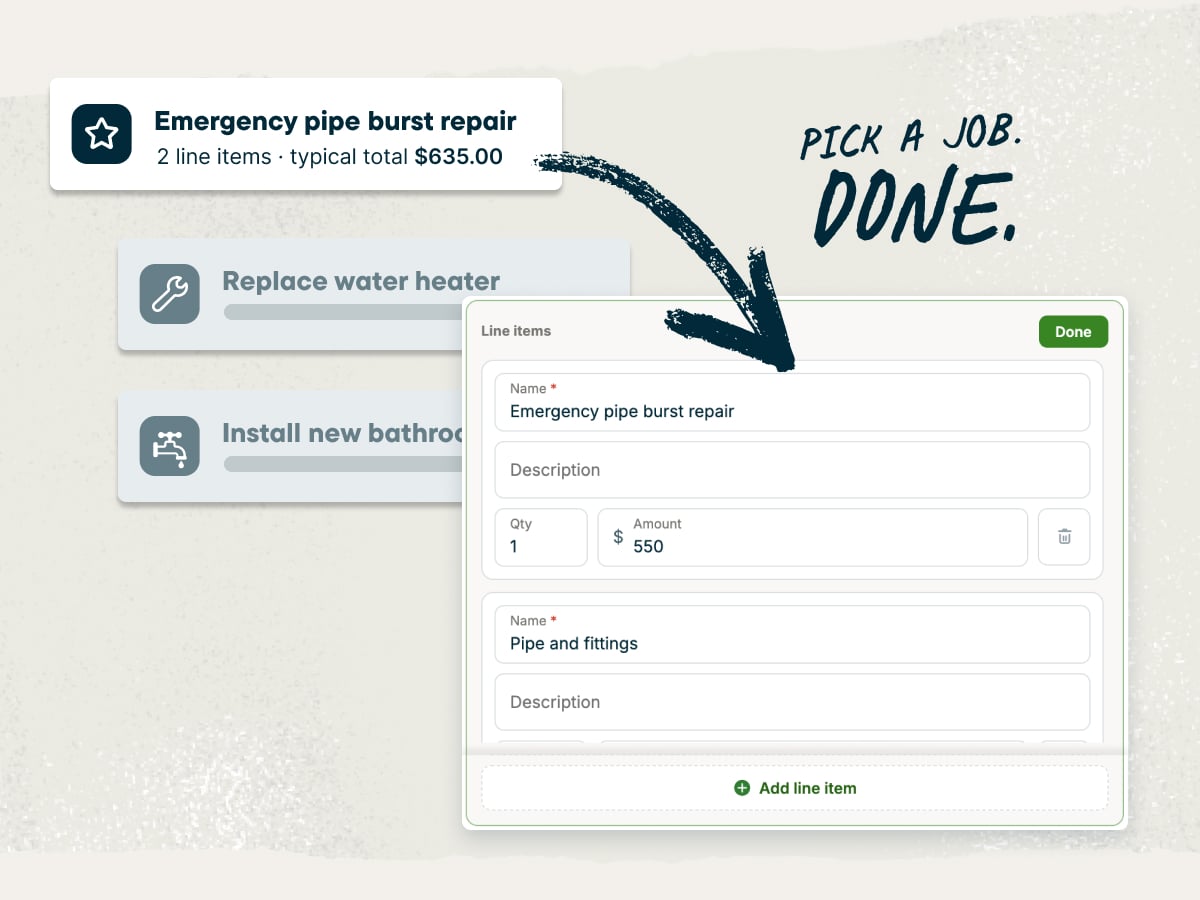
An invoice generator built for auto detailing businesses
Whether you run a mobile detailing rig or a shop with bays, your invoices should match how you sell. List packages like interior, exterior, or full detail, then put extras like clay bar or odor removal on their own lines. Price by vehicle size, add your mobile service fee, and show the total before you hand back the keys.
Explore more Jobber free tools for your auto detailing business
Over 400,000 home service pros in 50+ industries trust Jobber
“Before Jobber, we were using multiple platforms to communicate with our clients and with our teams…once we found Jobber, we had the opportunity to do all of those things all in one place. It was just extremely helpful to just have one platform to do everything.”

How to create an auto detailing invoice
You can build an invoice yourself in Word, Google Docs, Excel, or Google Sheets. But setting up the layout takes time you could spend on the next car. An auto detailing invoice generator gives you a prebuilt template, so you only fill in the job details.
Whichever tool you use, these seven tips help you write an invoice that’s clear and easy to pay:
- Start with your business info. Add your business name, logo, phone, email, and website so clients know who to pay and how to book again.
- Add client and vehicle details. Include the client’s name and contact info, plus vehicle year, make, model, color, and plate or vehicle identification number (VIN).
- List packages and add-ons on separate lines. Give the main package one line and each add-on its own, like pet hair removal.
- Show size and condition pricing. Name the vehicle size on the line item if an SUV costs more than a sedan. Add a short reason for any condition surcharge, like heavy stains or mold.
- Add your mobile travel fee. If you go to the client, list your travel or service-area fee on its own line. It helps cover fuel, vehicle upkeep, and commercial auto insurance.
- Apply deposits. For ceramic coating or paint correction, show the deposit you collected and subtract it from the balance due.
- Spell out payment terms. State when payment is due, which payment methods you accept, and any late fee. Add an optional tip line for clients who like to tip.
What is the auto detailing invoice generator best for?
This generator is for mobile detailers, shop owners, and small teams who want professional invoices without paying for software yet. It’s a good fit if you’re just starting out or invoice a few clients at a time.
Use this auto detailing invoice generator to:
- Bill one-time details: Send a clean invoice after a single interior, exterior, or full detail.
- Bill maintenance plans and recurring washes: Reuse the same line items so regular clients know what to expect.
- Invoice fleet or dealership work: List each vehicle by plate or VIN so fleet managers can match charges.
- Collect deposits on ceramic coating: Bill the deposit when the client books, then apply it to the final invoice.
- Itemize add-ons: Show each extra on its own line so clients see the value of everything they added.
When your maintenance clients start to stack up, Jobber’s scheduling tools keep recurring washes on the calendar and ready to invoice.
What should an auto detailing invoice include?
Include these details so clients know what they’re paying for and how to pay:
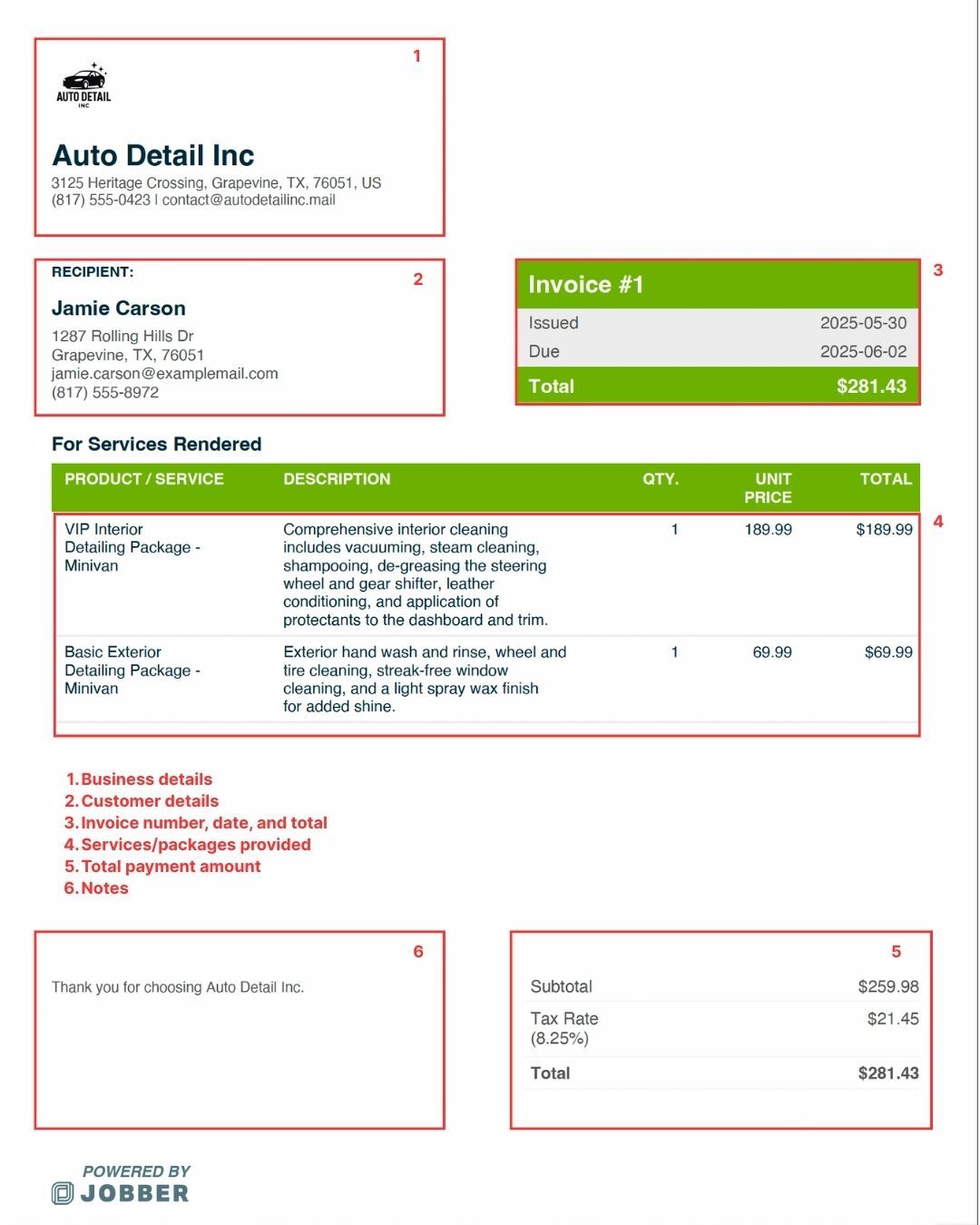
- Your business details: Business name, logo, address, phone number, and email.
- Client details: Name, contact information, and billing address. List the service address separately if it’s different.
- Invoice number and dates: A unique invoice number, the invoice date, service date, and payment due date.
- Vehicle details: Year, make, model, color, and license plate or VIN to identify the vehicle.
- Itemized services and pricing: List each detailing package and add-on with its description and price. For hourly work, include your rate and billable hours.
- Products and fees: Include any separate charges for specialty products, mobile service, or extra cleaning for pet hair, stains, or heavy dirt.
- Total and balance due: Show the subtotal, applicable sales tax, extra fees, total, payments or deposits received, and remaining balance.
- Payment instructions: List accepted payment methods and any late fees. Use these invoice payment terms examples for guidance.
- Service notes: Add relevant condition notes, links to before-and-after photos, and aftercare or warranty details for services like ceramic coatings.
Free auto detailing invoice generator vs. Jobber invoicing software
This free invoice generator is a quick way to make a professional invoice for one job. You fill it in, download the PDF, and send it yourself.
Jobber’s auto detailing software handles more of the work for you. It saves client and job info, turns completed jobs into invoices, and sends them by text or email. Clients can pay online, and automated reminders follow up on unpaid invoices.

and payment history organized in one place for easier access.
and pricing already recorded on the completed job.
making it easy for them to review and pay.
it is time to invoice after a visit, at job completion,
or on a recurring schedule.
and send them to customers in a few clicks.
remind customers when an invoice remains unpaid.
so they can pay directly from their digital invoice.
while working from the office, on the road, or at a job site.
Frequently asked questions about auto detailing invoices
-
It’s a free online tool that builds a professional invoice for you. Enter your business details, client info, and detailing services, then download a ready-to-send PDF.
-
Yes. Edit line items, prices, descriptions, and payment terms to match your packages, add-ons, and size-based pricing.
-
Yes. When your invoice is ready, download it as a PDF to print, email, or text to your client.
-
Yes. The auto detailing invoice generator is free to use, and you can download your invoices at no cost.
-
Open the auto detailing invoice generator and enter your business name, then add your client and vehicle details. List your package and add-ons, plus any fees, sales tax, and deposits. Set your payment terms and download the PDF.
-
A clean invoice puts your business info at the top, followed by client and vehicle details, itemized services, totals, and payment terms. The sample auto detailing invoice included shows a filled-in example.
-
People often use the two words to mean the same thing. An invoice is a formal request for payment with itemized services, terms, and a due date. A bill usually asks for payment on the spot, like a restaurant check.
-
An invoice asks for payment, and a receipt confirms you’ve been paid. Send the invoice when the job’s done, then send a receipt once your client pays. Make one in minutes with Jobber’s free Receipt Generator.
-
Download the PDF and email it, text it, or print it and hand it over at pickup. With Jobber, you can send invoices by text or email and keep every client message in one place with customer communication tools.
-
Send it as soon as the detail is done, while the results are fresh. For ceramic coating or paint correction, send a deposit invoice when the client books.
-
For most one-time details, ask for payment when the job’s done. Jobber’s credit card processing lets you take a card payment on site, right from your phone.
For fleet or dealership accounts, you might offer terms like net 30, which gives the client 30 days to pay. Shorter terms help you improve cash flow. -
It depends on where you work. Sales tax rules for detailing services and product sales vary by state and local area, and you may need a sales tax permit. Check with your state’s tax agency or a tax professional, then add the right rate as its own line on your invoice.
-
Auto detailing invoicing software like Jobber helps you create, send, and track invoices from your computer or phone. With Jobber, you can:
• Turn detailing packages and add-ons into professional invoices with invoicing software built for service work.
• Send multiple invoices at once in just a couple of clicks with batch invoicing.
• Text or email automatic reminders for unpaid invoices with customer communication tools.
• Take card payments online or in person with credit card processing.
• Let clients pay over time for higher-priced services, like ceramic coatings, with consumer financing.
• Plan recurring detailing appointments and one-time jobs with scheduling.
Over 400,000 home service pros in 50+ industries trust Jobber
“If you can make a quote on the spot, you’re 10 steps ahead of the competition.”
Jobber changed the game because it’s right at people’s fingertips.
