Free Pest Control Invoice Template
Jobber’s free pest control invoice template generator helps you bill for treatments, recurring visits, and products applied without starting from a blank page. Add your details, pick your services, and download a professional PDF that’s ready to send. Your clients get a clear invoice, and you get paid for the work you did.

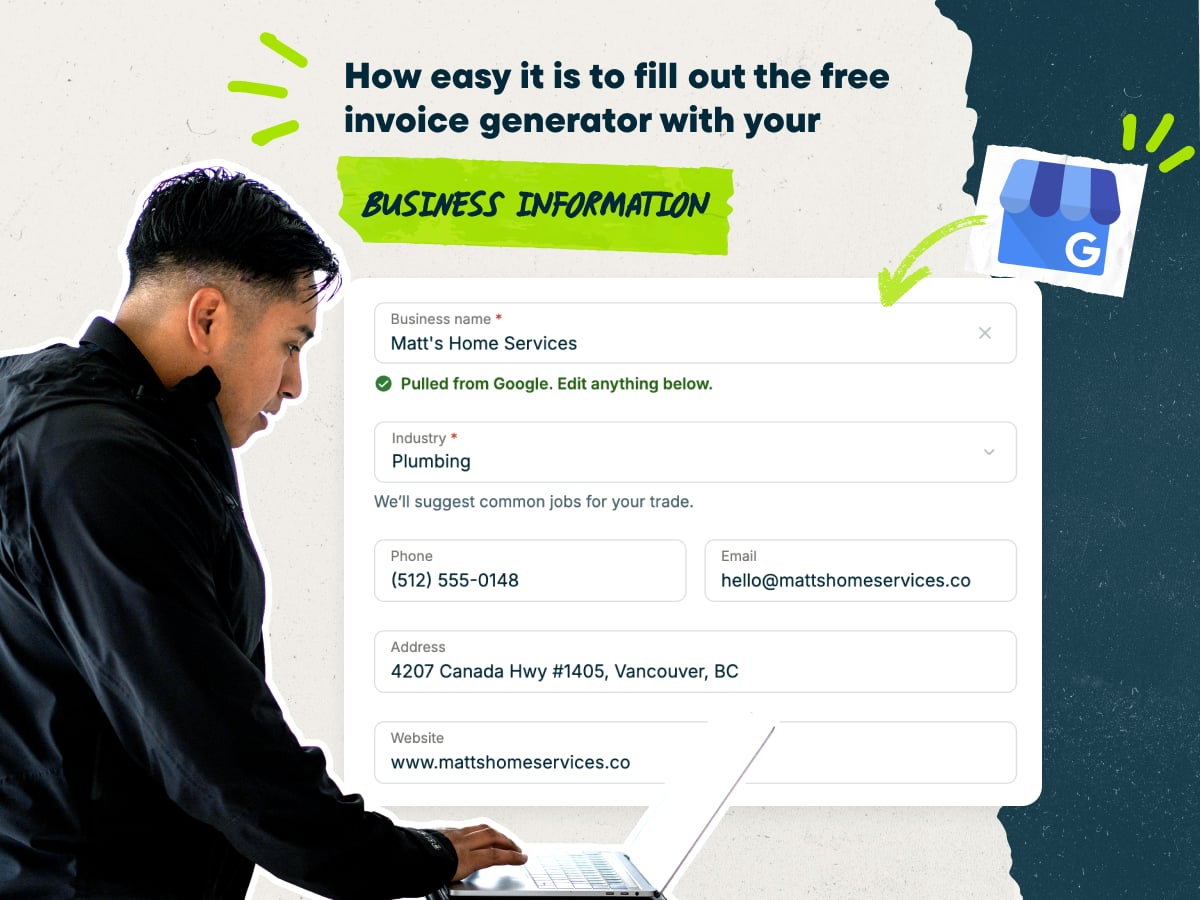
Create a pest control invoice fast with our free invoice template
- Enter your business name to auto-fill your contact details
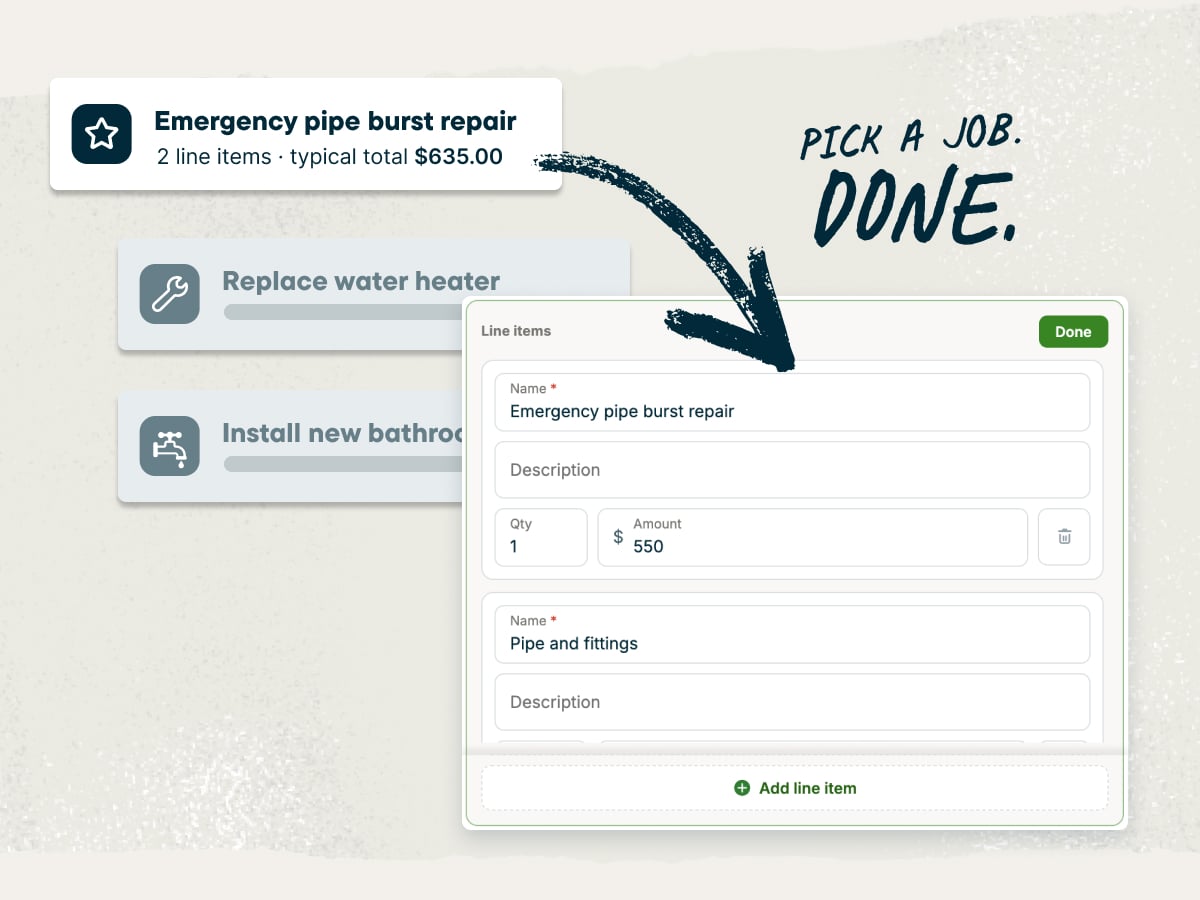
- Customize your line items or pick pre-loaded pest control services with typical pricing
- Add your client’s contact details and the service address
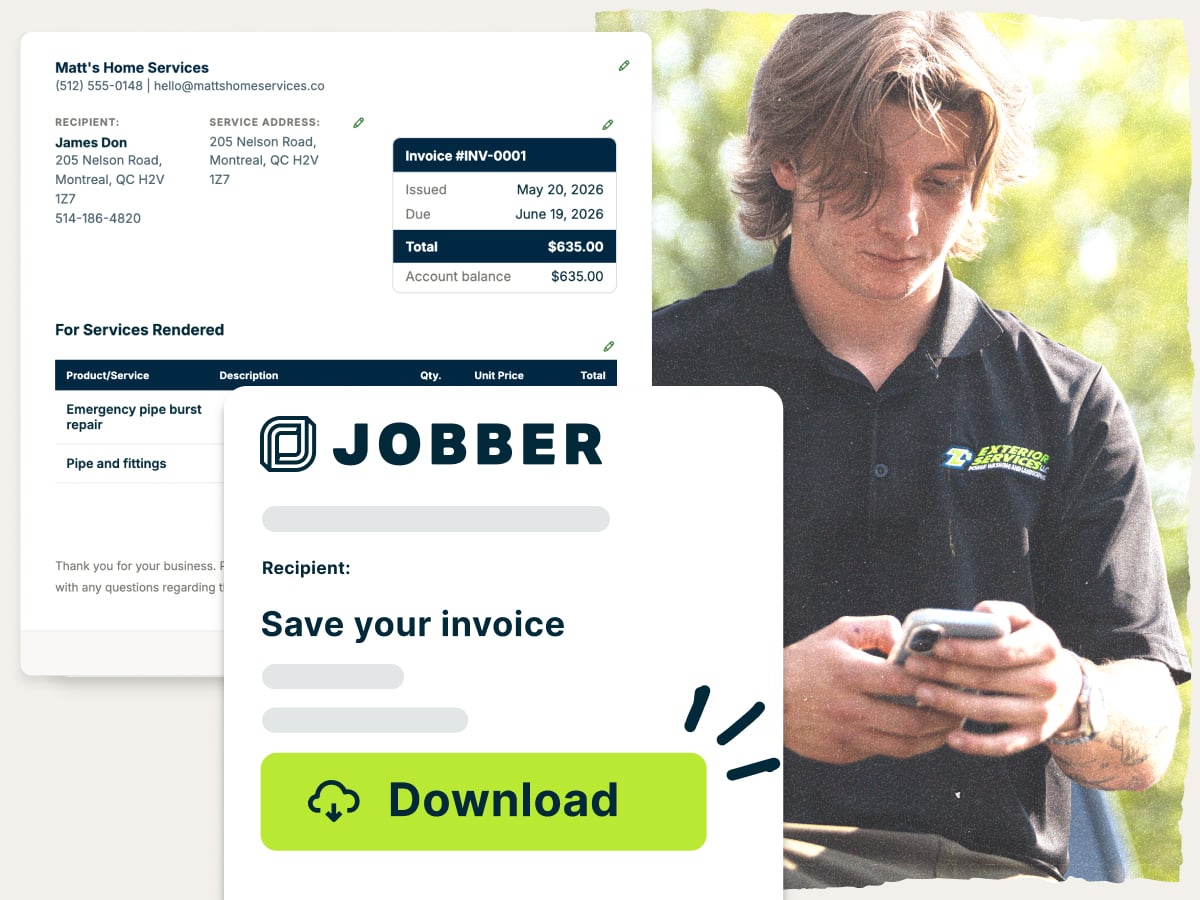
- Download your invoice as a PDF or save it in Jobber to send later
Why use Jobber’s free pest control invoice template?
- Ready to customize: Add your logo, your services, and your rates. Change line items for each job, from a one-time ant treatment to a quarterly service plan
- Set up with the essentials: Client details, line items, taxes, and payment terms are already built in. Fill in the job details without spending extra time on formatting
- Free to download: Download your pest control invoice as a PDF at no cost. Email it, print it, or hand it to your client at the door
An invoice template built for pest control businesses
Pest control billing has its own details, and this template makes room for them. List an initial service and the follow-up visits in a monthly, quarterly, or seasonal program on their own lines. Add the treatments you performed and the chemicals you applied so your client knows exactly what they’re paying for.
Explore more Jobber free tools for your pest control business
Get the rest of your paperwork and pricing sorted with more free tools
Over 400,000 home service pros in 50+ industries trust Jobber
“Jobber has a design that worked, especially just for our pest control company. From quoting, to invoicing, to contacting customers, to text messaging.”

How to create a pest control invoice
You can build an invoice from scratch in Microsoft Word, Google Docs, Excel, or Google Sheets. That means setting up the layout, the tables, and the math yourself. This pest control invoice template handles the layout, so you only have to fill in the job details.
Whatever way you write an invoice, these tips keep it clear and easy for the client to pay:
- Separate the initial service from recurring visits. Put the first treatment and each follow-up visit on their own lines. Clients on a plan can see what each visit costs.
- Note the target pest and treated areas. Write down what you treated for and where, such as the interior, exterior perimeter, crawlspace, or attic. Being specific answers questions before your client asks them.
- Record the products you applied and your license number. This keeps your records in one place. It also shows clients you’re licensed and careful about important details.
- Add prep and re-entry notes. Tell clients how long to stay out of treated areas and what to do before the next visit. A short note saves you a callback later.
- Set payment terms up front. State the due date, the payment methods you accept, and any late fees that apply to delayed payments. Clear terms help you get paid on time.
- Show the price breakdown. List labor, materials, and any add-ons separately. Clients trust a total they can follow.
Need to create lots of invoices, fast? Recurring treatment plans mean you send the same types of invoices again and again. Jobber turns completed visits into invoices so you can send invoices faster and spend less time on paperwork.
What is the pest control invoice template best for?
The template works for any pest control job you need to bill, from a single visit to a year-round contract. Use it when you want a professional invoice without setting up software first.
Here’s where the pest control invoice template fits best:
- One-time treatments: Bill for a single visit, like a wasp nest removal or a bed bug treatment.
- Recurring service plans: Invoice monthly, quarterly, or seasonal visits with the same services on each invoice.
- Termite and rodent jobs: Break out inspections, treatments, exclusion work, and bait stations as separate line items.
- Commercial accounts: Bill restaurants, offices, and property managers for the scheduled visits outlined in their service contract.
- Re-treatments and add-ons: Show a covered re-service at no charge, or bill for extra work like a mosquito treatment.
What should be included in a pest control invoice?
A complete pest control invoice tells your client who did the work, what you treated for, what chemicals or methods you used, and how much the client owes. Missing details lead to questions and slow payments.
Here’s what to include on an invoice for pest control services:
- Invoice number: Give each invoice a unique invoice number so you and your client can track it.
- Issue date and due date: Show when you sent the invoice and when payment is due.
- Company information: Add your business name, address, phone number, email, and pest control license number.
- Client information: Include the client’s name and contact details. List the service address separately if it’s different from the billing address.
- Service details: Note the target pest, the areas treated, the visit date, and the technician who did the work.
- Products applied: List each product name, its Environmental Protection Agency (EPA) registration number from the label, and the amount used.
- Line items: List each service, such as an initial inspection, interior and exterior perimeter treatment, quarterly service visit, bait station installation, rodent exclusion, termite treatment, or re-service.
- Itemized costs: Break out labor costs and materials, including chemicals, so clients can see where the total comes from.
- Payments received and balance: Show any deposit or payment already charged to the card on file, then the remaining balance.
- Subtotal, taxes, discounts, and fees: Add the subtotal, then any sales tax, discounts, and fees.
- Total due: Show the final amount your client owes.
- Payment terms and service guarantee: State your payment terms and any service guarantee, such as free re-treatments between scheduled visits.
- Thank-you note: End with a short thank-you note to build a relationship that brings repeat work.
Commercial and contract accounts need a few more details. Add the contract or purchase order (PO) number, the site name, and the visit schedule from your pest control contracts.
Free pest control invoice template vs. Jobber invoicing software
The free pest control invoice template is a quick way to bill for a single job. Add your business details, list your treatments, and download a PDF to send a client. This process works well when you only send a few invoices a month.
Once you’re running recurring routes with multiple jobs every week, invoicing takes more of your evenings. Jobber invoicing software saves your client and job details, turns finished visits into invoices, helps you collect payment online, and automatically follows up on outstanding invoices. That way, you spend less time chasing unpaid invoices and more time in the field.

and payment history organized in one place for easier access.
and pricing already recorded on the completed visit.
making it easy for them to review and pay.
it is time to invoice at job completion or on a recurring schedule.
and send them to customers in a few clicks.
remind customers when an invoice remains unpaid.
so they can pay directly from their digital invoice.
while working from the office, on the road, or at a job site.
Frequently asked questions about pest control invoices
-
A pest control invoice template is a ready-made invoice layout built for pest control work. Fill in your business details, your client’s details, and the services you performed. Jobber’s template handles the formatting and adds up the total amount due, then gives you a PDF to send.
-
A pest control invoice should include your business and license details, the client and service address, and what you treated. It should also list the products applied, itemized costs, the total due, and your payment terms. The full checklist is in the “What should be included in a pest control invoice?” section above.
-
Yes. You can add your logo, edit line items, set your own prices, and change payment terms. Pick from pre-loaded pest control services or write your own for each job. It’s also a good idea to include a personalized thank-you note to the client.
-
Yes. Once your invoice is ready, download it as a PDF. You can email it, print it, or save it in Jobber to send later.
-
Yes. The pest control invoice template is free to use and free to download. You only need an account if you want to save your invoice in Jobber.
-
Microsoft Word, Excel, and Google Sheets offer basic invoice layouts in their template galleries. Google Docs also works if you build the table yourself. However, you’ll still need to add pest control services, totals, and payment terms by hand.
-
A pest control invoice shows your business details at the top, then the client, the service address, and the services performed. Here’s an example of a pest control invoice made with Jobber’s template:

-
Bill the initial service on its own invoice, then send an invoice for each recurring visit on a set schedule. To set up recurring billing in Jobber, follow these steps:
1. Create a recurring job for the client’s treatment plan, such as quarterly visits.
2. Choose whether to invoice after each visit or on a monthly basis.
3. Save the client’s card on file with their permission.
4. Turn on automatic billing so Jobber charges the saved card after each visit.
5. Check your invoice list to confirm each visit was billed and paid. -
Price each service based on what it costs you to deliver, plus the profit you need. Use the service price calculator to work out your rates.
Your price should account for these factors:
• Labor: Include the time you and your technicians spend on site.
• Materials and chemicals: Add the cost of products, bait stations, and traps, as well as any markup.
• Travel: Factor in drive time and fuel to reach the property.
• Property size: Adjust your price for the square footage you treat.
• Pest type: Charge more for work that takes extra time or products, like termites or bed bugs. -
An invoice and a bill are often the same document. An invoice is the document you send as the business asking for payment. A bill is usually how your client thinks of it, as something they need to pay.
-
You can send a pest control invoice in a few ways:
• Email: Attach the PDF to your customer service follow-up email and send it to your client right after the visit.
• Text message: Text the invoice or a payment link so your client can view it on their phone.
• In person: Print the invoice and hand it to your client before you leave the property.
• Mail: Mail a printed copy to clients who prefer paper records if you don’t need them to pay the invoice on the same day. -
Send your invoice as soon as the job is done, ideally before you leave the property. For recurring plans, invoice after each visit or on a set monthly date. Whether you should invoice before or after a job depends on the size and length of your pest control contract.
-
Ask clients to pay within two weeks, and no more than net 30. Shorter terms keep money coming in and improve your cash flow. For large jobs like termite treatments, you can also offer financing so clients can pay over time instead of all at once.
-
Pest control software like Jobber creates, sends, and tracks invoices for you. It turns completed visits into invoices, bills cards on file, includes chemical tracking to record the products you apply, and sends payment reminders. See how Jobber invoicing software helps you get paid without chasing clients.
Over 400,000 home service pros in 50+ industries trust Jobber
“If you can make a quote on the spot, you’re 10 steps ahead of the competition.”
Jobber changed the game because it’s right at people’s fingertips.
