
Key takeaways:
Here’s what you need to know when choosing the best software for remodeling contractors in 2026.
- Start with your workflow needs. Identify your top challenges—like design, estimating, project coordination, client communication, or business administration—to help focus your software search on solutions that address your real pain points.
- Choose software by project type and business size. All-in-one tools like Jobber are great for small and growing remodelers who want to run their business smoothly. Larger or design-oriented firms may need specialized platforms for project management or advanced 3D visualization.
- Focus on features you’ll really use. Prioritize software that delivers on core needs such as lead management, quoting, scheduling, invoicing, payments, and mobile accessibility, rather than getting distracted by an overwhelming feature list.
- Test with a real project. Use free trials or demos to run a real project through your top choice, ensuring it fits your business’s daily workflow and helps eliminate bottlenecks.
- Consider integration and total cost. Factor in pricing tiers, user limits, integrations, and exit options, and remember you can combine different tools (e.g., design, business operations, and accounting) as your needs grow.
Stay ahead in the industry with more tips and resources. Sign up for the Jobber Newsletter.
Remodeling projects have a lot of moving parts—from initial designs and estimates to scheduling crews, communicating with homeowners, managing changes, and collecting payment.
The right remodeling contractor software can bring these workflows together, but not every tool can do the same job. Some platforms focus on floor plans and 3D rendering. Others are designed for project management or day-to-day business operations.
Keep reading to discover the best software for remodeling contractors. We’ll help you find the right fit for your project type, team size, and workflow.
Top software for remodelers:
Best remodeling contractor software at a glance
The right remodeling software depends on whether you need to run the business, manage complex projects, or handle design and visualization.
The table below highlights where each tool fits best. We also list mobile capabilities, current pricing, and limitations to consider before buying.
| Disclaimer: Software prices are subject to change after the publication of this article. |
| Software | Best for | Mobile app | Pricing | Limitation |
|---|---|---|---|---|
| Jobber | Running or growing your remodeling business | Yes | Starting at $29 per user per month | Not designed for CAD, BIM, or advanced 3D design |
| Chief Architect | Remodeling design | No | $229 per month or $1,995 per year billed annually | Primarily design software with limited business management capabilities |
| Houzz Pro | Design-oriented remodeling workflow | Yes | Must request pricing | Higher cost and some advanced features require the Custom plan |
| Plan7Architect | Renovation planning option to evaluate | No | One-time price starting at $99.99 | No CRM, scheduling, or payment features |
| Buildertrend | Managing complex remodeling projects | Yes | Must request pricing | Can be more complex and costly for smaller remodelers |
| Buildxact | Estimating and takeoffs | Yes (higher tier only) | $199 per month for unlimited users | Advanced estimating and project features can require higher-tier plans |
| Buildern | Project management and business operations | Yes | Starting at $250 per month for 2 users | May be more software than a solo or very small remodeler needs |
What type of remodeling software do you need?
The best remodeling software depends on what you actually need the software to manage.
A design-build firm may need detailed floor plans and 3D renderings. On the other hand, a growing remodeling contractor may get more value from software that handles estimates, scheduling, client communication, and payments.
Before comparing individual tools, it helps to separate remodeling software into four main categories.
Design and 3D visualization software
Contractor design software helps you turn ideas into plans that homeowners can understand and approve.
These tools typically support floor plans, layouts, material selections, 3D rendering, and other visualization features. This makes it easier to show what a finished kitchen, bathroom, addition, or whole-home renovation could look like.
However, design software isn’t necessarily built to run the business. A tool can be excellent at creating plans and renderings without offering lead management, scheduling, invoicing, or payment processing.
If you need both design and business management capabilities, you may need to pair an interior design platform with a separate remodeling contractor software solution.
Remodeling project management software
Construction project management software is designed to organize longer, more complex remodeling projects. It can help you:
- Assign tasks
- Manage schedules
- Store project files
- Track changes
- Provide project visibility
A remodel may run for weeks or months and involve many connected tasks, subcontractors, approvals, materials, and change orders.
However, this is different from the scheduling and dispatch needs of a typical service contractor. Service businesses often need to coordinate shorter jobs and optimize daily schedules. The right tool should match the way your projects actually run.
All-in-one remodeling business software
If your biggest challenge is running the business—not designing the project—you may benefit more from an all-in-one remodeling software.
These tools connect CRM and lead management with estimating, professional proposals, scheduling, client communication, invoicing, and payments.
For small and growing remodelers, Jobber is worth considering. It focuses on connecting the customer and business workflow, helping you manage work from the initial lead and quote through scheduling, client updates, invoicing, and payment.
Point solutions and integrations
You don’t necessarily need one platform to handle every part of a remodeling business. Many contractors build an integrated software stack around the tools they already prefer for accounting, job costing, takeoffs, photo documentation, e-signatures, or design.
For example, a remodeler might use:
- Specialized design software for floor plans and 3D rendering
- Accounting software for financial reporting
- An all-in-one business platform for leads, quotes, scheduling, client communication, and payments
This approach can give you stronger tools for specialized workflows without forcing one platform to do everything. However, the trade-off is that more tools can mean more subscriptions, duplicate data entry, and additional integrations to maintain.
If your business is small and your needs are straightforward, it may be simplest to use one platform. As your projects and team become more complex, a connected stack of specialized tools may make more sense.
READ MORE: How to start a home remodeling business
How we chose the best software for remodeling contractors
Remodeling software can look impressive on paper, but the best option depends on how well it fits the way your business actually works.
We evaluated each platform based on the workflows that matter most to residential remodelers. This includes everything from planning and client communication to estimating, scheduling, change management, and getting paid.
Look for construction software that offers these features and benefits:
- Fit for residential remodeling workflows: We looked at how well each tool supports common remodeling projects, including kitchens, bathrooms, home additions, and whole-home renovations. A platform designed for short service calls may not be the right fit for a remodel that runs for several months and involves multiple trades, approvals, and project milestones.
- Ease of use in the field and office: Software needs to work for the people actually using it. We considered mobile access, ease of navigation, learning curve, and how practical each platform is for owners, office staff, employees, and subcontractors working across the job site and office.
- Client communication and visibility: Remodeling projects involve frequent homeowner questions, decisions, approvals, and changes. We looked at features that help contractors keep clients informed, share updates and documents, manage approvals, and maintain clear expectations throughout a longer project.
- Estimating, change management, and getting paid: A remodeling project can change significantly between the initial estimate and final completion. We considered how each platform handles estimates and proposals, change tracking, invoicing, and payments, as well as how easily information moves from the initial quote through to the final invoice.
- Integrations, support, and total cost: We considered how each platform fits into a contractor’s software stack. This includes accounting integrations, onboarding, customer support, user fees, add-ons, contracts, and data export options.
Note: These rankings are based on use-case fit for remodeling contractors, not affiliate payouts. There isn’t one best software for every remodeler. Instead, our goal is to highlight which tools make the most sense for different project types, business sizes, and workflows.
The best remodeling contractor software compared
1. Jobber: Best for running a small or growing remodeling business
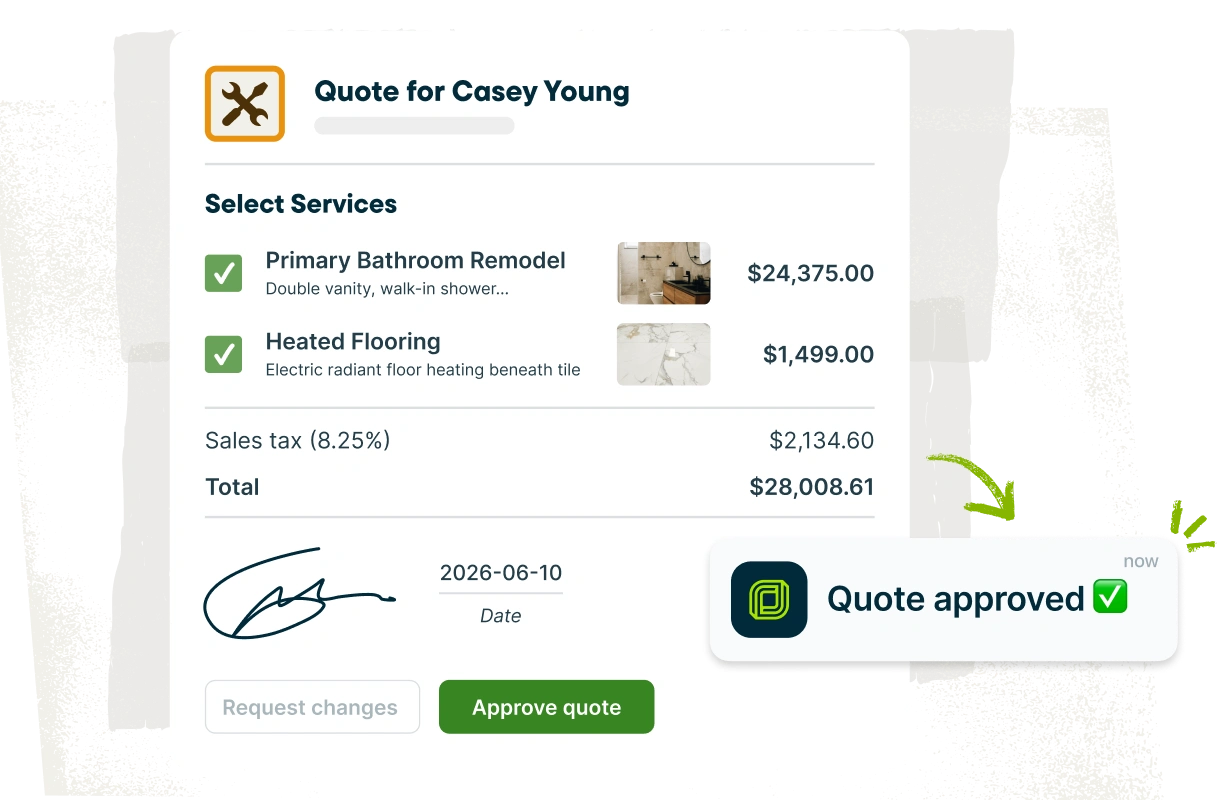
Jobber’s remodeling software is an all-in-one tool designed to help you manage the operational side of your work.
Jobber provides a central place to manage customers, quotes, schedules, client communication, invoices, and payments—helping connect the workflow from the first customer inquiry through to getting paid.
Best for
Jobber is best for small and growing residential remodeling contractors who need to organize the business side of their projects.
It’s particularly useful for remodelers who want to connect customer management, quoting, scheduling, client communication, invoicing, and payments in one workflow rather than managing each step with separate tools.
Why it stands out
For a remodeling contractor, the value of Jobber is its lead-to-payment workflow. You can:
- Manage customer information
- Create and send professional quotes
- Schedule work
- Communicate with clients
- Send invoices
- Collect payments from a connected platform
That makes Jobber a practical option for remodelers who are outgrowing spreadsheets, email, and paper-based processes. Instead of having customer details in one system and estimates in another, the platform keeps the core business workflow connected.
Jobber is also designed with mobile use in mind. This makes it easier for contractors to manage customer and job information while moving between the office and job site. If you have employees or subcontractors, this keeps everyone aligned on schedules and job details.
We instantly looked professional with [Jobber’s] invoicing and scheduling. It motivated us to keep that high standard of professionalism.
Potential limitations
Jobber may not be the right choice if your primary need is architectural or design software. It doesn’t have features for advanced floor plans, 3D visualization, CAD, BIM, or highly detailed construction documentation.
It’s also worth considering project complexity. You may want a dedicated construction management platform for large, multi-project operations with extensive RFIs, submittals, document control, and enterprise-level construction management requirements.
Pricing and trial
Jobber offers tiered pricing starting at $29 per user per month. You can get started with a 14-day free trial.
2. Chief Architect: Best for remodeling design
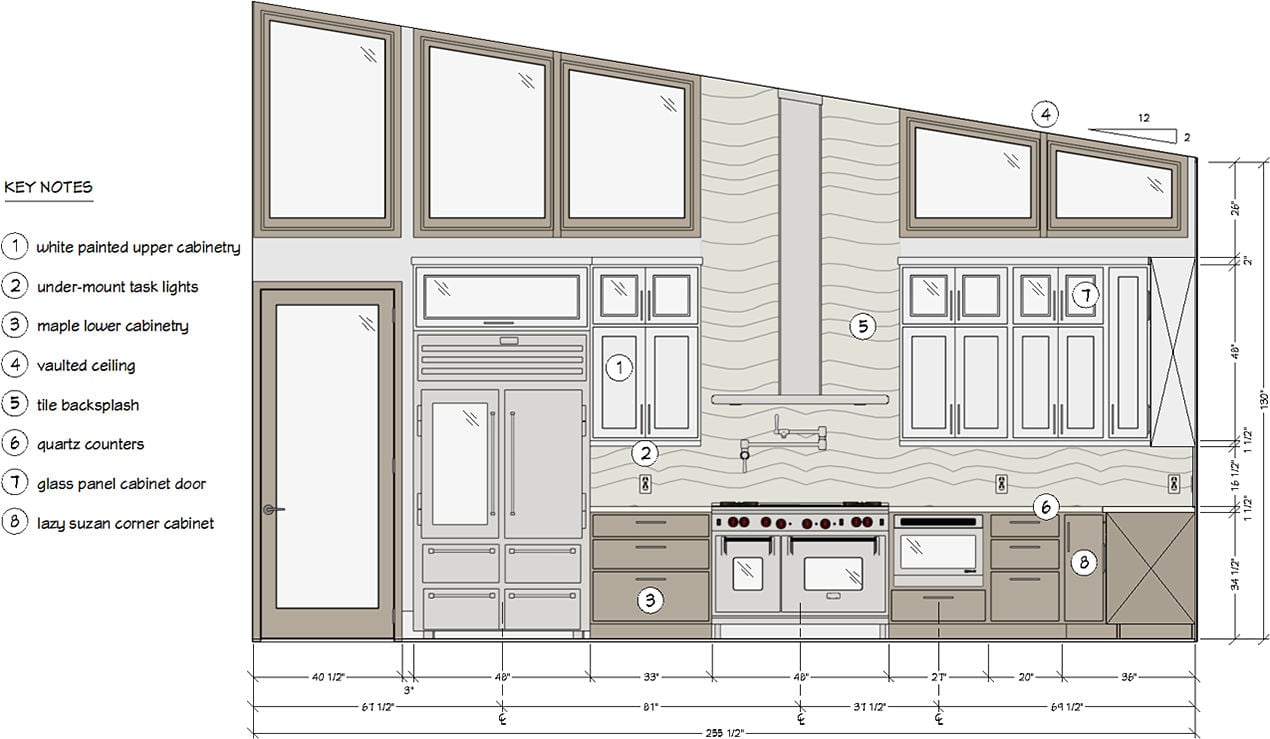
Chief Architect is a professional home design and architectural software platform built for residential construction and remodeling.
It helps contractors, designers, and architects turn existing conditions and ideas into detailed plans, layouts, and 3D visualizations that homeowners can review before work begins.
Best for
Chief Architect is best for remodeling contractors who need detailed design and visualization tools for kitchens, bathrooms, additions, and whole-home renovations.
It’s a particularly strong option for design-build firms that want to create accurate floor plans, model existing spaces, explore design options, and produce professional construction drawings.
Why it stands out
Chief Architect combines 2D drafting with 3D modeling and visualization, allowing you to move from a floor plan to a realistic representation of the finished space. You can:
- Model existing conditions
- Experiment with layouts and materials
- Generate plans and renderings that help homeowners understand what they’re approving
- Bridge the gap between initial concept and construction documentation
If you frequently need to show clients how a new kitchen, bathroom, addition, or whole-home renovation will look, this level of visualization can make the sales and design process more effective.
Potential limitations
Chief Architect’s strength is also its main limitation: it’s primarily a design and drafting platform, rather than an all-in-one system for running a remodeling business. You’ll need additional software for lead and client management, crew scheduling, invoicing, and payment processing.
It can also have a steeper learning curve than simpler home design tools. If you only need basic layouts or occasional visualizations, a less specialized tool may be easier to adopt.
Pricing and trial
Chief Architect is priced at $229 per month or $1,995 per year if billed annually. You can download a trial or start the full software with a two-week money-back guarantee.
3. Houzz Pro: Best for a design-oriented remodeling workflow
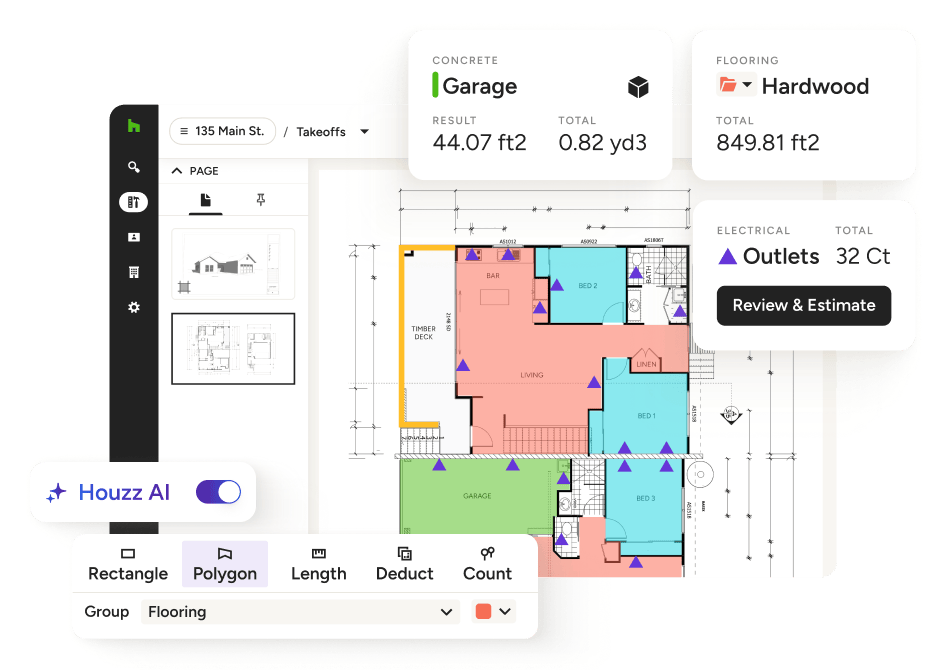
Houzz Pro is an all-in-one platform built for home remodeling and design professionals. It combines design and visualization tools with business and project management features.
This makes it a strong option for remodelers who want to connect the design, client, and project workflows in one system.
Best for
Houzz Pro is best for design-oriented remodeling contractors and design-build firms that want software for both presenting projects to homeowners and managing the business behind them.
It’s particularly well suited to remodelers who need 3D floor plans, mood boards, selections, estimates, proposals, scheduling, change orders, invoicing, and online payments in a connected workflow.
Why it stands out
Houzz Pro combines several capabilities that are often spread across separate tools. Its design features include 3D floor plans, photorealistic renders, mood boards, product sourcing, and selections. This helps you visualize a project so homeowners can make design decisions.
The platform also offers a mobile app, allowing you to keep projects moving on the go. For remodelers managing longer projects, features such as visual schedules, daily logs, client dashboard, and subcontractor collaboration can help improve visibility for both the team and homeowner.
Potential limitations
If you only need basic quoting, scheduling, invoicing, and payment tools, you may end up paying for design and project management capabilities you don’t use. You may also want dedicated design software if your business has specialized CAD, BIM, or architectural needs.
Pricing and trial
Houzz Pro offers three pricing tiers and an advertising add-on. You must request a demo to get a quote.
READ MORE: How to advertise a remodeling business
4. Plan7Architect: Best for renovation planning
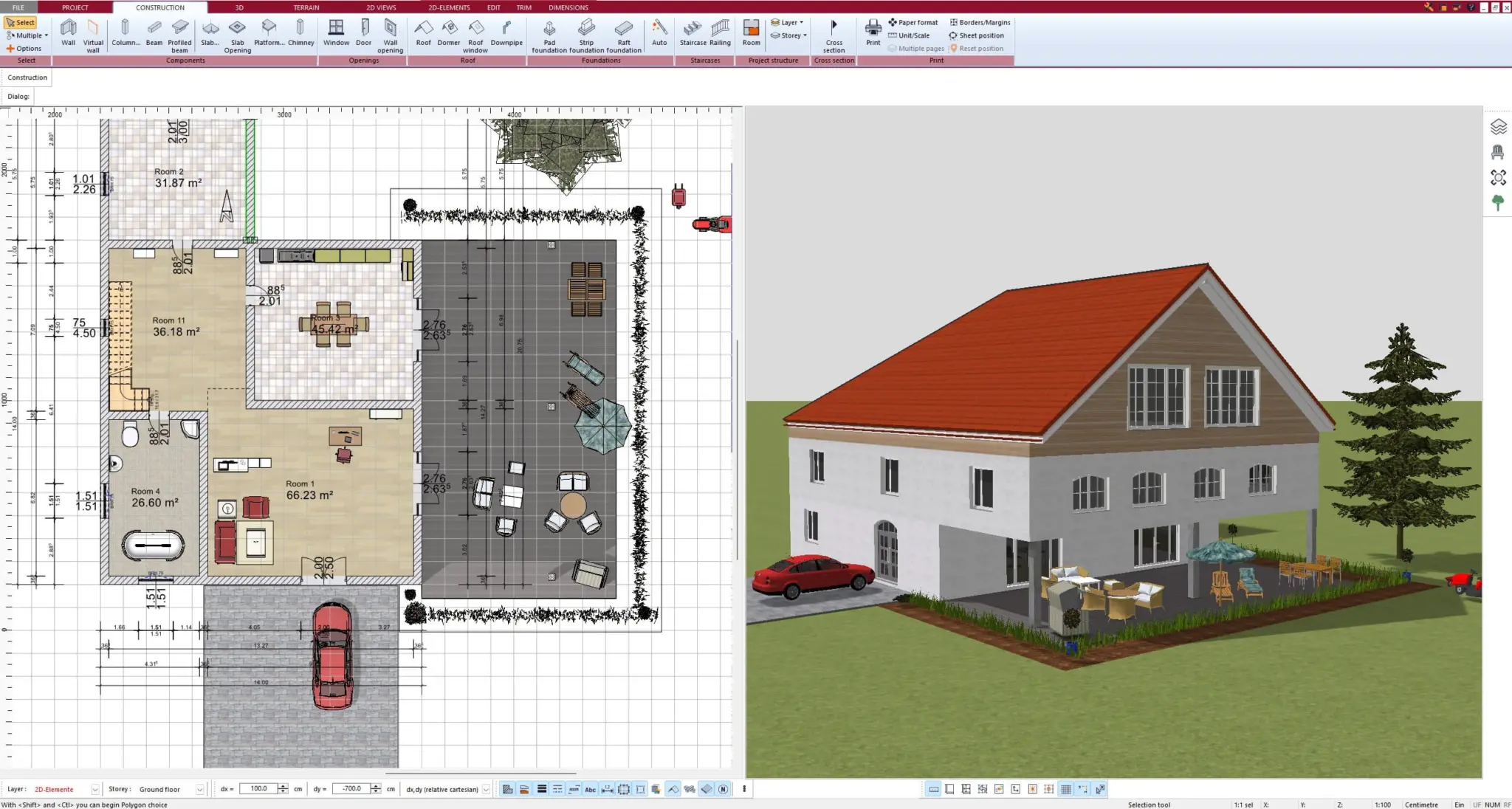
Plan7Architect is home renovation planner software focused on creating detailed floor plans, construction drawings, and 3D visualizations.
Plan7Architect can be used for renovations, additions, and other residential projects. This makes it a good option for contractors who want a relatively affordable design tool without committing to a recurring subscription.
Best for
Plan7Architect is best for remodelers who need affordable renovation planning and visualization software. It can be useful for creating floor plans, modeling existing spaces, experimenting with layouts, and visualizing proposed renovations in 2D and 3D.
The software supports both metric and imperial measurements, which can be useful for contractors working in Canada or the U.S.
Why it stands out
One of Plan7Architect’s top benefits is its combination of design capabilities. It works in 2D and 3D, with tools for floor plans, elevations, sections, materials, textures, and objects.
Higher-level versions support construction drawings and additional import/export capabilities. You can even import projects from existing floor plans and share saved projects with architects for further editing.
Plan7Architect also comes with one-time pricing. Rather than paying a monthly subscription, you can purchase a license and continue using the software indefinitely.
Potential limitations
Plan7Architect is primarily a design and planning tool, not a complete remodeling business management platform. It won’t replace software for CRM, lead management, scheduling, client communication, invoicing, or payments.
If you need to manage the business side of your projects, you will likely need to pair it with a separate platform.
Pricing and trial
Plan7 Architect offers three packages: Basic, Expert, and Pro 5. The Basic package is $99.99, and this is a one time price with no recurring costs. There is no free trial.
5. Buildertrend: Best for managing complex remodeling projects
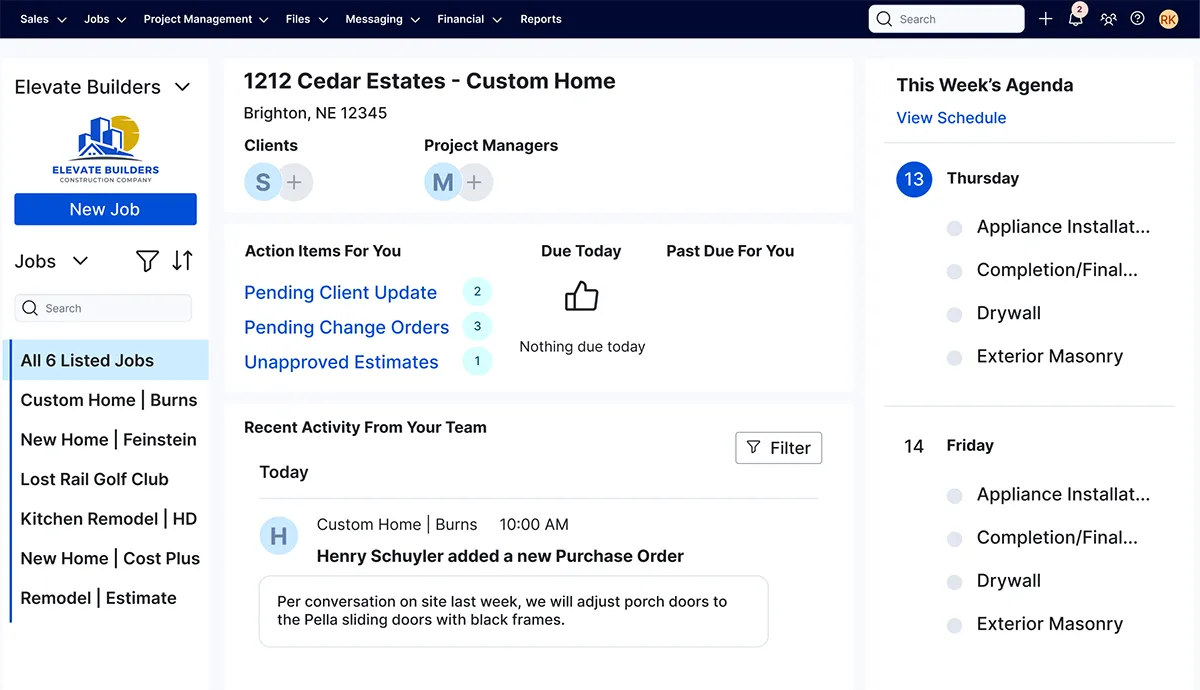
Buildertrend is a construction management platform built for residential builders and remodelers that need to connect sales, project management, financials, and client communication.
It’s best for longer, higher-value remodeling projects that require coordinated schedules, selections, change orders, budgets, subcontractors, and homeowner communication.
Best for
Buildertrend is best for established remodeling contractors and growing design-build firms managing multiple complex projects.
It can support kitchen and bathroom remodels, as well as larger additions and whole-home renovations. Buildertrend provides tools for estimating, scheduling, selections, daily logs, change orders, budgeting, invoicing, and payments.
Why it stands out
Buildertrend covers a broad portion of the remodeling workflow in one platform. You can manage leads and proposals before a project starts, then move into scheduling, tasks, daily logs, change orders, client communication, invoices, and payments.
Buildertrend’s change order and client management features are particularly relevant to remodeling. Homeowners can review selections and approvals, while contractors can document changes, update pricing, and keep project information centralized.
Buildertrend also provides client and subcontractor portals, file storage, messaging, and daily logs to improve visibility throughout a longer project.
Potential limitations
Buildertrend’s broad feature set can be more than a small remodeling contractor needs. A lighter platform might be easier to manage if you’re primarily looking for simple quoting, scheduling, invoicing, and payment tools.
Pricing and trial
Buildertrend offers custom pricing. You must request a demo to get a quote.
6. Buildxact: Best for estimating and takeoffs
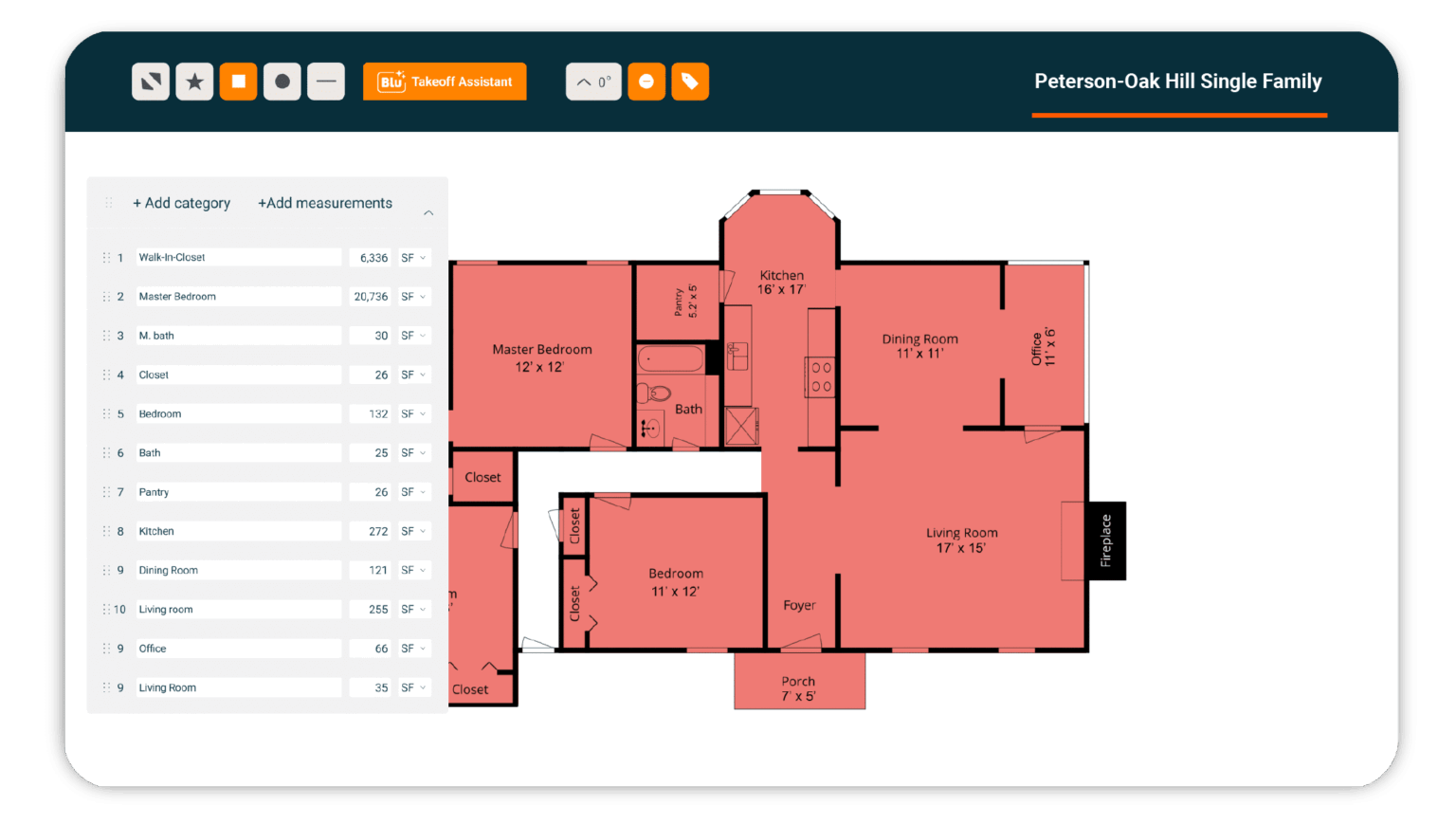
Buildxact is construction estimating and project management software designed primarily for residential builders and remodelers.
It connects digital takeoffs and estimating with quoting, budgeting, scheduling, job management, invoicing, and accounting integrations. This makes it a good choice for contractors who want to connect preconstruction and project execution in one platform.
Best for
Buildxact is best for residential remodelers who want stronger estimating, takeoff, and cost-control tools alongside project management.
It’s particularly useful for contractors handling whole-home renovations and other projects where accurate material quantities, budgets, and job costs are important.
Why it stands out
Buildxact puts estimating and takeoffs at the center of its workflow. You can upload PDF plans, perform digital takeoffs, add pricing information, and turn estimates into professional quotes.
Project costs can then flow into budgets, schedules, purchase orders, change orders, and invoicing. This helps contractors track estimated costs against actual spending as a job progresses.
Buildxact’s Pro plan adds job management, scheduling, a Gantt chart, client portal, invoicing, and the Buildxact Onsite mobile app. The platform also integrates with accounting software such as QuickBooks Online and Xero, connecting your construction operations with financial workflows.
Potential limitations
Buildxact isn’t design software and doesn’t provide CAD or drafting functionality. You’ll need a separate tool for detailed floor plans, 3D model rendering, or architectural design.
Some of Buildxact’s more advanced estimating and AI capabilities are tied to higher-tier plans or paid add-ons, such as the mobile app. You should compare the features you actually need against the total subscription cost.
Pricing and trial
Buildxact starts at $199 per month for unlimited users. You can get started with a 14-day free trial.
7. Buildern: Best for project management and business operations
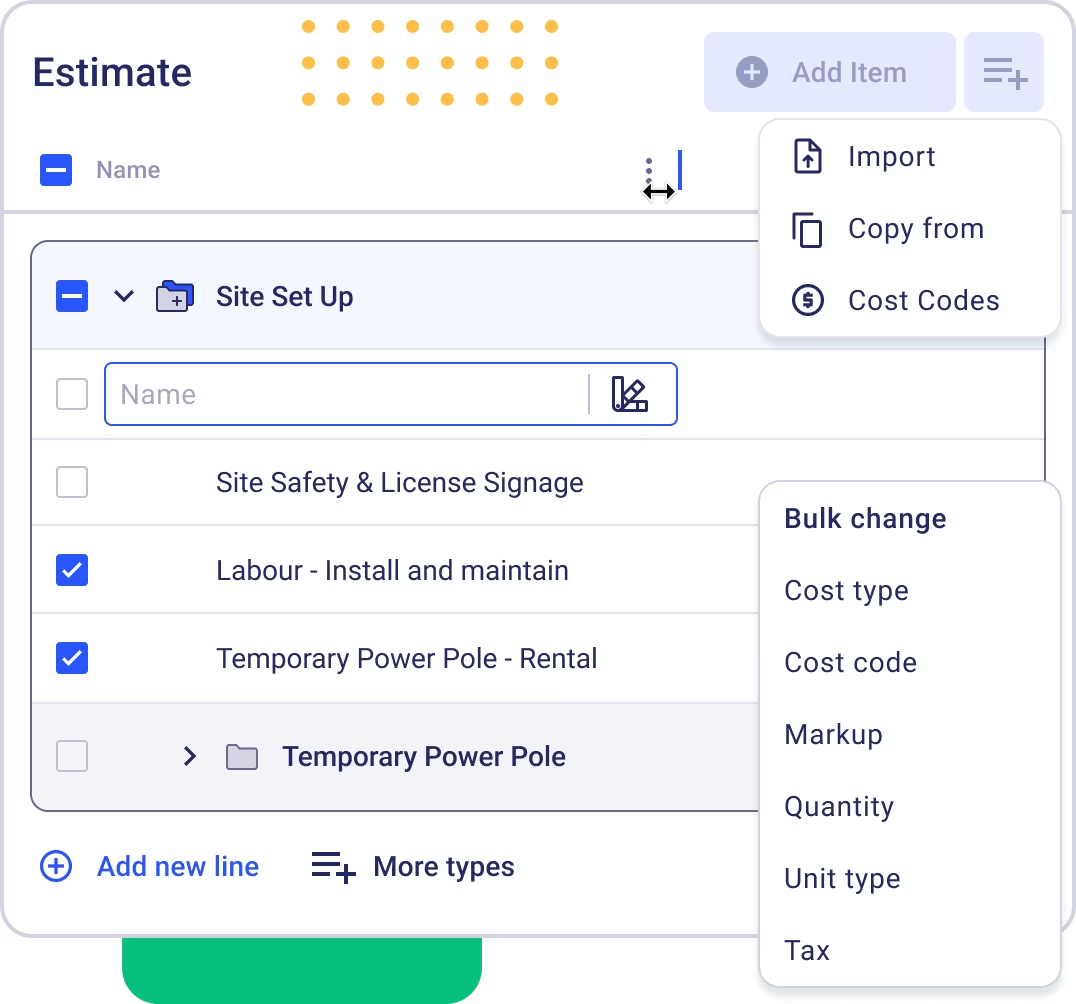
Buildern is an all-in-one construction management platform. It brings estimating, takeoffs, proposals, scheduling, budgeting, change orders, client communication, invoicing, and project management into one system.
It’s designed for construction businesses ranging from remodelers and general contractors to custom home builders. Buildern has a particular focus on connecting financial, project, and field workflows.
Best for
Buildern is best for growing remodeling contractors and design-build companies that need deeper project and financial management than a basic contractor business platform provides.
It’s a good fit for remodelers managing multiple projects, subcontractors, budgets, selections, change orders, and longer construction timelines.
Why it stands out
Buildern covers a broad portion of the remodeling workflow, including estimating, proposals, scheduling, project execution, budgeting, invoicing, and payments.
Its takeoff tools can measure directly from plans and connect those quantities to estimates. This helps reduce duplicate data entry between preconstruction and project management.
Its project management features help you manage schedules, selections, allowances, change orders, daily logs, tasks, and client communication from the same platform.
Buildern also puts considerable emphasis on financial management. You can manage budgets, bills, purchase orders, client invoices, and payments. Integrations with QuickBooks and Xero help keep accounting data synchronized.
Potential limitations
Buildern can be more than a solo remodeler or very small contractor needs. A lighter platform may be easier to learn and less expensive if your main requirements are customer management, simple quoting, scheduling, invoicing, and payments.
The platform also uses per-seat pricing for internal users. You can add field workers, clients, subcontractors, and vendors without additional subscription charges, but additional paid seats increase the monthly cost.
Plus, some advanced features—including takeoffs, timesheets, selections, RFIs, and submittals—are available on the Professional plan rather than Starter.
Pricing and trial
Buildern offers tiered pricing starting at $250 per month for 2 users. You can get started with a 7-day free trial.
How to choose remodeling contractor software
The best remodeling contractor software isn’t necessarily the platform with the longest feature list. Start by identifying where your current workflow breaks down, then choose software that solves that problem without adding unnecessary complexity or cost.
Start with your biggest workflow problem
Before comparing platforms, identify the part of your business that needs the most improvement. Here are some examples of possible challenges, along with what to look for:
- Design: Prioritize floor plans, 3D rendering, material selections, and construction documentation.
- Estimating: Use tools that simplify takeoffs, build accurate estimates, create professional proposals, and help you track costs.
- Project coordination: Look for scheduling, task management, document filing, change orders, and project visibility features.
- Client communication: Choose client portals, automated updates, approvals, messaging, and document sharing to keep clients informed throughout a longer project.
- Business administration: Look for customer management, invoicing, online payments, accounting integrations, and tools that connect the workflow from lead to payment.
Match the platform to your company size and project mix
Your ideal software can change as your remodeling business grows. For example:
- A solo remodeler or smaller crew may only need straightforward estimating, scheduling, invoicing, and client communication with good mobile access.
- Design-build firms and larger remodeling companies managing several projects at once may need more advanced features for budgets, selections, change orders, subcontractors, client portals, and project documentation.
Consider the types of projects you typically handle, too. A platform that works well for smaller kitchen and bathroom renovations may not provide enough structure for multi-month additions or whole-home remodels.
READ MORE: How to advertise a remodeling business
Separate must-have features from nice-to-haves
A long feature list doesn’t necessarily mean a better fit. Create a short checklist based on your actual workflow and prioritize the features you’ll use every week.
Your checklist might include:
- Lead and customer management
- Estimates and professional proposals
- Scheduling and task management
- Mobile app for field use
- Client communication and project updates
- Change orders and approvals
- Invoicing and online payments
- Renovation project files, photos, and documentation
- Accounting and other integrations
- Design, floor plans, or 3D visualization, if required
Evaluate any additional features based on whether they solve a real business problem—not simply because the feature is included in the software.
Run a real-project trial
A software demo can make almost any platform look useful. A better test is to run a real remodeling project through the software from start to finish. Testing the software against your actual workflow will reveal gaps that aren’t obvious during a sales demo.
For business operations software such as Jobber, test a workflow like:
Lead → site visit → quote → schedule → client update → invoice → payment
See how easily information moves between each stage and whether you can complete common tasks from your phone while working on site.
For design-focused software, test a different sequence:
Existing conditions → concept → revision → client approval → field handoff
Create an actual floor plan, make a revision based on a realistic homeowner request, produce the required visualization or drawings, and determine whether the final information can be handed off to the people doing the work.
Check the full cost and exit terms
Instead of comparing software based only on its advertised monthly price, look at the total cost of ownership, including:
- Additional users
- Project limits
- Payment processing fees
- Add-ons
- Onboarding
- Integrations
- Required contracts
- Data exports
Check what happens if you decide to stop using the software. Can you export your customer information, project data, documents, and financial records? Is there a minimum contract period? Are there cancellation fees?
Understanding these terms before you commit can prevent an inexpensive-looking platform from becoming an expensive or difficult system to replace.
When Jobber is the right remodeling software
Jobber is a strong fit if you’re a growing residential remodeler who wants to simplify the business side of your projects. It’s ideal if you’ve outgrown spreadsheets, texts, and disconnected admin tools but don’t need a complex enterprise construction management system.
Jobber combines workflows and solves challenges like:
- Keeping track of leads
- Creating and sending quotes
- Scheduling work
- Communicating with homeowners
- Sending invoices
- Collecting payments
FREE TOOL: Invoice faster with our free remodeling invoice template
Instead of using separate systems for customer information, quotes, schedules, and payments, you can manage the core customer-to-payment workflow in one place.
The most challenging part of running a roofing business is managing schedules, quotes, and customer expectations all at once. Jobber brings it all together so we don’t drop the ball.
That said, Jobber isn’t intended to replace specialized design software such as CAD, 3D rendering, BIM, or complex architectural documentation. If you need detailed floor plans or modeling, you’ll likely want a dedicated design platform for those workflows.
But that doesn’t mean you have to choose one or the other. You can use a software stack that combines Jobber with specialist tools. For example, you could use:
- Design software for floor plans and 3D renderings
- Jobber for customer management, quoting, scheduling, invoicing, and payments
- Accounting software such as QuickBooks for more detailed financial reporting and bookkeeping
The best software for remodeling contractors depends on what you need to improve—whether that’s design, project coordination, or the day-to-day business workflow.
For small and growing residential remodelers, choosing a platform that connects customers, quotes, scheduling, invoicing, and payments can simplify operations and make it easier to run profitable remodeling projects.
Frequently Asked Questions
-
The best software for remodeling contractors depends on your workflow. Jobber is a strong choice for small-business operations like customer management, quoting, scheduling, invoicing, and payments. Design-heavy remodelers, on the other hand, may need specialist software for floor plans, 3D rendering, or architectural documentation.
-
Yes, remodelers often need design software and business software. Design software handles plans, layouts, and visualization. Business software, on the other hand, manages customers, scheduling, invoicing, and payments. An integrated stack can give remodelers the right tools for both workflows.
-
Small remodeling contractors should prioritize:
• Mobile access to manage jobs and customer information from the field
• Professional quotes to create clear estimates and proposals for homeowners
• Scheduling to coordinate projects, employees, and subcontractors
• Client communication to keep homeowners informed throughout the project
• Change tracking to document updates to project scope, pricing, and timelines
• Invoicing to send accurate invoices and keep payments organized
• Payments to make it easy for customers to pay online
• Integrations with the other tools they use to run their business -
Home remodeling software can definitely be worthwhile for a small business. The right software can help you:
• Remember to follow up with customers
• Avoid schedule conflicts
• Send invoices on time
• Avoid duplicate data entry
• Maintain project visibility
• Reduce administrative work
• Ensure a more consistent workflow