
Key takeaways:
Exploring the top software for general contractors in 2026, this guide compares leading platforms and helps you choose the best fit for your business needs and workflows.
- Match software to your business type and needs. Pick the tool that aligns with your company size, workflows, and growth goals—Jobber for all-in-one management, Buildertrend for residential PM, Procore for complex projects, and more.
- Look for features that streamline your entire project workflow. The best platforms connect estimating, scheduling, communication, documentation, budgeting, invoicing, and payments, reducing manual work and information silos between office and field teams.
- Ease of use, mobile access, pricing, and integrations matter. Choose software that’s intuitive for your team, provides seamless mobile access, offers transparent pricing, connects to your accounting tools, and delivers reliable customer support.
- Explore specialized apps for focused needs. For plan markup (Bluebeam), field reporting (Raken), or precise takeoffs and estimating (STACK), consider adding specialty solutions to support core construction workflows.
- Evaluate with a trial before you buy. Run through your full workflow—from quoting to payment—to ensure the software fits your day-to-day operations. Avoid platforms with red flags like limited mobile access or hidden per-user costs.
Stay up to date with the latest tips for general contractors. Sign up for the Jobber Newsletter.
Running a general contracting business means juggling far more than the work happening on the job site—you need to handle quotes, subcontractors, schedules, change orders, project costs, client updates, and invoices.
The right software can bring those moving pieces together—whether you’re a small general contractor managing a handful of residential projects, a remodeler coordinating clients and subs, or a growing construction firm looking for a more scalable system.
In this guide, we’ll compare the best software for contractors. You’ll get a shortlist of top tools, what each one does best, and a framework for choosing software that fits your projects, team, and day-to-day operations.
Top 7 software for general contractors:
Quick picks: best general contractor software by need
If you don’t need to compare every platform in detail, these quick picks can help you narrow down your options based on the type of work you do and the workflow you need to improve most.
- Best all-in-one for general contractors and remodelers → Jobber is best for small and growing residential contractors that want quoting, scheduling, client communication, invoicing, and payments in one platform.
- Best for residential construction project management → Buildertrend is a strong choice if you manage multiple projects, subcontractors, schedules, budgets, and client communication.
- Best for mid-to-large commercial general contractors and complex multi-project PM → Procore is built for larger construction organizations that need robust project controls, financial management, field operations, and collaboration across complex projects.
- Best for plan markup and PDF workflows → Bluebeam is ideal if you regularly review drawings, perform takeoffs, compare plans, and manage construction PDFs.
- Best for field daily reporting → Raken is best if you need a dedicated mobile solution for daily reports, photos, time tracking, safety documentation, and job-site updates.
- Best budget/mid-market construction operations → Contractor Foreman is a broad construction management option for growing contractors who want estimating, scheduling, job costing, documentation, and other project tools
- Best for takeoffs and estimating → STACK is a good choice if you need dedicated tools for digital takeoffs, quantity measurement, estimating, and preconstruction workflows.
What general contractors actually need software to do
The best general contractor software should help you manage the entire job—not just one piece of it. It brings office and field workflows into one place so you can spend less time chasing information and more time running projects.
Here’s what the top software for general contractors can do:
- Estimating, proposals, and change orders: Create accurate estimates, turn them into professional proposals, and keep approved changes organized as project scope evolves.
- Scheduling crews, jobs, and subs: Keep project timelines, crew schedules, subcontractors, and upcoming jobs organized in one calendar.
- Field documentation and client updates: Capture job-site photos, notes, daily updates, documents, and other project information from the field using a mobile app..
- Project and job financials: Track project costs, budgets, invoices, payments, and profitability as the work progresses. Connecting financial information to individual jobs gives you a clearer picture of whether a project is staying on budget.
- Team communication: Keep job details, assignments, updates, and important conversations connected to the project instead of buried in group texts.
READ MORE: Best apps for contractors
How we evaluated the best software for general contractors
To choose the top software for general contractors, we compared each platform against the practical needs of small and growing general contractors.
Rather than focusing on the number of features alone, we looked at how well each tool fits real workflows and how easily it can support a business as it grows.
We considered:
- Fit for general contractor workflows: We looked at how well each platform handles core tasks such as managing jobs and clients, scheduling work, and coordinating field operations.
- Ease of use and mobile: We considered how intuitive each platform is and whether its mobile app makes it easy to access information and update jobs from the field.
- Pricing transparency: We evaluated pricing, plan limitations, user fees, and overall value for small and midsize businesses.
- Integrations: We considered integrations with essential tools—particularly accounting and payment platforms—to help reduce duplicate data entry and keep business and project information connected.
- Support and onboarding: We looked at the resources and customer support available to help contractors set up the software, train their teams, and get the most from the platform as the business grows.
Best general contractor software compared
The best software for general contractors depends on your company size and where you need the most help—from running the entire business to managing plans, estimates, or field reporting.
Use this table to quickly compare each option’s best use case, pricing, strengths, and limitations:
| Tool | Best for | Starting price | Standout feature | Limitation |
|---|---|---|---|---|
| Jobber | All-in-one for general contractors and remodelers | Tiered plans starting from $29 per month | Quoting-to-payment workflow | Not designed for complex commercial construction |
| Buildertrend | Residential construction project management | Custom pricing | Project management and client communication | Can be more than small general contractors need |
| Procore | Mid-to-large commercial general contractors | Custom pricing | Comprehensive project and financial management | Too much software for small contractors |
| Contractor Foreman | Growing contractors | $49 per user per month | Broad construction management features | Can have a steeper learning curve |
| Bluebeam | Plan markup and document workflows | Starting at $260 per user per month | PDF markup, takeoffs, and drawing review | Lacks business management features |
| Raken | Field reporting and daily logs | Custom pricing | Mobile field reporting and documentation | Doesn’t replace full business management software |
| STACK | Takeoffs and estimating | Starting at $249 per user per month | Digital takeoffs and preconstruction | Limited project management |
1. Jobber
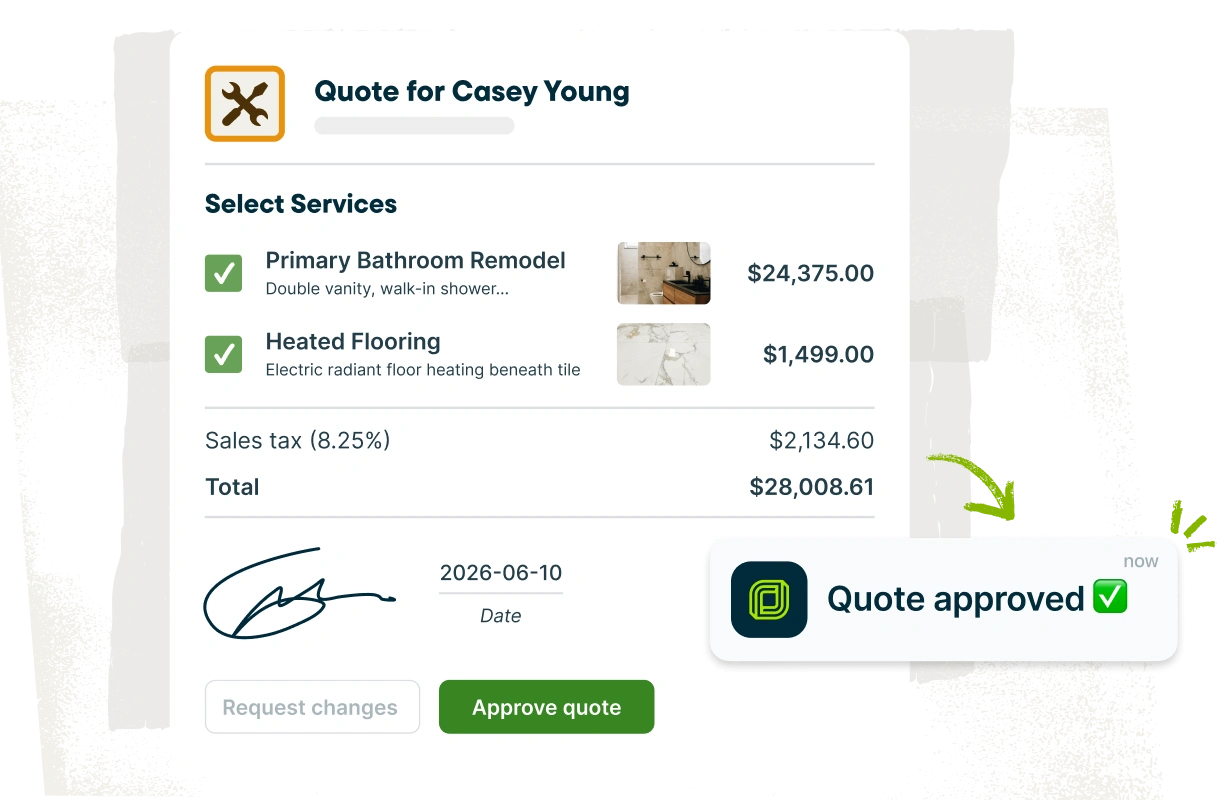
Jobber is the best all-in-one general contractor software for business owners who want to manage every aspect of their workflow.
By bringing quoting, scheduling, client communication, invoicing, and payments into one platform, Jobber helps your team avoid juggling spreadsheets, email, and separate apps. Its mobile tools also make it easier for contractors and crews to stay connected while working in the field.
Jobber is strongest for residential, service-leaning, and small general contractor operations rather than large commercial or high-rise projects that require specialized construction project management.
With Jobber, everything is in one place—scheduling, estimates, invoicing, and more.
Key features
- Build and send professional quotes, then turn approved work into jobs without re-entering information.
- Use a drag-and-drop calendar to schedule jobs, assign work, and keep crews organized.
- Send follow-ups, reminders, appointment updates, and other messages to keep clients informed throughout the job.
- Generate invoices, send them to clients, and accept online payments to simplify getting paid.
- Give crews mobile access to job details, schedules, client information, and other important updates from the job site.
Why it’s best
Jobber stands out for general contractors and remodelers who want one system to connect the customer journey from quote to final payment.
Instead of using separate tools for client communication, scheduling, and financial administration, you can manage these workflows from one platform.
This makes it particularly useful for residential contractors and growing general contractors who need more structure without adopting a complex enterprise construction management system.
Limitations
Jobber isn’t designed to replace specialized commercial construction project management software for large or complex projects.
You may need a more specialized platform if you manage high-rise construction, large commercial projects, or workflows involving advanced BIM, RFIs, submittals, and subcontractors.
Pricing
Jobber starts at $29 per user per month. Higher-tier plans offer additional features and capabilities for growing businesses.
2. Buildertrend
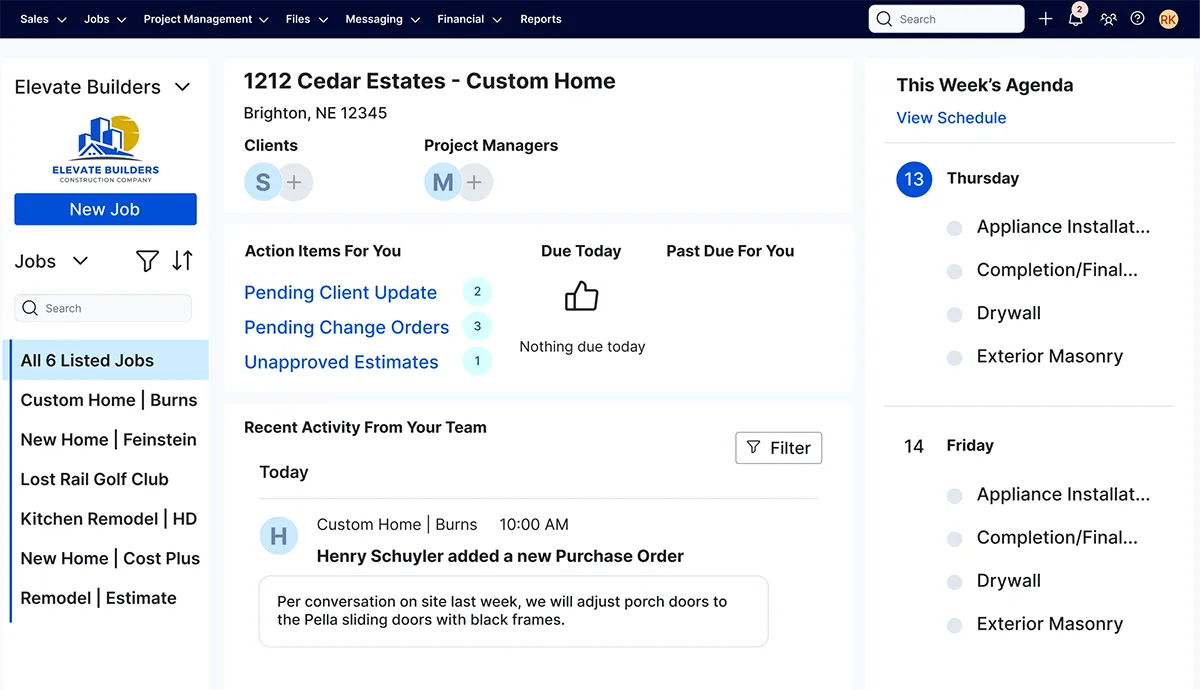
Buildertrend is best for residential construction project management, particularly for established home builders and remodelers managing multiple or complex projects.
Buildertrend brings project scheduling, change orders, daily logs, client communication, budgeting, estimates, bid management, invoicing, and payments into one platform.
Key features
- Build and manage project schedules, tasks, deadlines, and timelines in one place.
- Record daily updates, project information, and important documents to maintain a clear project history.
- Give homeowners a dedicated place to view updates, photos, documents, and communicate with the project team with a client portal.
- Create estimates, manage bids, track budgets and project costs, and handle invoices and payments.
Why it’s best
Buildertrend is the best construction management software for residential general contractors, custom home builders, and remodelers who need more robust project management than a basic contractor app provides.
Its combination of crew scheduling, financial management, client communication, change orders, and project documentation makes it particularly useful for teams managing multiple or multi-phase projects.
Limitations
Buildertrend can be overwhelming, particularly if you need simple quoting, scheduling, invoicing, and payments. It also isn’t the ideal choice for every type of commercial construction workflow. Specialized platforms may offer deeper tools for complex commercial project controls.
Pricing
You must fill out a form to get a custom quote.
3. Procore
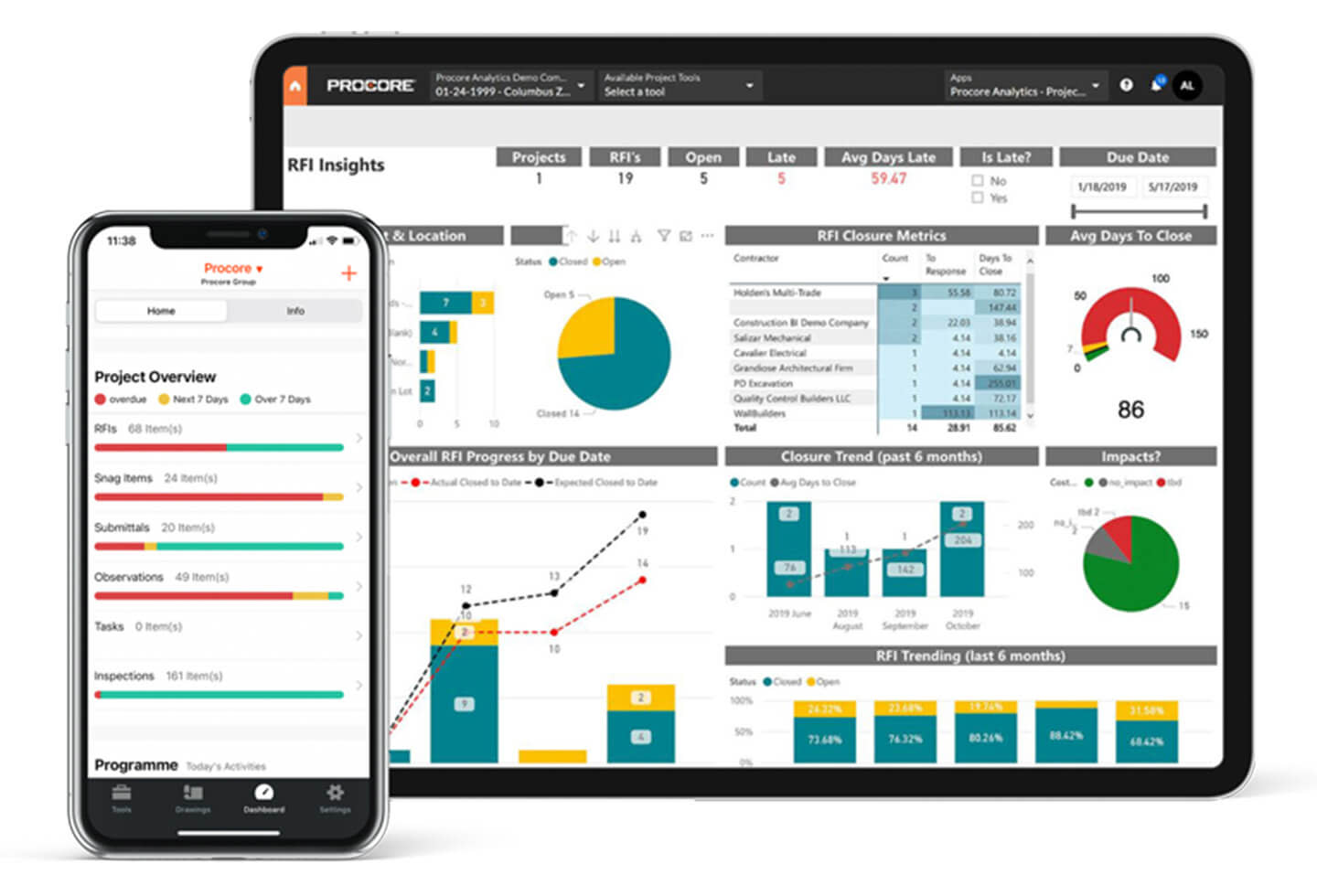
Procore is a construction management platform designed for general contractors managing complex projects and larger teams.
It connects project management, financials, bidding, scheduling, field operations, and collaboration in one platform, making it particularly well suited to mid-to-large commercial general contractors.
Key features
- Manage schedules, tasks, documents, drawings, and project communications from a centralized platform.
- Distribute bid information, collect bids, and track coverage during preconstruction.
- Track budgets, commitments, costs, change orders, contracts, and invoices throughout a project.
- Use the mobile app for daily logs, inspections, observations, timecards, and other field activities.
- Manage workforce availability, skills, equipment, and project resource needs.
Why it’s best
Procore is a strong choice for general contractors that need deep project controls, RFIs, submittals, financials, and complex job visibility across multiple teams and stakeholders.
The platform’s combination of field and office tools, project financials, bidding, documentation, and collaboration makes it well suited to organizations that have outgrown spreadsheets.
Limitations
Procore can be more software than a small residential general contractor needs, particularly if your goal is to manage quotes, schedules, client communication, invoices, and payments.
Its broad feature set and implementation requirements can also make it a bigger investment than simpler contractor-focused platforms.
Pricing
Procore provides custom pricing based on your company type and annual revenue.
4. Contractor Foreman
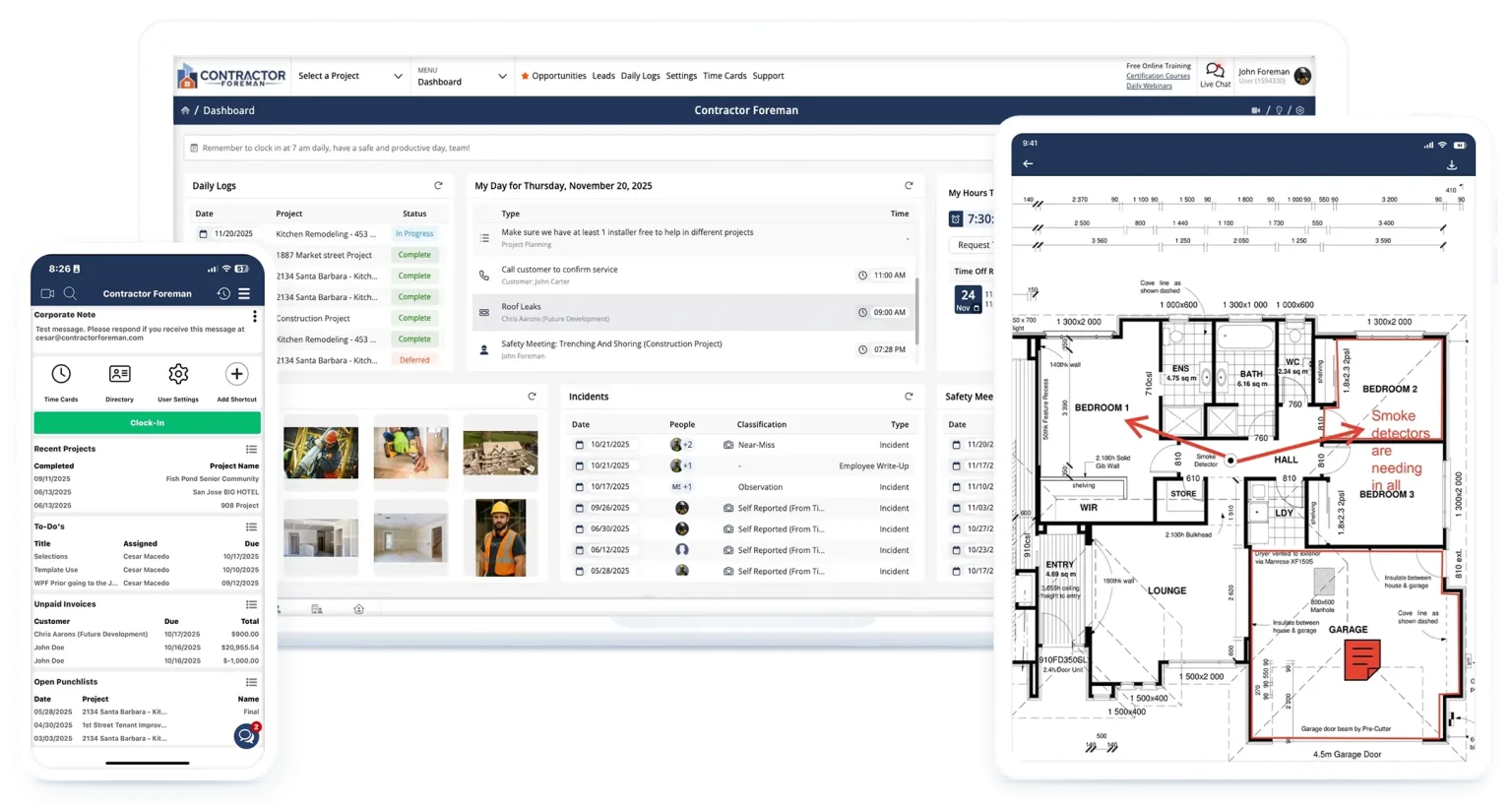
Contractor Foreman is a construction management platform built for growing contractors that need more than basic scheduling and invoicing.
It combines estimating, project management, scheduling, job costing, time tracking, documents, daily logs, change orders, and financial tools in one system, making it a strong fit for growing contractors managing multiple projects.
Key features
- Create detailed, job-costed estimates and use takeoff tools to help turn drawings and quantities into estimates.
- Build project schedules, Gantt charts, tasks, dependencies, and timelines to keep work moving.
- Track estimated, committed, and actual costs by project and cost code to monitor budgets and profitability.
- Use daily logs, time cards, documents, and other project tools to keep field information connected to the job.
- Manage scope changes and create invoices directly from the platform.
Why it’s best
Contractor Foreman is a good choice for growing contractors who want broad construction task management functionality without moving immediately to a large enterprise platform.
Its combination of estimating, scheduling, job costing, field documentation, and financial management makes it particularly useful if you need tighter control over project costs while taking on more work.
Limitations
The platform has a wide range of features, which can mean a steeper setup and learning curve than simpler residential general contractor software.
Pricing
Contractor Foreman offers tiered pricing starting at $49 per user per month.
5. Bluebeam
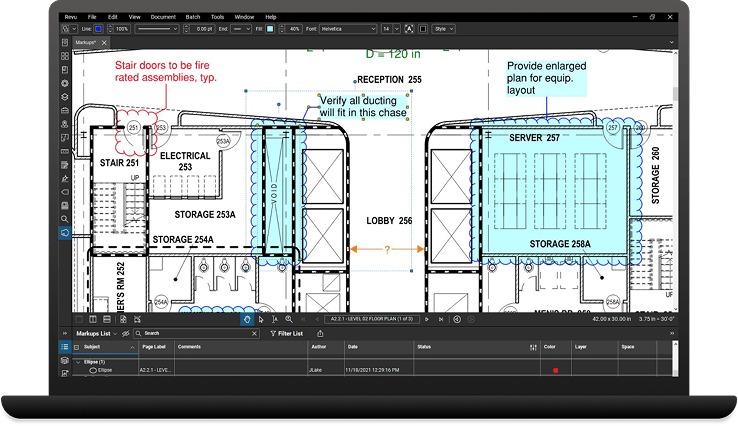
Bluebeam is a specialty construction tool focused on PDF markup, drawing review, takeoffs, and document workflows rather than overall business management.
It’s a strong addition for general contractors who regularly work with plans and technical documents. Some contractors may keep Bluebeam alongside an operations platform rather than trying to use one tool for everything.
Key features
- Annotate drawings with measurements, comments, stamps, symbols, and custom markups.
- Compare drawing revisions and identify changes between versions.
- Measure quantities and perform takeoffs directly from construction drawings.
- Collaborate in real time and share project documents using Studio, Bluebeam’s built-in collaboration tool.
- Create, edit, organize, convert, and secure construction PDFs for simple document management and version control.
Why it’s best
Bluebeam excels at a specific part of the general contractor workflow that general business and operations platforms don’t necessarily handle well: working with construction drawings and PDFs.
Its markup, measurement, document comparison, and takeoff capabilities make it useful for estimating, reviewing plans, and coordinating changes, while its web and mobile tools extend document workflows beyond the office.
Limitations
Bluebeam isn’t an all-in-one general contractor management platform.
It doesn’t replace software for quoting, scheduling, CRM, invoicing, payments, or broader job and business management, so many general contractors will use it alongside an operations or construction management platform.
If you primarily need to manage customers and jobs rather than review detailed plans, a broader contractor platform may provide more value.
Pricing
Bluebeam offers tiered pricing starting at $260 per user per month.
6. Raken
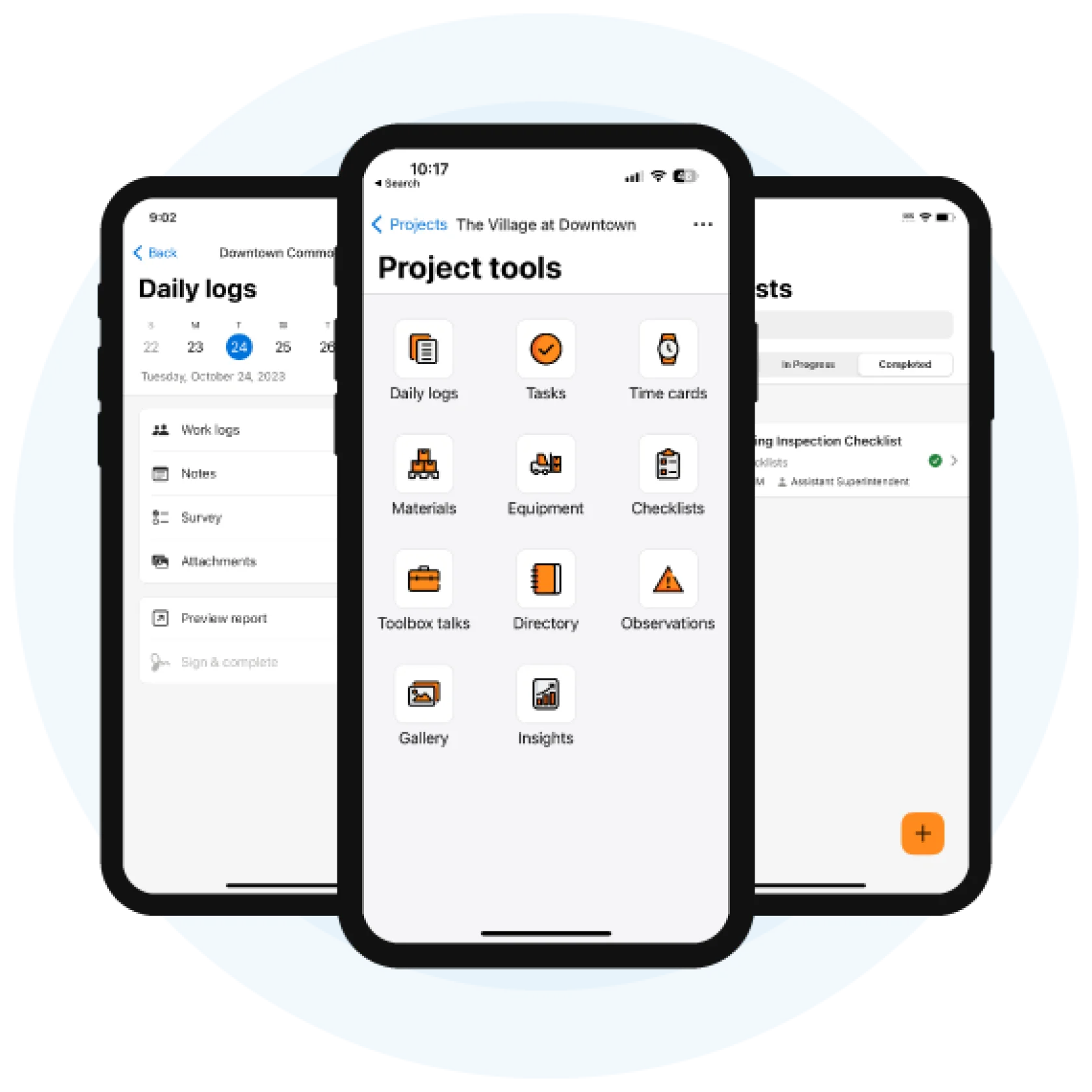
Raken is a construction management platform designed to help contractors capture and organize what happens on the job site each day. It’s best for construction firms that need better field reporting and daily logs.
Its mobile app connects field crews with office teams through daily reports, time tracking, photos, safety documentation, and project updates.
Key features
- Record work completed, manpower, notes, weather, photos, and other job-site activity from the field.
- Capture time-stamped photos and videos and attach them to daily reports and projects.
- Track hours, materials, equipment, and production data from the field.
- Invite subcontractors to submit their own daily reports and combine them into a project-level report.
- Manage checklists, observations, and incidents from the mobile app.
- Turn field data into shareable reports and monitor project activity from the office.
Why it’s best
Raken is a good choice if you need better visibility into what’s happening across jobsites without relying on paper logs, texts, and spreadsheets. It’s particularly useful for documenting project progress, tracking subcontractor activity, and creating a reliable record of project events.
Limitations
Raken is more focused on field management and project documentation than the complete business workflow. If you need robust quoting, customer management, scheduling, invoicing, and payments in one system, an all-in-one contractor platform may be a better fit.
Pricing
Raken offers personalized pricing—you must contact them to get a quote.
7. STACK
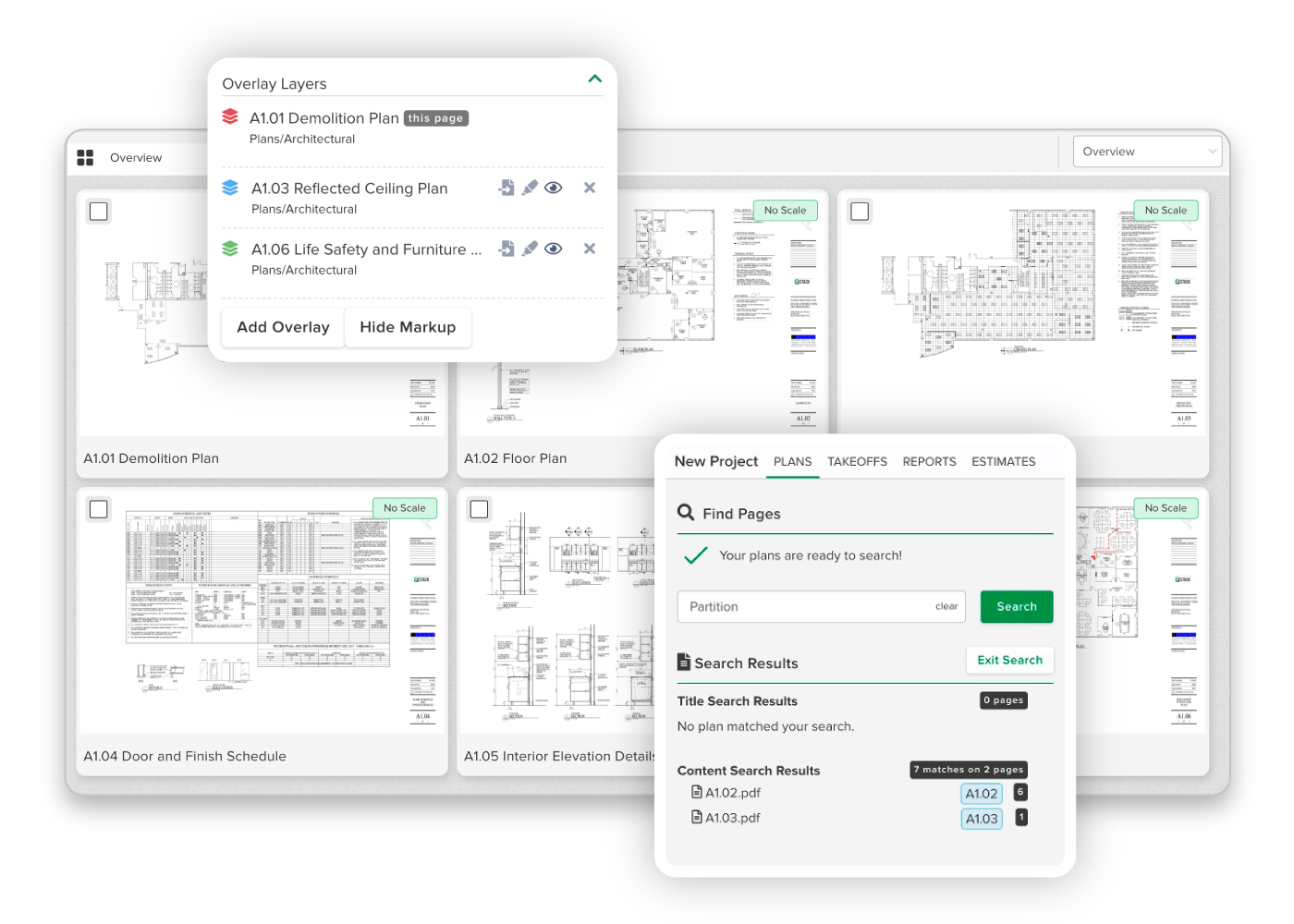
STACK is a cloud-based construction estimating software platform focused on digital takeoffs, quoting, and preconstruction workflows.
It’s a good option for general contractors and estimators who spend significant time measuring plans, calculating quantities, and building bids, particularly when accuracy and speed during preconstruction are priorities.
Key features
- Measure areas, lengths, counts, and other quantities directly from digital plan sheets.
- Build estimates using takeoff quantities, labor and material costs, markups, overhead, and profit.
- Annotate drawings and overlay different plan versions to identify changes.
- Use AI tools to help identify and measure items such as walls, doors, windows, and areas.
- Store plans and project documents online and give team members access to projects and takeoffs.
Why it’s best
STACK is particularly useful for general contractors who need a dedicated preconstruction tool rather than a general business management platform.
Its takeoff and estimating workflows keep measurements, quantities, and estimate data connected, helping estimators move from project planning to a bid without relying on separate spreadsheets and manual calculations.
Limitations
STACK is primarily focused on preconstruction, takeoffs, and estimating, so it isn’t a complete replacement for software that handles customer management, scheduling, field operations, invoicing, and payments.
You may need to connect STACK with an operations or accounting platform to manage the rest of the project lifecycle.
Pricing
STACK’s Takeoff & Estimate plan starts at $249 per user per month.
How to choose software for your general contracting business
The best software for your business depends on how you work today and where you expect to be in the next few years. Start by identifying what stage your business is in, then focus on the features that solve your biggest operational issues.
Start with your company stage
Solo general contractors and small crews typically need simple software that connects estimates, scheduling, client communication, invoicing, and payments without a steep learning curve.
Multi-crew and growing general contractors may need stronger project management, scheduling, document management, and team collaboration as more jobs and subcontractors become harder to coordinate.
Commercial general contractors with larger or more complex projects may benefit from specialized construction management platforms with advanced project controls, documentation, and subcontractor workflows.
READ MORE: How to start a home remodeling business
Must-have features checklist
Look for software that covers the core workflows you manage every day, like:
- Estimates, proposals, and change orders
- Job and project scheduling
- Mobile access for field teams
- Document management and job-site updates
- Project costs and budget tracking
- Invoicing, payments, and accounting integrations
- Client and construction team communication
Red flags
Not every construction software platform is a good fit for you. Watch for these red flags before committing to a tool:
- No mobile app: If your crew can’t easily access schedules, job details, or updates from the field, you’ll likely end up relying on texts, calls, or paperwork. This can lead to missed information and extra admin work.
- Weak quoting-to-invoice workflow: Software that doesn’t connect estimates, approved work, and invoices can force you to enter the same information multiple times and increase the risk of billing errors.
- Surprise per-user pricing: Low starting prices can become expensive as your team grows if you have to pay for every additional employee or subcontractor. Check user limits and pricing tiers before choosing a platform.
- No accounting integrations: Without a connection to your accounting software, you may have to manually transfer financial data between systems. This creates duplicate work and makes it harder to keep track of finances.
Trial plan
If a platform offers a free trial, don’t just click around the dashboard. Use the trial to run a realistic project from start to finish:
- Create a quote.
- Schedule workers.
- Complete the job.
- Invoice the customer.
- Accept payment.
This will quickly show whether the software actually fits your workflow, how much work it takes to keep information updated, and whether it can handle the process—from winning a job through collecting payment.
The best software for general contractors isn’t necessarily the platform with the most features.
Choose a tool that fits your construction company size, project type, and day-to-day workflows.
Whether that means an all-in-one platform for quoting through payment, specialized construction project management, or a focused tool for plans, estimating, or field reporting, the right general contractor software is out there for you.
Frequently Asked Questions
-
The best software for general contractors depends on your company size, project type, and workflow. Small general contractors may benefit from an all-in-one contractor platform, such as Jobber. Larger or more complex firms may need specialized construction project management software.
-
Yes, if it helps eliminate spreadsheets, disconnected apps, and manual administrative work. If you’re a small general contractor, prioritize easy-to-use software with the features you actually need rather than paying for complex enterprise tools.
-
A contractor CRM primarily helps manage leads, customers, and sales. GC software typically covers a broader workflow, including estimating, scheduling, project management, job costs, invoicing, and payments. Some platforms, like Jobber, combine both into one system.
-
For some small and midsize GCs, an all-in-one platform can replace several point solutions by combining estimating, scheduling, invoicing, payments, and other business workflows. However, specialized tools such as Bluebeam or QuickBooks may still be worth keeping if you need advanced features or workflows they handle particularly well.