Top 7 Construction Employee Scheduling Software Tools for Managing Crews

Key takeaways:
If you’re searching for the best employee scheduling software for your construction crews, these tools can help you save time, reduce confusion, and keep projects on track.
- Focus on features that matter most. The top tools offer ease of use, mobile access, flexible scheduling, automation, integrations, conflict detection, GPS tracking, and real-time notifications to streamline operations.
- Choose software that matches your needs. Whether you need simple shift scheduling, detailed workforce management, or advanced project coordination, there’s a solution tailored for different team sizes and project complexity.
- Evaluate pros and cons. Each tool excels in certain areas, from all-in-one management platforms like Jobber to task-focused solutions like Fieldwire and shift-focused tools like Sling. Balance robust features with usability and cost based on your business needs.
- Consider scalability and integration. Look for software that can grow with your business and connects scheduling with other workflows like quoting, invoicing, and time tracking.
- Prioritize crew accountability and communication. The best scheduling tools keep your team informed, reduce no-shows, and allow for quick adjustments as conditions change, so you stay on schedule and ahead of the competition.
Want more tips on running and growing your business? Sign up for the Jobber Newsletter.
Forget sticky notes and last-minute texts—today’s job sites demand smarter tools.
As a construction business owner, you’ve got enough on your plate—tight deadlines, juggling contractors, and endless client expectations. The last thing you need is a scheduling nightmare, throwing a wrench in your workflow and slowing things down.
In this article, we’re laying the foundation for smoother operations by listing seven construction employee scheduling software options to help you streamline crew management, reduce no-shows, and keep your business running like a well-oiled machine.
The top employee scheduling software construction owners should consider:
How we chose the best construction employee scheduling software
To find the best construction labor scheduling software, we focused on what really matters to construction business owners, including:
- Ease of use: Intuitive software for office staff and field crews to use without extensive training or a complicated setup process.
- Mobile access: Let contractors and crew members view schedules, receive updates, and manage jobs from the job site without needing to return to the office.
- Flexibility: Flexible software makes it easier to adjust assignments, move jobs, and accommodate changing project timelines.
- Automation: Reduce administrative work and help business owners spend less time manually updating calendars, assigning employees, and sending reminders.
- Integrations with other tools: Integrations with accounting, payroll, project management, and other business tools help keep information connected.
- Conflict detection: Built-in conflict detection helps prevent issues before they affect the project.
- Multi-site schedules: A clear view of where employees are working lets you allocate crews efficiently across multiple sites.
- GPS and geofence time tracking: Verify when and where employees clock in and out, making time tracking more accurate and reducing timekeeping errors.
- Real-time notifications: Keep employees informed when assignments, locations, or timelines change, reducing miscommunication between the office and field.
- Payroll and timesheet export: Save administrative time and help ensure employees are paid accurately based on the hours they’ve worked.
- Certifications: Track employee certifications and qualifications to help assign workers to jobs they’re qualified for.
With these features in mind, we checked out construction industry forums and reviews on sites such as G2 to find what real construction pros had to say. When available, we watched app tutorials to see these tools in action and determine their intuitiveness.
The result is seven software solutions to optimize your crew scheduling, reclaim your time, and improve your bottom line.
Construction employee vs project scheduling software
Construction crew scheduling software and project scheduling software both help you plan work, but they focus on different parts of the process.
Employee scheduling software helps you assign employees or crews to jobs, manage working hours, and avoid scheduling conflicts.
Look for employee scheduling software if you need to:
- Assign employees or crews to specific jobs
- See who is working and where
- Manage employee hours and availability
- Prevent double-booking or scheduling conflicts
Project scheduling software focuses on project timelines, task dependencies, milestones, and documents.
Look for project scheduling software if you need to:
- Track project timelines and milestones
- Manage task dependencies and deadlines
- Organize project plans and documents
- Coordinate complex, multi-phase construction projects
For many construction businesses, the two can work together. Employee scheduling helps answer “Who is working, where, and when?”, while project scheduling helps answer “What needs to happen, and when does it need to be completed?”
Construction employee scheduling software comparison table
The best construction scheduling software depends on whether you need simple shift scheduling, detailed workforce management, or scheduling connected to broader project and business workflows.
Compare these options based on their core strengths, pricing, and the size and complexity of the crews they’re designed to support.
| Tool | Best for | Starting price | Standout feature | Best crew size |
|---|---|---|---|---|
| Jobber | Contractors who want to connect scheduling to their other workflows | Tiered plans starting from $29 per month | Connect scheduling with quoting, invoicing, routing, GPS time tracking, and team notifications | Crews of all sizes |
| TCP | Construction companies with complex workforce scheduling | Must request demo for pricing | Switch job codes between sites, tasks, equipment, and more | Midsize to large teams |
| Buildertrend | Remodelers and general contractors who need strong project management features | Must request pricing | Project schedules sync from to Google Calendar or Outlook | Midsize to large teams |
| Connecteam | Construction businesses focused on workforce management | Starting at $29 per use per month | Build site-specific schedules | Small to midsize teams |
| Pro Crew Schedule | Construction businesses that need equipment scheduling | Starting at $9.99 per user per month | Schedule equipment alongside your employees | Small to midsize teams |
| Sling | Contractors focused on shift scheduling | Free plan for up 30 users, then $1.70 per user per month | Free scheduling templates | Small teams |
| Fieldwire | Construction businesses needing strong task management | Free plan available, then $39 per user per month | Manage project schedules using Kanban boards, Gantt charts, and calendar views | Midsize to large teams |
The top construction employee scheduling software
Construction employee scheduling software helps you assign crews, manage availability, coordinate multiple job sites, and keep field teams informed.
We compared the top options based on scheduling capabilities, workforce management features, ease of use, and how well they connect with broader construction workflows.
1. Jobber
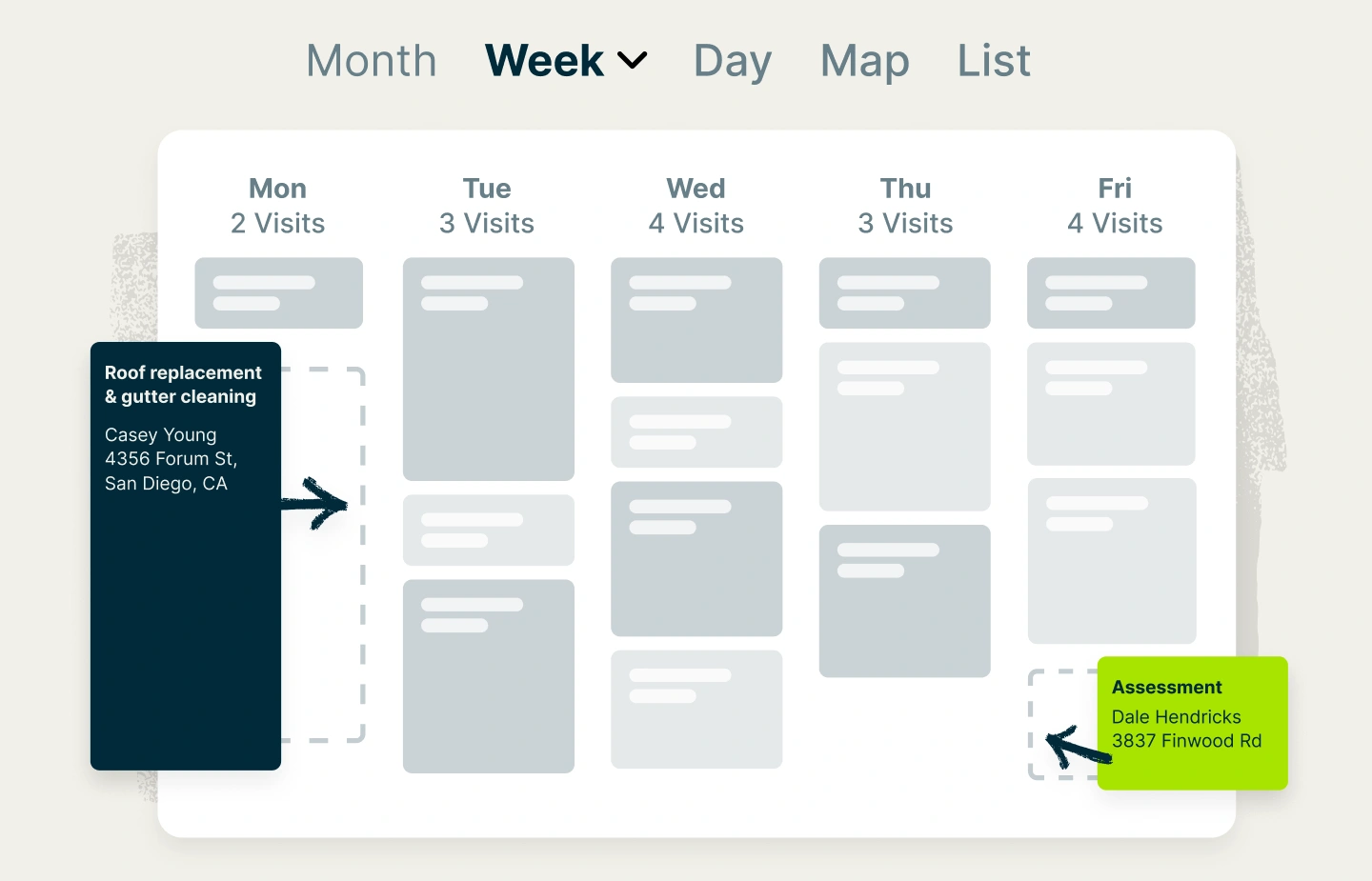
Jobber’s employee scheduling software features help you create organized, conflict-free schedules in minutes—so your team knows where to be and when. Easily assign jobs, track crew availability, and manage last-minute changes without the chaos.
Plus, instead of using one tool to schedule employees and another to manage customers, quotes, invoices, and payments, Jobber’s construction management software brings these processes together in one platform.
With built-in route optimization, time tracking, and seamless integration with quotes, invoices, and job details, Jobber keeps your entire operation running smoothly from the office to the job site.
The most challenging part of running a roofing business is managing schedules, quotes, and customer expectations all at once. Jobber brings it all together so we don’t drop the ball.
Key features
Here are the key features that make Jobber the best employee scheduling software for construction companies:
Job scheduling
Create and assign jobs to employees or crews in just a few clicks. Jobber gives you visibility into team availability so you can identify scheduling conflicts, gaps, or overlaps before they disrupt the workday.
Because scheduling is connected to Jobber’s broader workflow, your crew can access important job details from the same platform.
This means employees can see where they need to go, what work needs to be completed, and easily access the information they need to arrive ready to work.
Calendar management
Jobber’s customizable calendar gives you a clear overview of upcoming work, employee availability, and scheduled visits. Multiple calendar views, filters, and color-coding make it easier to distinguish jobs and quickly see where your team is allocated.
Rescheduling contractors is also a breeze—just click click, drag, and drop to new time slots. Jobber will automatically update your crew members to keep everyone on the same page.
This makes it easier to manage the schedule when jobs run long, customers reschedule, or crews become available unexpectedly.
Map and routing
Maximize crew productivity by fitting more jobs into your schedule while reducing fuel costs and idle time.
Use Jobber to organize jobs geographically so crews can spend less time driving between sites and more time working. Visualize your daily visits on a map—from there, Jobber will automatically plan the most fuel-efficient routes.
GPS tracking
Jobber shows your construction crew’s exact location on a map every time they clock in or out, providing you with greater visibility into field operations.
Better yet, Jobber’s location timers can automatically clock your employees in and out as soon as they arrive and leave a client’s property. This ensures accurate, up-to-date timesheets.
Team notifications
Jobber provides your employees with daily work overviews so that they know what’s ahead of them for the day.
If a job is rescheduled or a last-minute change needs to be communicated, you can send updates to your team in real time. This helps reduce the back-and-forth between the office and job site and keeps everyone working from the same schedule.
READ MORE: Best apps for general contractors
Vehicle management
Use Jobber to keep track of important vehicle information. Monitor your vehicles’ battery health, fuel levels, and idle time to keep your fleet running longer.
Plus, when you integrate Jobber with Fleetsharp, you can keep better track of your vehicles and use FleetSharp’s web platform for driver behavior reports, route replay, idle time tracking, and more.
Pros and cons
Jobber combines employee scheduling with other essential construction business workflows, making it a strong option for contractors who want to manage their operations in one platform.
| Pros | Cons |
| • An all-in-one platform to run your construction business • Assign jobs in only a few clicks • Compare team member schedules side-by-side for a clear view of availability • Integrates with accounting software such as QuickBooks Online and Xero to streamline payroll | • Its capabilities work best for construction businesses with crews of up to 15 users |
Who should skip it
Jobber may not be the best fit for large construction companies managing highly complex commercial projects that need advanced project scheduling or specialized construction management features.
If you’re looking primarily for comprehensive project management rather than connected job and crew scheduling may want to consider a more specialized construction project management platform.
READ MORE: Best software for general contractors
2. TCP
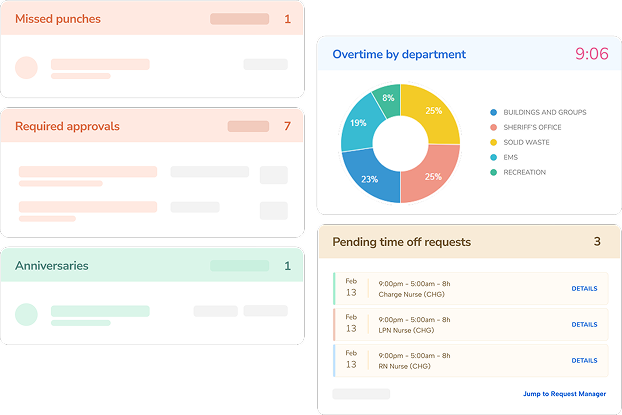
TCP is best for construction companies with complex workforce scheduling. It offers construction employee scheduling and time tracking tools designed for businesses managing crews across multiple job sites.
Its construction solution combines employee scheduling, job-cost tracking, time and attendance, compliance management, and payroll-related workflows, making it particularly well suited to larger or more complex construction operations.
Key features
- Build and adjust crew schedules based on employee availability, skills, certifications, and labor requirements.
- Track employee hours by job, site, task, equipment, or cost code to improve labor-cost visibility.
- Use location-based time tracking to verify when and where employees clock in and out at job sites.
- Track employee qualifications, licenses, and certifications to help ensure workers are assigned to jobs they’re qualified to perform.
- Capture hours, breaks, overtime, and other time data to simplify payroll and improve the accuracy of employee records.
Pros and cons
TCP is good for construction businesses that need detailed workforce scheduling, time tracking, and labor management across multiple job sites.
However, its robust workforce management features may be more than smaller contractors need, particularly if you’re looking for an all-in-one platform that also handles broader construction operations.
| Pros | Cons |
| • Built specifically to support construction workforce scheduling and time tracking • Supports geofencing and location-based time tracking • Payroll integrations help connect workforce data with other systems | • May be more robust than necessary for very small contractors • More focused on workforce management than end-to-end construction management |
Who should skip it
TCP may be overkill for small contractors that simply need a basic calendar for assigning employees to jobs.
3. Buildertrend
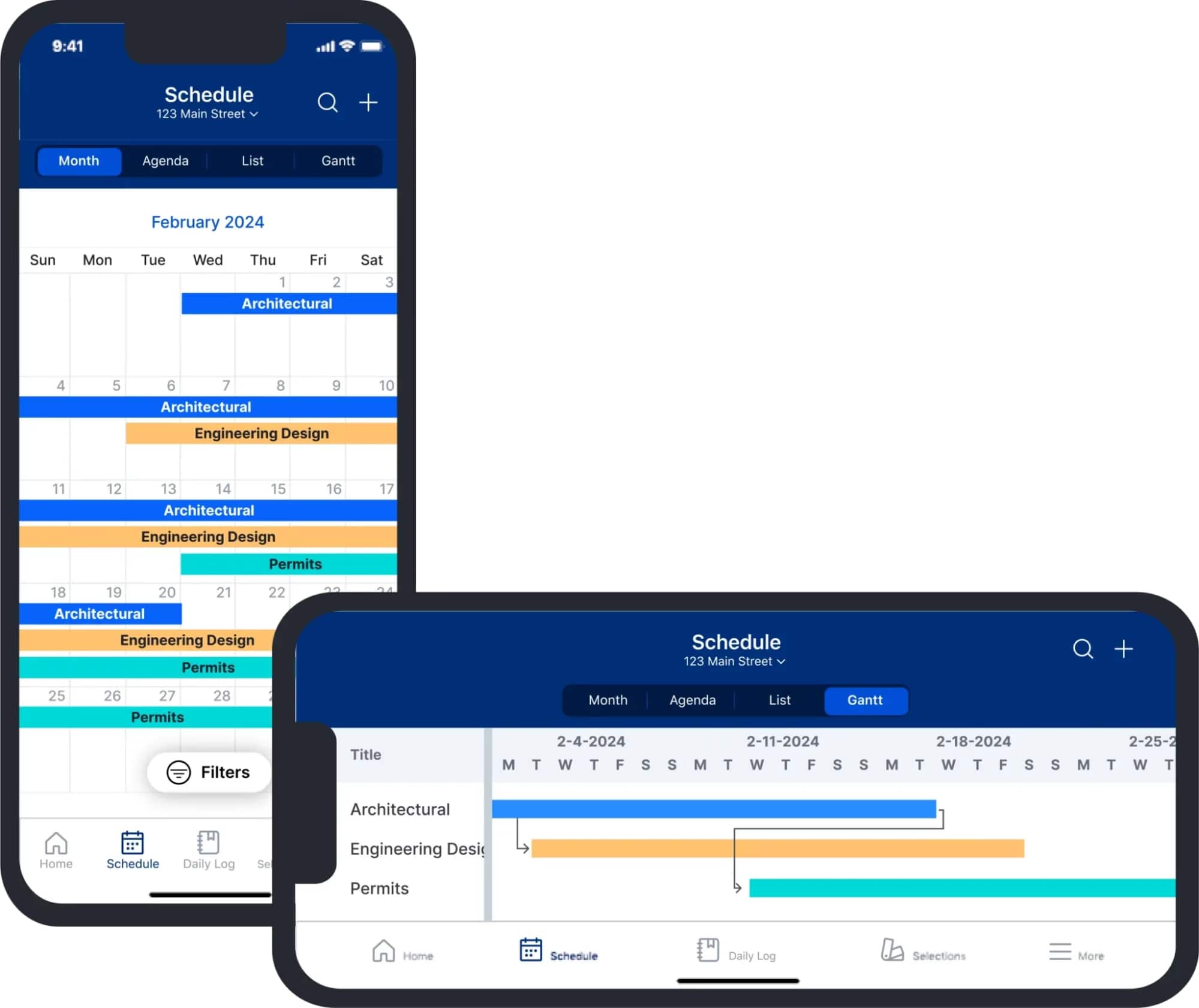
Buildertrend is best for general contractors, remodelers, and home builders who need a robust construction project management platform.
Rather than focusing solely on employee scheduling, Buildertrend connects project schedules with budgeting, tasks, daily logs, documents, communication, and other project workflows.
When it comes to employee scheduling, Buildertrend offers tools that integrate with the rest of your project workflows to improve task management.
Key features
- View project schedules in formats including Gantt, list, agenda, workday expectations, and calendar views.
- Assign group and color-code work items for better task management.
- Designate work items as “dependent” on other individual tasks.
- Connect project timelines with checklists, daily logs, real-time updates, RFIs, and other construction documents.
- Keep project schedules connected to budget information to help contractors monitor progress against planned costs and timelines.
READ MORE: Best Buildertrend alternatives for your construction business
Pros and cons
Buildertrend combines detailed project scheduling with broader construction management tools, making it a strong fit for remodelers and general contractors managing complex projects.
However, its broader feature set and higher price point may be more than smaller contractors need if they only want basic employee scheduling.
| Pros | Cons |
| • Keeps your employee scheduling aligned with your budget • Allows you to define job information, including projected and actual start and completion dates • Provides flexibility with several schedule view types, such as Gantt, list, agenda, workday expectations, and calendar | • Limited customization capabilities • Pricier than other software options |
Who should skip it
Buildertrend may be excessive for contractors who simply need to assign employees to jobs and manage day-to-day crew schedules.
4. Connecteam
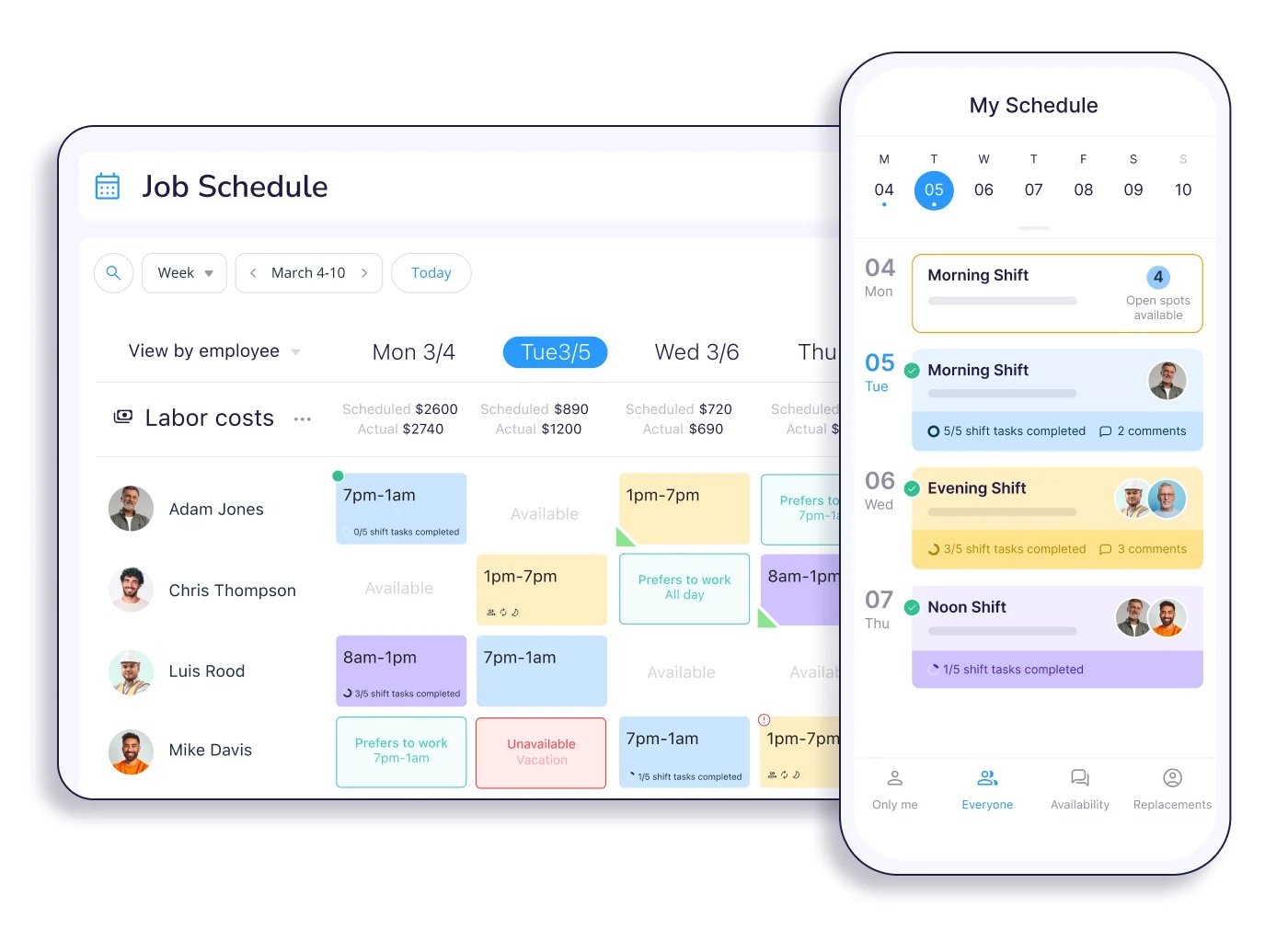
Connecteam is best for construction companies that need more control over employee availability, shifts, and compliance.
It helps you create schedules, track employee hours, and improve your overall workforce management.
Use Connecteam to build site-specific schedules for your construction team, where you can define job assignments and shifts to meet project needs.
Key features
- Use GPS tracking and geofencing to ensure your crew stays on schedule.
- Communicate with employees within the mobile app.
- Quickly share schedules with job locations, materials, and equipment.
- Track hours, breaks, overtime, and time off to simplify workforce administration and improve payroll accuracy.
- Create site-specific schedules, assign employees to shifts, and manage recurring schedules across construction projects.
READ MORE: Best Connecteam alternatives for field teams
Pros and cons
Connecteam is a strong option for construction businesses that want detailed workforce management tools.
However, it focuses more on managing employees than on connecting scheduling with customer, job, and financial workflows such as invoicing and payments.
| Pros | Cons |
| • Assign tasks per employee certification for safety and compliance • Easily calculate overtime, breaks, and time off for payroll • Set up recurring shifts for specific projects | • Lacks related scheduling features like invoicing and payments for better payroll and cash flow |
Who should skip it
Connecteam may not be the best fit for contractors looking for one platform to connect employee scheduling with quoting, job management, invoicing, and payments.
For those businesses, a platform such as Jobber may be a better fit because scheduling is connected to the broader customer and financial workflow.
5. Pro Crew Schedule
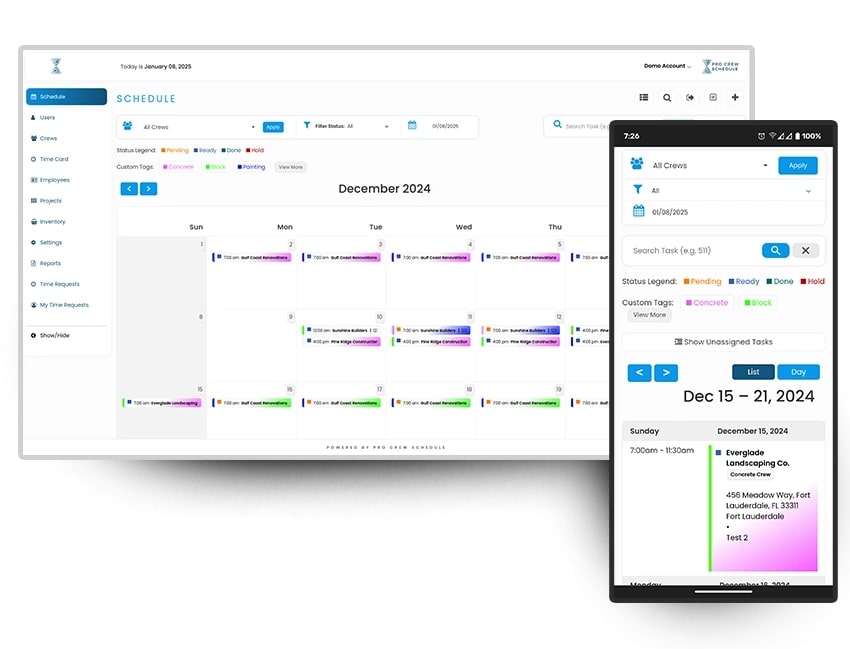
Pro Crew Schedule is a construction management scheduling software solution made to track crew and project performance.
Pro Crew Schedule allows you to manage multiple projects of any size and assign the right subcontractors to each one.
Key features
- Assign crews, subcontractors, and resources to projects while managing schedules across multiple jobs.
- Add photos and documents to crew schedules so field teams can access important project information from their mobile devices.
- Create tasks, reminders, and checklists to help crews stay on track with project requirements.
- Filter tasks by status—pending, in progress, complete or on hold—to monitor project progress and identify work that needs attention.
- Coordinate equipment alongside crew schedules to help ensure the right resources are available when and where they’re needed.
Pros and cons
Pro Crew Schedule is a useful option for construction businesses that need to coordinate crews and equipment while keeping project information accessible to field teams.
However, its lack of GPS time tracking and built-in route optimization may be a drawback for contractors who need more advanced field scheduling and dispatch capabilities.
| Pros | Cons |
| • Schedule your crew and manage equipment scheduling in one platform • The same information is accessible to all crew members through a mobile app • Troubleshoot problems and redeploy resources as needed | • No GPS feature for time tracking • No built-in route optimization |
Who should skip it
Pro Crew Schedule may not be the best fit for construction managers looking for integrated customer management, quoting, invoicing, payments, route optimization, or GPS-based time tracking.
6. Sling
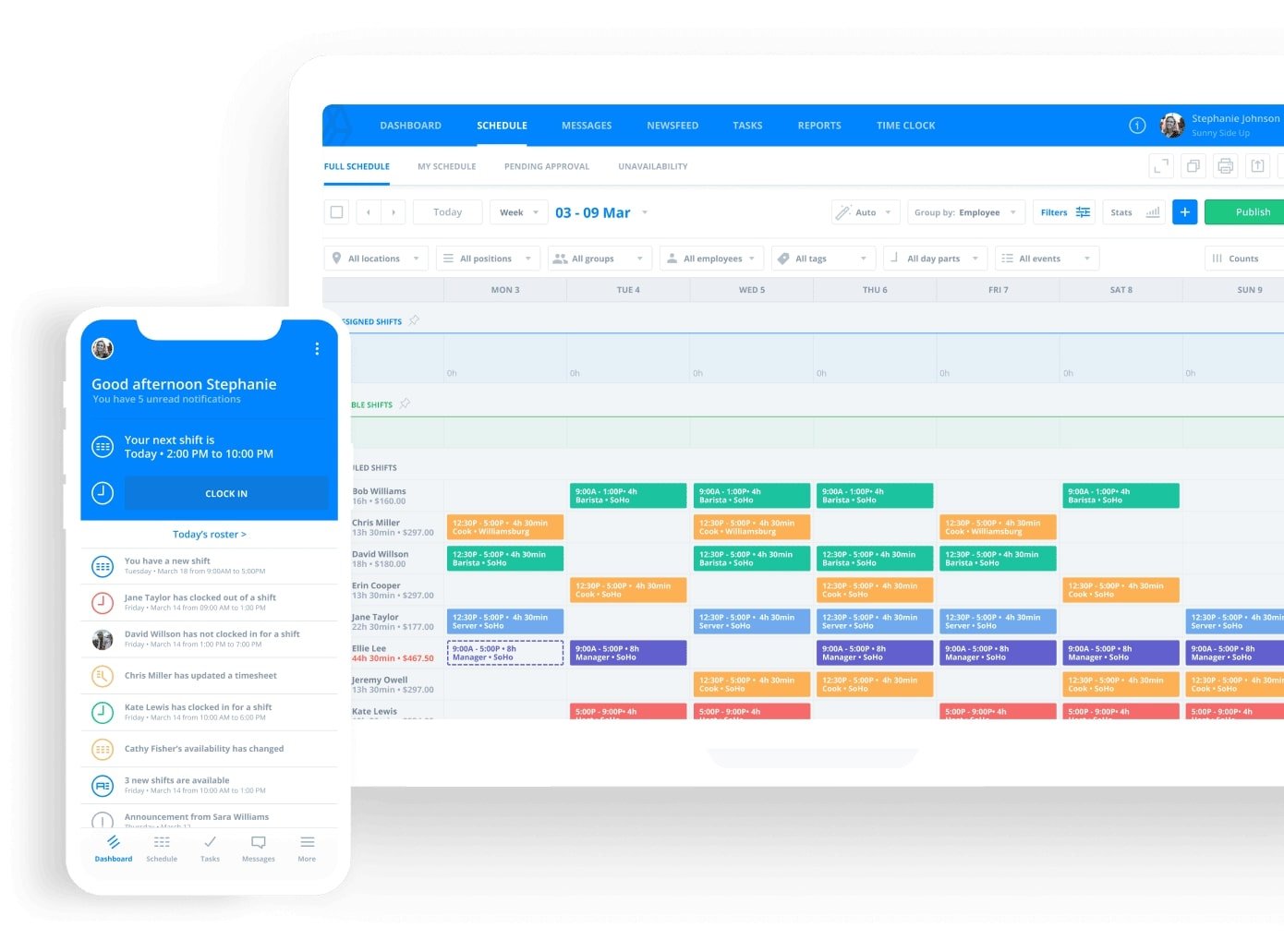
Sling is an app best for employee shift scheduling, making it a great option for construction project scheduling.
The platform focuses more on organizing employee shifts and availability, rather than managing construction projects or connecting scheduling to broader general contractor workflows.
With Sling, you can create, update, and manage shift schedules with just a few clicks. The app also has time tracking features to help optimize employee schedules and improve productivity.
Sling offers a free plan for basic scheduling, making it an option for smaller construction businesses on a budget. However, you may need additional tools for construction-specific needs such as project management, job costing, and GPS time tracking.
Key features
- Schedule across multiple work locations to help manage several sites at once.
- Perform easy shift changes with a drag-and-drop calendar.
- Schedule templates that you can save and load when you need to recreate an employee schedule.
- Receive notifications for overlapping shifts or double-bookings.
- Track employee hours and connect scheduling with time and attendance features on paid plans.
Pros and cons
Sling is a good option for construction businesses that primarily need employee shift scheduling, with a free plan that can support smaller teams.
However, because it isn’t construction-specific, contractors may need additional tools for project management and field operations, particularly if they need mobile time tracking or calendar integrations.
| Pros | Cons |
| • Options to view availability by contractor or by day, week, or month • Manage time off requests and find replacements • Offers a free plan for up to 30 users | • No construction-specific solution option • No mobile time tracking or calendar sync in their free plan |
Who should skip it
Sling may not be the best fit for construction businesses that need more than basic employee shift scheduling.
7. Fieldwire
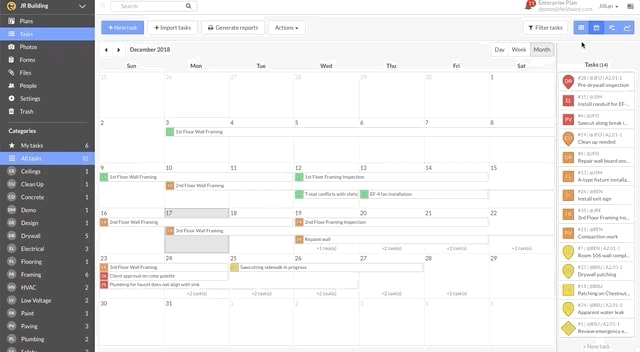
Fieldwire is a field service management solution best for field task management. It helps contractors organize tasks, coordinate crews, and keep project information accessible from the job site.
Fieldwire’s scheduling tools are closely tied to field task management, making it a strong option for teams that need to coordinate work and track progress across construction projects.
Key features
- Create, assign, prioritize, and track construction tasks while giving crews clear instructions for work that needs to be completed.
- Manage project schedules using Kanban boards, Gantt charts, and calendar views to see work from different perspectives.
- Quickly adjust task dates and assignments as project timelines change with a drag-and-drop schedule
- Keep comments, photos, updates, and other information attached to individual tasks so teams have a record of field activity.
- Import external task spreadsheets to centralize all of your task information.
READ MORE: Jobber vs. Fieldwire
Pros and cons
Fieldwire is a strong choice for construction teams that need detailed field task management, project coordination, and visibility into work progress.
However, contractors looking for GPS-based employee tracking or built-in route optimization will need to use additional tools alongside the platform.
| Pros | Cons |
| • Dispatch work to specialty contractors and foremen • Arrange task deadlines by due date, trade, and priority • Every task comment, photo, and update is timestamped and sent to you as a notification | • No GPS tracking • No built-in route optimization |
Who should skip it
Fieldwire may not be the best fit for contractors looking primarily for employee shift scheduling or scheduling connected to quoting, invoicing, payments, and routing.
How to choose the right construction employee scheduling software
With so many construction staff scheduling software programs out there, choosing the right one can be challenging. But the right construction app can save you hours every week, reduce costly mistakes, and keep your construction workers organized and accountable.
When you’re choosing construction management software, consider the following:
- Type of construction company: Whether your company focuses on new build construction or remodelling might make a difference in what construction project scheduling software you choose.
- Crew size and scheduling complexity: Are you managing a small team with consistent hours or multiple crews on rotating shifts across job sites? Some tools are better suited for large, dynamic teams, while others are perfect for smaller, more predictable projects.
- Ease of use: Choose a tool with a clean, intuitive interface that both your office staff and construction crew can navigate with ease.
- Budget: You don’t want your construction employee scheduling software to break the bank or impact your profit margins. There are solutions that range from no cost to hundreds of dollars per month. Establish your budget early on and stick with it during your search for the best platform.
- Scalability: Your construction company might grow, so your software should grow with it. Make sure your software offers features that will grow with your business—a free plan might fit your budget now, but might not be able to handle your workflows down the line.
- Multi-site scheduling needs: If you manage crews across multiple job sites, look for software that lets you see schedules, assignments, and employee availability across locations so you can allocate resources efficiently.
- Compliance and overtime management: Choose a platform that can track overtime, breaks, certifications, and other labor requirements to help you stay compliant and avoid costly payroll errors.
- Offline reliability: Your crews may work in areas with limited or unreliable internet access, so offline functionality can help employees access schedules and job information without losing productivity.
- Whether job costing and invoicing need to be included in the same platform: If you want scheduling connected to the rest of your business operations, look for software that links crew assignments and time tracking with job costing, estimates, invoices, and payments.
If your scheduling needs extend beyond assigning crews and managing shifts, an all-in-one field service platform like Jobber can be a better choice. Connecting scheduling with quotes, jobs, invoices, and payments can help keep your entire workflow organized in one place.
Key features to look for
Some must-have features in scheduling software for construction companies include:
- Mobile access to let construction crews view schedules, job details, and updates from their phones so they can stay connected throughout their shift.
- Drag-and-drop scheduling to make it easy to move employees to different dates or times as project timelines change without having to rebuild the construction schedule.
- Daily job details to give employees the information they need for each job, such as the location, scope of work, customer details, and assigned tasks.
- Real-time updates and notifications to alert employees when schedules, job assignments, or other important details change.
- Route optimization and GPS tracking to help crews take more efficient routes between job sites while giving you visibility into employee locations.
- Multi-site scheduling to manage employees across multiple job sites from a centralized schedule so you can see where workers are assigned and identify staffing gaps.
- Time tracking to record employee hours against specific jobs to improve payroll accuracy, monitor labor costs, and understand how much time crews spend on each job.
- Geofencing to help verify when employees arrive and leave, making time tracking more accurate without requiring manual clock-ins.
- Scheduling conflict detection to flag overlapping assignments, double-booked employees, or other scheduling issues before they create problems in the field.
- Employee certifications and availability to help you track workers’ availability, skills, licenses, and certifications.
- Payroll export to send approved employee hours and timesheets to your payroll system to reduce manual data entry and minimize payroll errors.
- Multi-site permissions to control what employees, managers, and office staff can view or edit based on their roles or locations, helping protect sensitive information.
Choosing the right construction employee scheduling software can make a huge difference in how smoothly your projects run.
The best tools don’t just help you fill shifts—they streamline communication, boost productivity, and give you more control over your business.
Whether you’re managing one crew or ten, investing in the right solution will help you stay on schedule and ahead of the competition.
Originally published in August 2025. Last updated on August 14, 2026.
Frequently Asked Questions
-
Construction employee scheduling software is a digital platform that helps you assign employees and crews to jobs, manage availability, track working hours, and communicate project schedule changes. It can also include tools such as GPS tracking, time tracking, and multi-site scheduling.
-
Construction scheduling software typically focuses on project timelines, tasks, dependencies, and milestones, while employee scheduling software focuses on assigning people or crews to jobs and managing their working hours. Some construction management platforms combine both types of scheduling.
-
The best scheduling app depends on your crew size, project complexity, and the features you need. Jobber is a great option for contractors who want scheduling connected to quoting, job management, invoicing, routing, and time tracking.
-
Yes, many construction scheduling platforms can help with dispatch by assigning employees or crews to specific jobs, providing job details and locations, and notifying workers about schedule changes. Some also include routing and GPS tracking to improve field coordination.
-
Construction employee scheduling software can range from free plans for basic shift scheduling to hundreds of dollars per month for more advanced workforce or construction management platforms. Pricing typically depends on the number of users and the features your business needs.