
Key takeaways:
Choosing the right construction management software is crucial to streamline operations and grow your construction business.
- Identify your specific needs and pain points. Evaluate what tasks (like scheduling, estimating, or document management) you want software to solve, and consider the complexity of your projects and crew size.
- Focus on essential features. Prioritize tools offering robust scheduling, budgeting, cost tracking, document organization, field-office communication, mobile access, integrations with existing tools, insightful reporting, and client self-service portals.
- Evaluate potential platforms with real job trials. Involve both office staff and field crew in testing through practical, real-world workflows to ensure the software matches your day-to-day operations.
- Consider usability, support, and total cost. Choose platforms that are easy for your team to adopt, provide strong onboarding and training resources, and have transparent pricing without hidden fees for additional users or features.
- Avoid common pitfalls. Don’t rely solely on brand name, skip field usability testing, ignore integrations, or rush to purchase without a training plan. Always use free trials when available.
Stay ahead in the construction industry with smart insights. Get more helpful tips and updates when you sign up for the Jobber Newsletter.
The right construction management software helps you organize, run, and grow your business. Before investing, it’s important to choose a platform that fits your job types, crew size, and biggest pain points.
Learn how to choose construction software, including which features to prioritize, how to compare your options, and what pitfalls to avoid to help you find the best fit for your business.
What to know before buying construction management software:
-
What is construction management software?
-
Why choosing the right platform matters
-
Key features to look for in construction management software
-
How to evaluate construction management software
-
Common mistakes when choosing construction management software
-
Types of construction management software (and who they’re for)
What is construction management software?
Construction management software is a digital platform that helps construction businesses plan, coordinate, and document their work. It takes the place of spreadsheets and group texts when they stop cutting it.
Some platforms focus on project-specific support, like organizing job plans, logging daily site progress, and tracking punch lists. Others also help manage your business by handling quoting, scheduling, invoicing, and similar tasks.
All-in-one field service management software like Jobber helps construction companies:
- Create and send custom estimates and invoices with photos and line items.
- Manage sales pipelines, from generating leads and booking jobs to offering consumer financing and processing payments.
- Cost jobs and track expenses.
- Schedule jobs and crews.
- Manage customers through a dedicated CRM.
- Market services through websites, email campaigns, and review and referral programs.
Construction management software vs project management apps vs contractor business software
Construction management software covers a wide range of tools. Before you start comparing features, it helps to know which category best fits your construction company needs.
- Field and task apps are lightweight tools focused on job site coordination and basic project management. They help you assign daily tasks and keep crews aligned with what needs to be done on-site.
- Small and midsize business (SMB) contractor platforms are for small teams who need help with both project-based and administrative tasks. They help with everything from managing leads and booking jobs to sending invoices and processing payments.
- Residential construction project management platforms are built for home remodelers and builders. They typically include client portals, scheduling, budgeting, job costing, and subcontractor management tools.
- Construction management (CM) suites are ideal if you’re a construction project manager or have a large team with complex commercial projects and multi-stakeholder approval. They can be used for project planning and to manage documentation and track job progress long-term.
Why choosing the right platform matters
Choosing the wrong construction management software can cost you time and money. If it’s difficult for your crew to use, includes features you don’t need, or creates duplicate work, it can slow down jobs and lead to frustration for both your crew and customers.
The right software supports your project workflows, and makes key processes more efficient. It can help reduce project delays, keep budgets on track, improve client communication, and prevent costly mistakes.
It also makes running your business easier by keeping it organized and handling repeatable tasks.
Key features to look for in construction management software
Choosing construction management software depends on which pain points you want to address. The most common features contractors look for include:
1. Scheduling and task management
Scheduling construction employees and jobs takes up a lot of time. And it’s also where a lot of mistakes can happen, like double bookings, unassigned tasks, and disorganized routes.
Construction management software platforms like Jobber can help cut down on errors and save time on project scheduling, so look for a tool that can:
- Create job and crew schedules
- Optimize routes
- Provide automatic job updates everyone can see
- Assign jobs
- Track employee time
It’s an important feature to have for teams juggling multiple job sites or projects at a time.
2. Budgeting, estimating, and cost tracking
Budgeting, estimating, and cost tracking are what help to keep your construction business profitable. They’re essential for covering operating expenses, calculating accurate job costs, and informing change orders.
Construction estimating software can help you:
- Create customized estimates.
- Track expenses like labor and material costs for every job.
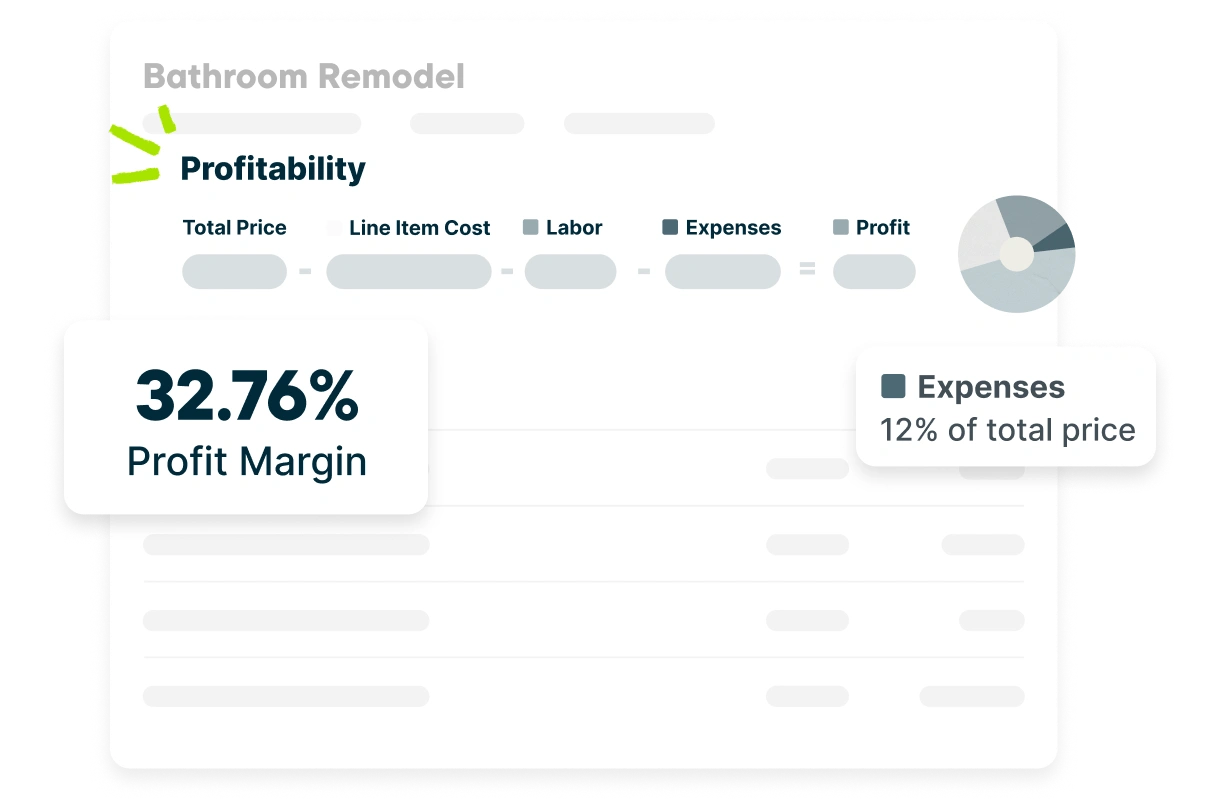
- See job profitability updates in real time.
- Compare costs and profit across multiple projects.
Look for a tool that’s tailored to construction management or trades. Simple project management platforms won’t come with the tools you need to handle in-depth cost tracking or estimating.
For example, Jobber’s job costing feature automatically tracks costs, showing you how much you make across every job.
3. Document and plan management
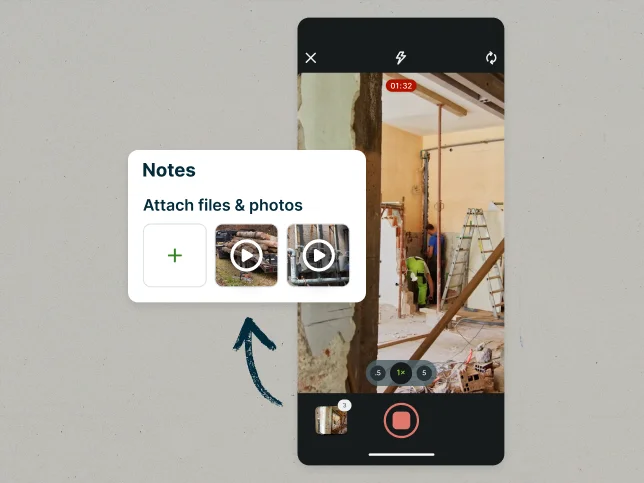
Managing project information like documents, permits, change orders, notes, and photos is essential for keeping construction projects on track. If this is one of your pain points, look for a platform like Jobber that lets you:
- Attach plans, permits, and documents directly to job files.
- Add job site photos.
- Keep digital notes and files where your team can access them.
- Organize jobs by client so all your documents, notes, photos, files, and work history for each customer are in one place.
Whether you choose a complex document management system depends on the type of work you do. For smaller remodels and residential work, keeping plans, documentation, and photos organized by job is usually enough.
If you handle more complex work, like commercial projects, where you need to manage RFIs, submittals, drawings, and dedicated version control, you may need a more robust platform to match the scale of work you do.
4. Field–office communication and mobile access
Platforms that help construction teams communicate and view job details in the field cut down on missed updates, duplicate work, and wasted time. Look for a tool that lets your crew:
- Get schedule and job updates in real time.
- Add photos and notes directly from the job site.
- Access job information from a mobile app.
The easier a construction management platform makes it for your crew to do their jobs, the more likely they are to adopt new technology.
5. Integrations
When construction management software integrates with other tools you already use, it reduces double data entries and keeps accurate records across platforms. Look for an option that:
- Syncs with your existing accounting software, like QuickBooks or Xero
- Connects to your business email
- Works with tools already in your workflow, like payment processors or marketing apps
Integrations are essential if you have established tools you regularly use. But if you’re starting from scratch, aim for field service management software that comes with the core tools built-in, so you don’t have to mix and match platforms.
6. Reporting
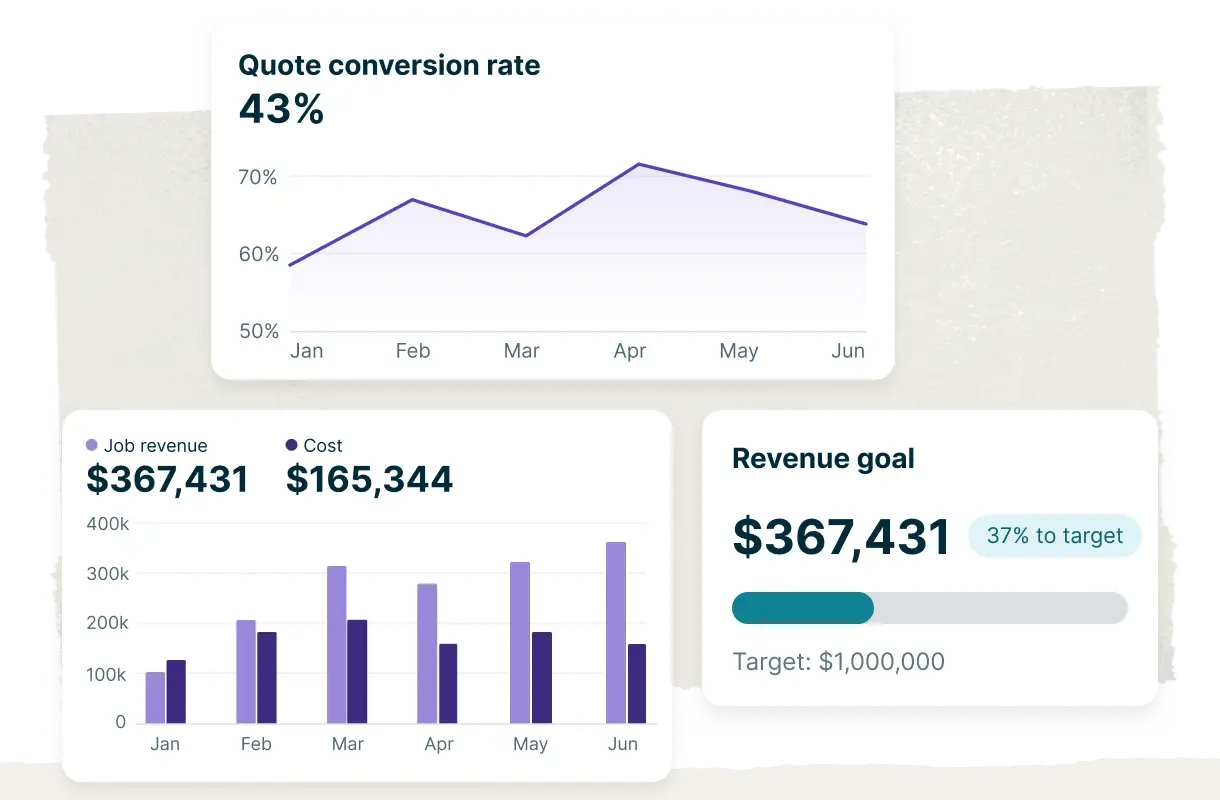
Reporting tells you which jobs are making money, whether your construction profit margins are high enough, and if you need to adjust markup to cover costs. To stay on top of profit and costs, look for a financial reporting tool that can:
- Automate reports and data for you to review.
- Track project progress in real time.
- Compare costs and profitability across projects.
- Monitor trends over time.
That way, you’ll be able to mark potential issues before they become long-term problems, like rising material costs or seasonal demand.
Jobber Reports tracks your data and turns it into reports. Use these reports to find out what’s working and where you may need to make adjustments.
7. Client visibility
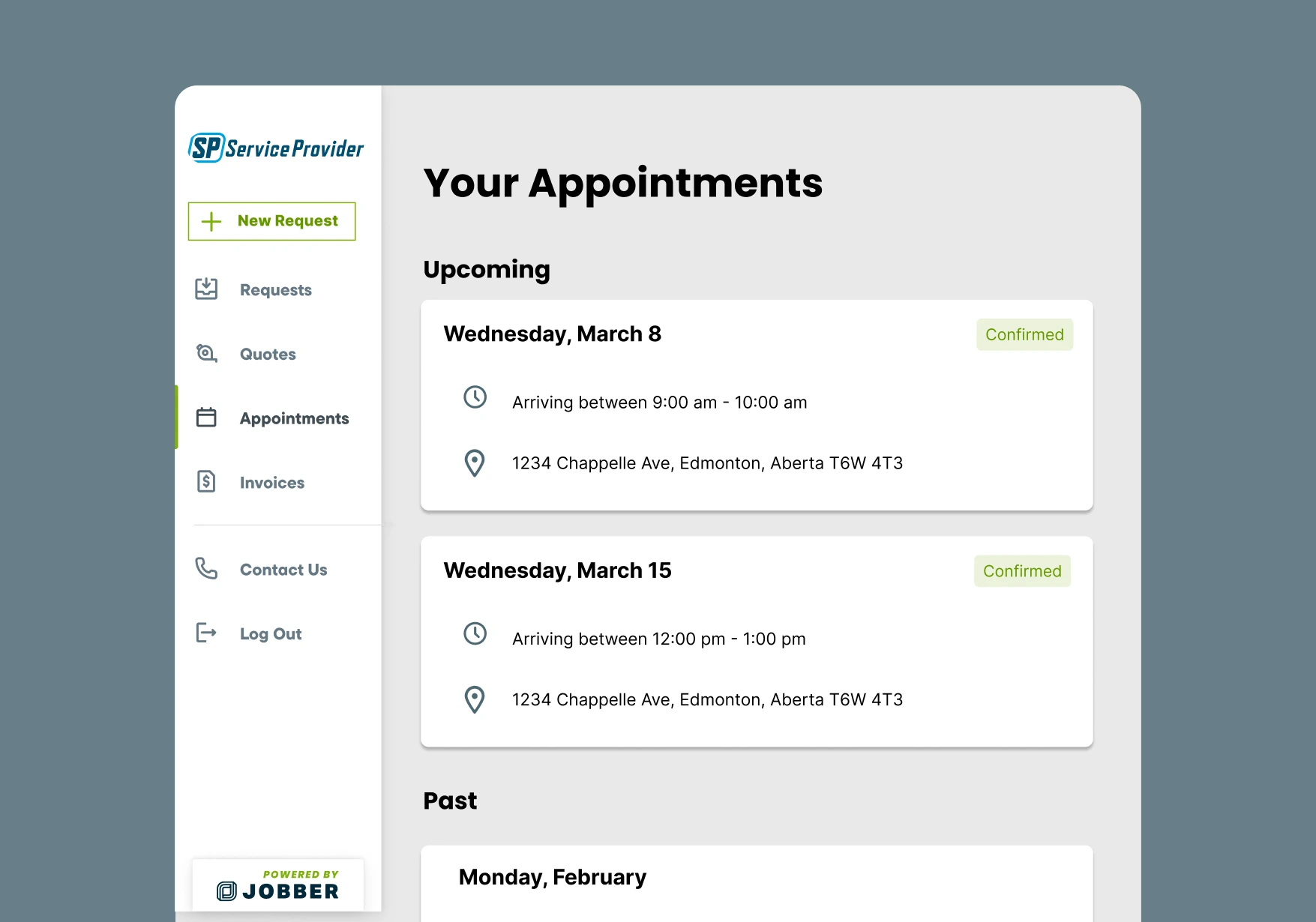
Many construction business owners and their customers like self-serve portals because they let clients complete basic tasks without having to call the office or send an email.
If you want to add more robust customer self-service options to your business, look for a platform that allows customers to:
- Check job statuses
- Approve quotes
- Pay invoices
Platforms with built-in customer self-service tools like Jobber make it easy to keep clients in the loop without adding to your workload. And they make it easier for you to request quote approvals, get paid on time, and ask for reviews.
How to evaluate construction management software
After you identify your pain points and choose a platform to try, you need to put it through its paces. Follow these steps to evaluate whether the construction management software you’ve selected is worth investing in long-term.
1. Run a real-job trial, not a canned demo
Many construction management software platforms offer demos, but they don’t always show how well they’ll work for your crew on a real job. Make sure to run a real trial instead of a scripted workflow.
For example, put in an online booking request, send a quote, schedule your team, and see how it holds up after any mid-day changes. That will give you a realistic idea of how the tool will perform under stress and for your employees, clients, and workflows.
2. Involve the field early
During the demo, involve the crew, not just the office. Since they’re the ones who will end up using it most, you need tools that make sense for what they’d actually do on a job.
Have them test it out in the field and ask for their feedback. If the software solution doesn’t work for them during a trial, it’s unlikely to perform better once you start paying for it.
3. Check support, onboarding, and training
No matter how user-friendly a construction management software platform is, it will still come with a learning curve. The more support it offers through onboarding and training, the less steep that curve will be.
Look for tools that not only have the features you need, but that provide the resources you need to use them. For example, some platforms come with dedicated training sessions and support contacts, while others provide self-help options and guided walkthroughs.
4. Price vs total cost
The base price of the construction management software isn’t always what you’ll end up paying. Many charge additional fees based on the number of users, projects, and add-ons you need.
Before you commit, compare pricing tiers and consider whether you’ll need to pay extra to include your whole team or to unlock the features you need.
You can also reach out to the sales team to ask:
- What happens if I need to add more users?
- Is there a limit on active jobs or jobs per plan?
- What’s included in the base price, and what’s charged separately?
- Can I cancel at any time? Is there a fee?
- Can I export my data if I decide to switch platforms later?
5. Scalability
The best software scales with you. Instead of single-use or one-off tools, look for a platform that lets you add users, features, and functionality as you grow.
For example, if scheduling is your biggest pain point today but you’ll eventually need job costing or invoicing, choose software that offers those as add-ons. That way, you pay for them when you’re ready, not before.
On the other hand, going all-in on an enterprise tool with features you don’t need yet means paying for tools you aren’t using.
You cannot scale a business to a million dollars without having field software.

Common mistakes when choosing construction management software
Even with a clear evaluation process, it’s easy to get tripped up. Avoid these common mistakes to choose the right construction management software for your business.
- Buying on brand name alone: Going with a platform because it’s familiar instead of based on fit may mean paying for enterprise features you don’t need. Look for platforms made for your company’s size and needs and check reviews from other construction business owners to find the right fit.
- Ignoring field usability: If your crews can’t use the software while on the job, or it’s clunky or hard to access, they’ll be less likely to adopt it. Choose a tool they can access from a mobile device so they can complete tasks in the field.
- Skipping a free trial: Free trials help you see exactly what a platform can (and can’t) do. If you skip it, you won’t be able to test out the software in the field, leaving you to find out where it falls short while you’re on the job.
- Overlooking integrations: Integrations with your existing software make transferring data like customer information and job details much easier. If the platform you choose doesn’t offer integrations, you may need to start from scratch.
- Having no training plan: If you don’t have a plan for how to train your team on new software, they probably won’t use it. Build a short onboarding plan before rollout, like a walkthrough and printed Q&A they can keep in their trucks to start them off on the right foot.
- Picking the “best” option from a list: Software roundups can be helpful, but they’re based on general recommendations, not your specific business needs. Choose an option that supports your job mix, team size, and workflow instead.
Types of construction management software (and who they’re for)
Different teams have different needs when it comes to construction management software. To choose the best fit for your business, review the different types of software available to the construction industry before moving ahead.
Enterprise / full-suite construction platforms
Enterprise platforms work well for large teams that manage complex projects, need heavy document control, and work on long-term jobs. They typically include more features, cater to commercial work, and come with higher price tags.
Residential construction project management
Residential construction project management platforms usually offer:
- Client portals
- Selections, like flooring finishes and paint colors
- Job scheduling
- Subcontractor organization
They’re tailored to home builders and remodelers.
Field and job site coordination tools
Field and job site coordination apps are smaller, more focused tools that can be used for:
- Assigning tasks
- Creating punch lists
- Making job plans
They’re useful on site but don’t work as well for billing or client management.
All-in-one construction management platforms
All-in-one construction management apps cover everything from generating leads and booking jobs to creating on-site job lists and invoicing.
Platforms like Jobber work well for general contractors and remodelers who need help running their business end-to-end, without the added complexity of RFIs, drawings, or formal document approvals.
Picking the right platform
There’s no one-size-fits-all option when it comes to choosing construction management software. The best platform will fit your job types, crew size, pain points, and budget, without adding to your workload or costing you more than it saves.
Before you commit, take advantage of free trials, involve your crew, and consider long-term scalability. That way, you’ll have a better chance of choosing a platform that serves you now and in the future.
Frequently Asked Questions
-
Construction management software is a digital platform that helps you plan, coordinate, and document construction work. Some tools focus on project details like plans and punch lists, while others also handle the business side, like quoting and invoicing.
-
Start by identifying your biggest pain points and look for software that matches your job types, crew size, and budget. Run a free trial with real jobs in the field, involve your crew, and ask the sales team about total costs based on your needs. For example, whether additional users cost more and how much the features you want will cost on top of the base price.
-
Yes, if it solves a problem that’s eating into your time or profit, like booking jobs, scheduling crews, creating invoices, or processing payments.
-
Construction management software typically covers the full business, from leads to invoicing. Contractor apps tend to be more specific, handling a single aspect of a job, like tracking tasks or creating punch lists.
-
Yes, cloud-based construction project management software lets you and your crew access job details, customer information, and schedules from anywhere. It’s the easiest way to communicate and coordinate work while team members are in the field.